EML to JPG API
POST an .eml file to /v2/convert/eml/to/jpg and each page of the message comes back as a JPEG. The sample asks for PageRange=1, ImageWidth=640 and ImageQuality=80, and the roof inspection email returned one 640 × 905 preview of 96,625 bytes.
- Endpoint
- POST /v2/
convert/ eml/ to/ jpg - Accepts
- eml
- Sample timing
- 24 ms median of 5 runsHow we measure
- Request size
- Up to 10 MB on the Free plan or 100 MB on paid plans, all files together
Request and response
Every sample below ran against the API before this page was published. Set PDFCONVERSIONAPI_KEY to your key and run it as is.
curl -sS -X POST \
  https://api.pdfconversionapi.com/v2/convert/eml/to/jpg \
  -H "Authorization: Bearer $PDFCONVERSIONAPI_KEY" \
  -F File=@roof-inspection-418-linden.eml \
  --form-string PageRange=1 \
  --form-string ImageWidth=640 \
  --form-string ImageQuality=80 \
  -o response.json

# FileData is base64. Save the first file in converted/,
# or print the JSON error.
if jq -e '.Files' response.json > /dev/null; then
  mkdir -p converted
  name=$(jq -r '.Files[0].FileName' response.json)
  jq -r '.Files[0].FileData' response.json \
    | base64 --decode > "converted/$name"
else
  cat response.json
fi
import base64
import os
import requests
key = os.environ["PDFCONVERSIONAPI_KEY"]
response = requests.post(
"https://api.pdfconversionapi.com/v2/convert/eml/to/jpg",
headers={"Authorization": f"Bearer {key}"},
files=[
("File", open("roof-inspection-418-linden.eml", "rb")),
],
data={
"PageRange": "1",
"ImageWidth": "640",
"ImageQuality": "80",
},
timeout=180,
)
result = response.json()
if not response.ok:
raise SystemExit(f"{result['Code']}: {result['Message']}")
os.makedirs("converted", exist_ok=True)
for file in result["Files"]:
path = os.path.join("converted", file["FileName"])
with open(path, "wb") as out:
out.write(base64.b64decode(file["FileData"]))
print(path, file["FileSize"], "bytes")
import { mkdir, readFile, writeFile } from "node:fs/promises";
import { join } from "node:path";

const form = new FormData();
const file = "roof-inspection-418-linden.eml";
form.append("File", new Blob([await readFile(file)]), file);
form.append("PageRange", "1");
form.append("ImageWidth", "640");
form.append("ImageQuality", "80");

const url = "https://api.pdfconversionapi.com/v2/convert/eml/to/jpg";
const key = process.env.PDFCONVERSIONAPI_KEY;
const response = await fetch(url, {
  method: "POST",
  headers: { Authorization: `Bearer ${key}` },
  body: form,
});
const result = await response.json();
if (!response.ok) {
  throw new Error(`${result.Code}: ${result.Message}`);
}

await mkdir("converted", { recursive: true });
for (const file of result.Files) {
  const path = join("converted", file.FileName);
  await writeFile(path, Buffer.from(file.FileData, "base64"));
  console.log(path, file.FileSize, "bytes");
}
{
  "ConversionCost": 1,
  "ConversionTime": 0.024,
  "Files": [
    {
      "FileName": "roof-inspection-418-linden-1.jpg",
      "FileExt": "jpg",
      "FileSize": 96625,
      "FileData": "/9j/4AAQSkZJRgABAgAAAQAB…"
    }
  ]
}
Response from our test run on 2026-11-03. ConversionTime shows the median of 5 runs. FileData is shortened here; the real response carries the whole file as base64.
The sample, converted
The same file the code sends. Download the input and the output and compare them yourself.
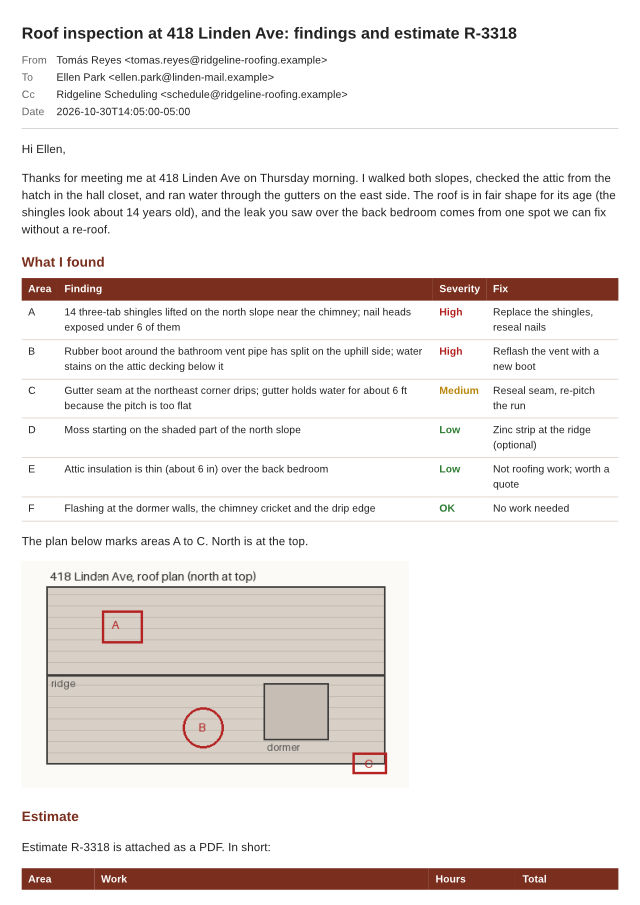
- Input
- roof-inspection-418-linden.eml (77 KB)
- Output
- roof-inspection-418-linden-1.jpg (94 KB)
- Source
- A fictional two-page roof inspection email with an inline roof plan and four attachments, written and drawn by us for this site. (CC0-1.0). How it was made
- Made by
- 2026-11-04, API build
9eeeb0640aba
Parameters
Send these as form fields next to the file. Names are case-insensitive. If you set one of the documented options below that we don't support yet, the request fails with a 400 that names it instead of returning a file made without it.
| Parameter | What it does |
|---|---|
ImageQualityinteger, default 85 | JPEG quality. For the 640 px first page: 60 gave 73,061 bytes, 80 gave 96,625, our default of 85 gave 107,731 and 95 gave 161,526. ConvertAPI documents 75 as its default, so send 75 to match it.Values: 1–100 |
ImageWidthinteger | Width of each JPEG in pixels, height following the page shape. The page is drawn at that size, not shrunk from a larger picture, so small text stays crisp at 640 or even 320 px (320 × 453, 30,355 bytes).Values: 1–20,000 |
ImageHeightinteger | Height in pixels. Sent with ImageWidth, the page is fitted inside both.Values: 1–20,000 |
PageRangestring | Pages to return. The sample's 1 keeps the header block and the top of the body; leave it out to get one JPEG per page.Values: 1, 2, 1-2, 2- |
ImageResolutioninteger, default 150 | Drawing resolution when no width or height is sent: A4 at 150 dpi is 1240 × 1753. Sent explicitly, it is also stored in the JFIF header (100 gives a 100 dpi density); otherwise the header holds only a 1:1 aspect ratio.Values: 36–600 |
ConvertHeaderboolean, default true | false drops the subject and the From, To, Cc and Date rows, so a thumbnail shows the body alone. |
PageSizeenum, default a4 | Paper the message is broken into pages on. letter makes each image a little wider and shorter than A4.Values: a0–a9, b0–b5, letter, legal, ledger |
PageOrientationenum, default portrait | landscape gives wide images, useful for HTML newsletters built wider than A4.Values: portrait, landscape |
PageWidthinteger | Paper width in millimeters; it overrides PageSize.Values: 10–30,000 (mm) |
PageHeightinteger | Paper height in millimeters. With PageHeight=600 the whole two-page sample fit in a single tall image.Values: 10–30,000 (mm) |
MarginTopinteger, default 5 | Top margin, whole millimeters.Values: 0–500 (mm) |
MarginRightinteger, default 5 | Right margin.Values: 0–500 (mm) |
MarginBottominteger, default 5 | Bottom margin.Values: 0–500 (mm) |
MarginLeftinteger, default 5 | Left margin. Set all four to 0 to crop a thumbnail tighter to the text.Values: 0–500 (mm) |
ColorSpaceenum, default default | gray and monochrome write single-channel JPEGs; cmyk returns 400.Values: default, rgb, gray, monochrome |
BackgroundColorstring, default white | Paint behind the page wherever the message draws no background of its own. black in our test gave a black page around the body.Values: Color names, #RRGGBB or R,G,B |
IgnoreAttachmentErrorsboolean, default false | Read and ignored: attachments are only named on the last page. |
Mergeboolean, default true | Read and ignored. Pages always come back as separate JPEG files. |
FileNamestring | Name stem for the results; -1.jpg, -2.jpg and so on are added. |
StoreFileboolean, default false | Send true to get download links (valid 3 hours) in Files[].Url in place of the image bytes. |
Not supported yet
Setting one of these to anything but its default returns 400.
| Option | What to do instead |
|---|---|
TemplateFile | Refused with any value; the header layout is fixed. |
DateTimeFormat | Refused with any value; dates print in ISO 8601 with the sender's UTC offset. |
ConvertAttachments | Only false passes. Attachments are listed by name, not turned into extra JPEGs. |
What carries over, and what doesn't
Kept
- The top of the message at thumbnail size: the subject line, the From row with the decoded name Tomás Reyes, To, Cc, Date and the first table, all legible at 640 px wide
- Colors from the HTML body: table headings in #7a2e1d with white text, and the red, amber and green severity labels
- The inline roof plan, carried in the .eml as a cid: part, drawn in place (on page 1 of the default A4 layout)
- Full color resolution: the JPEGs are baseline with no chroma subsampling (4:4:4), so thin colored text keeps its edges
- An even white page background, since every page is drawn opaque before the JPEG step
Lost or not yet supported
- Some sharpness. JPEG is lossy: zoomed in, the 640 px first page at quality 60 shows faint blocky noise around the gray header text, which is barely visible at 80.
- Transparency. JPEG has none, and
TransparentColoris read only for PNG, WebP, TIFF, GIF and TGA; sent here it changed nothing. - Any picture the HTML points to by URL. It is not downloaded, and its space is left empty when the img tag gives a size.
- Old presentational HTML: bgcolor, border and cellpadding on tables and the font tag's color and size were ignored in our test, while inline CSS was applied.
- Links and text. The JPEG is a picture of the message; nothing in it can be clicked, copied or searched.
- Reply-To, In-Reply-To and Bcc. The header block prints only From, To, Cc and Date.
Limits
- One .eml per request; two files return 400 "this conversion takes exactly one file".
- Requests up to 10 MB on the Free plan or 100 MB on paid plans, all files and fields together.
ImageWidthandImageHeightfrom 1 to 20,000; a page over 16,000 px on a side or over 100,000,000 pixels returns 413.- Up to 2,000 pages, and so 2,000 JPEGs, per request.
- Files that are not mail messages return 422 "the input file could not be read: this is not an e-mail message".
- A conversion can run for 120 seconds before the API returns 504.
Where teams use it
Thumbnails in a ticket or inbox list
Send PageRange=1 with a small ImageWidth and store the JPEG next to the message. The sample's 640 px preview is under 100 KB and shows the subject, sender, date and the first table without opening the mail.
Messages in systems that only take photos
Field service, insurance and property apps often accept JPEG uploads and nothing else. Converting the emailed report lets it sit in the same gallery as the site photos it describes.
Sharing a message in chat
A JPEG of the email pastes into a chat thread or a slide and reads on a phone without a mail app. Use ImageQuality=75 or lower when the image only has to be legible.
Questions
How do I get just one preview image?
Add PageRange=1. Without it you get every page: the sample message lays out to two A4 pages, so a plain request returns roof-inspection-418-linden-1.jpg and -2.jpg (286,856 and 244,274 bytes at the default 150 dpi and quality 85).
What quality should I use?
It depends on how the image is shown. For the sample's first page at 640 px, quality 60 was 73,061 bytes, 80 was 96,625 and 95 was 161,526; text was readable at all three. We use 85 when you send nothing, which is higher than ConvertAPI's documented 75.
Why does my JPEG have no DPI?
Pages are sized in pixels unless you ask for a resolution, and then the JFIF header holds only an aspect ratio. Send ImageResolution (36 to 600) and that value is stored as the density, so a print workflow reads 100 dpi when you send 100.
Are attachments turned into JPEGs too?
No. The last page lists them, for example "estimate-R-3318.pdf (29 KB)", and ConvertAttachments=true returns 400. Get the files with /v2/convert/email/to/extract, then send a PDF attachment to /v2/convert/pdf/to/jpg.
Does the image show what Outlook or Gmail would show?
Close for messages styled with CSS, like the sample. It differs for older HTML that uses attributes such as bgcolor or font color, which our layout ignores, and for remote images, which a mail client may load and we never do.
Convert your first EML file in a minute.