EML to PNG API
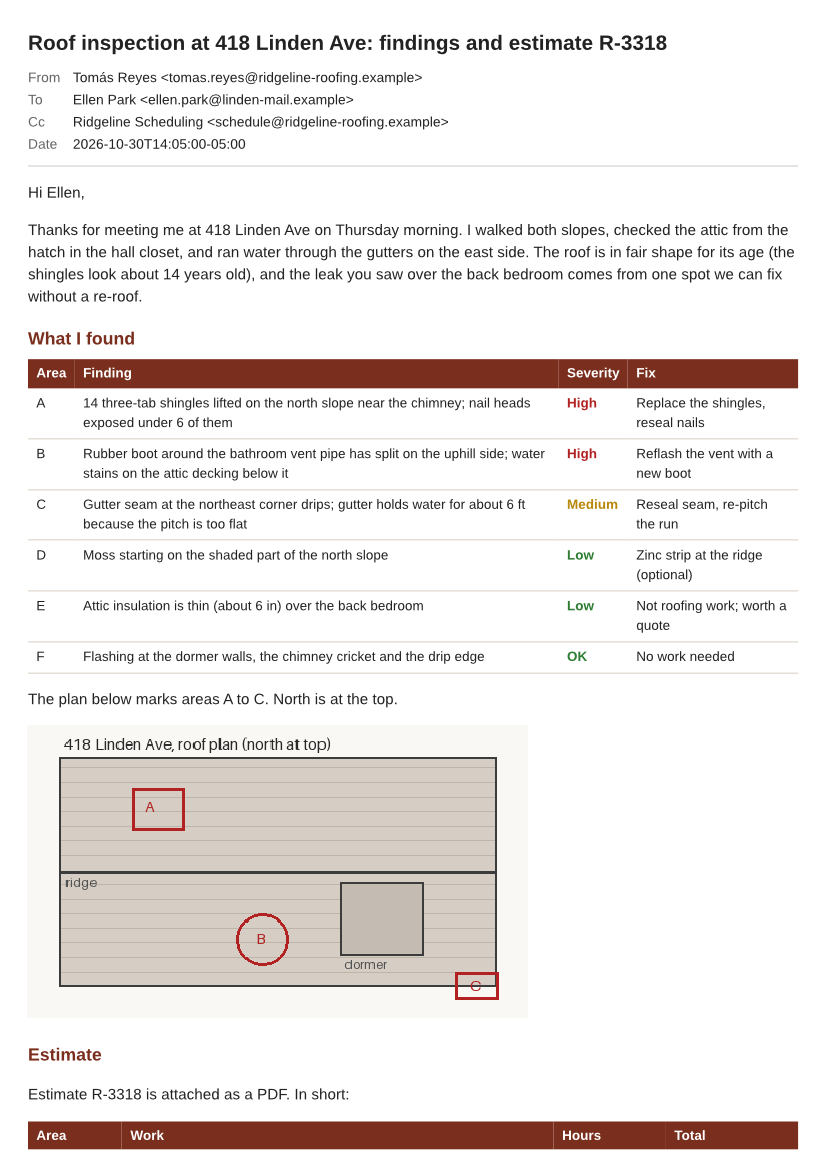
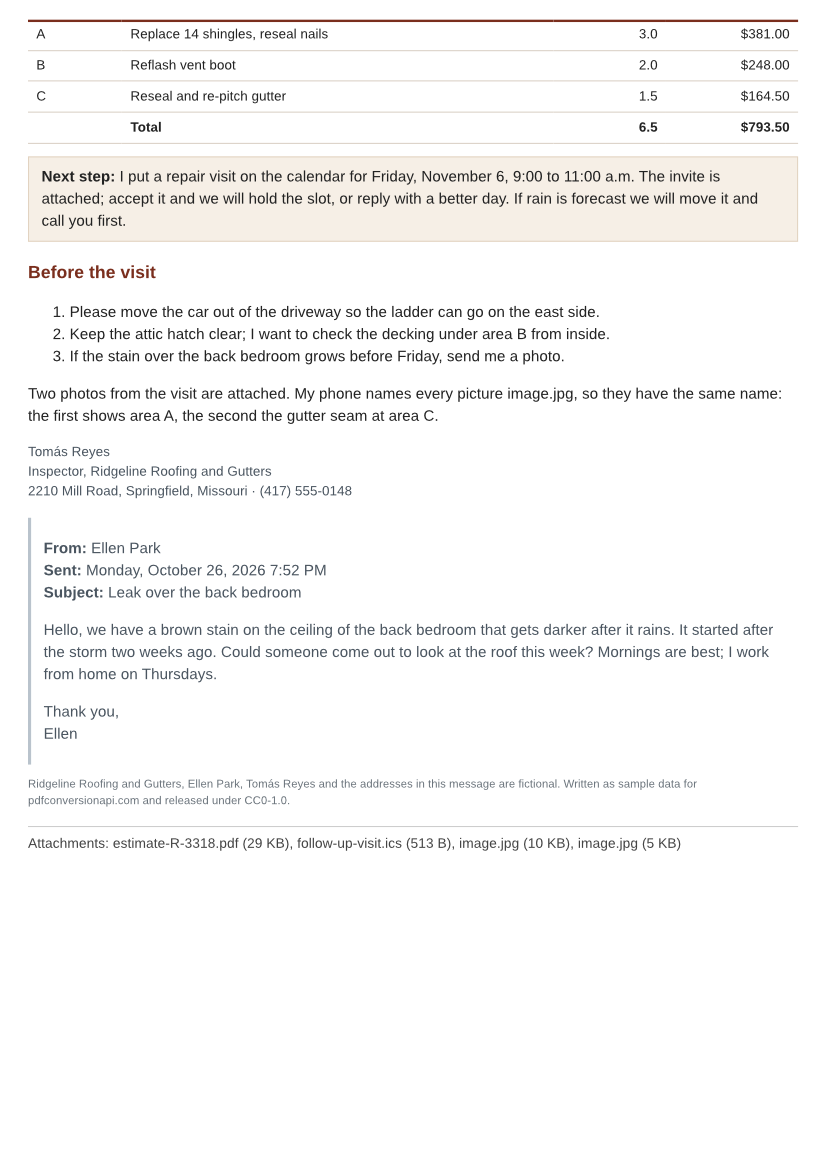
POST an .eml file to /v2/convert/eml/to/png and get one PNG for each page of the laid-out message. Our two-page roof inspection sample came back as two 826 × 1169 PNGs at ImageResolution=100, named with -1 and -2 after the file's own name.
- Endpoint
- POST /v2/
convert/ eml/ to/ png - Accepts
- eml
- Sample timing
- 37 ms median of 5 runsHow we measure
- Request size
- Up to 10 MB on the Free plan or 100 MB on paid plans, all files together
Request and response
Every sample below ran against the API before this page was published. Set PDFCONVERSIONAPI_KEY to your key and run it as is.
curl -sS -X POST \
  https://api.pdfconversionapi.com/v2/convert/eml/to/png \
  -H "Authorization: Bearer $PDFCONVERSIONAPI_KEY" \
  -F File=@roof-inspection-418-linden.eml \
  --form-string ImageResolution=100 \
  -o response.json

# FileData is base64. Save the first file in converted/,
# or print the JSON error.
if jq -e '.Files' response.json > /dev/null; then
  mkdir -p converted
  name=$(jq -r '.Files[0].FileName' response.json)
  jq -r '.Files[0].FileData' response.json \
    | base64 --decode > "converted/$name"
else
  cat response.json
fi
import base64
import os
import requests
key = os.environ["PDFCONVERSIONAPI_KEY"]
response = requests.post(
"https://api.pdfconversionapi.com/v2/convert/eml/to/png",
headers={"Authorization": f"Bearer {key}"},
files=[
("File", open("roof-inspection-418-linden.eml", "rb")),
],
data={
"ImageResolution": "100",
},
timeout=180,
)
result = response.json()
if not response.ok:
raise SystemExit(f"{result['Code']}: {result['Message']}")
os.makedirs("converted", exist_ok=True)
for file in result["Files"]:
path = os.path.join("converted", file["FileName"])
with open(path, "wb") as out:
out.write(base64.b64decode(file["FileData"]))
print(path, file["FileSize"], "bytes")
import { mkdir, readFile, writeFile } from "node:fs/promises";
import { join } from "node:path";

const form = new FormData();
const file = "roof-inspection-418-linden.eml";
form.append("File", new Blob([await readFile(file)]), file);
form.append("ImageResolution", "100");

const url = "https://api.pdfconversionapi.com/v2/convert/eml/to/png";
const key = process.env.PDFCONVERSIONAPI_KEY;
const response = await fetch(url, {
  method: "POST",
  headers: { Authorization: `Bearer ${key}` },
  body: form,
});
const result = await response.json();
if (!response.ok) {
  throw new Error(`${result.Code}: ${result.Message}`);
}

await mkdir("converted", { recursive: true });
for (const file of result.Files) {
  const path = join("converted", file.FileName);
  await writeFile(path, Buffer.from(file.FileData, "base64"));
  console.log(path, file.FileSize, "bytes");
}
{
  "ConversionCost": 1,
  "ConversionTime": 0.037,
  "Files": [
    {
      "FileName": "roof-inspection-418-linden-1.png",
      "FileExt": "png",
      "FileSize": 245252,
      "FileData": "iVBORw0KGgoAAAANSUhEUgAA…"
    },
    {
      "FileName": "roof-inspection-418-linden-2.png",
      "FileExt": "png",
      "FileSize": 237155,
      "FileData": "iVBORw0KGgoAAAANSUhEUgAA…"
    }
  ]
}
Response from our test run on 2026-11-03. ConversionTime shows the median of 5 runs. FileData is shortened here; the real response carries the whole file as base64.
The sample, converted
The same file the code sends. Download the input and the output and compare them yourself.
- Input
- roof-inspection-418-linden.eml (77 KB)
- Output
- roof-inspection-418-linden-1.png (240 KB)roof-inspection-418-linden-2.png (232 KB)
- Source
- A fictional two-page roof inspection email with an inline roof plan and four attachments, written and drawn by us for this site. (CC0-1.0). How it was made
- Made by
- 2026-11-04, API build
9eeeb0640aba
Parameters
Send these as form fields next to the file. Names are case-insensitive. If you set one of the documented options below that we don't support yet, the request fails with a 400 that names it instead of returning a file made without it.
| Parameter | What it does |
|---|---|
ImageResolutioninteger, default 150 | Dots per inch the pages are drawn at, also written into each PNG's pHYs chunk. Without it the A4 pages come out 1240 × 1753 and no DPI is recorded. ConvertAPI documents 200 as its default; send 200 to match it (1653 × 2338 on A4).Values: 36–600 |
ImageWidthinteger | Pixel width of every PNG. The page is drawn at the scale that width needs rather than drawn at 150 dpi and stretched, so ImageWidth=800 gives sharp 800 × 1131 pages.Values: 1–20,000 |
ImageHeightinteger | Pixel height of every PNG; alone it derives the width from the page shape (ImageHeight=500 gave 354 × 500). With ImageWidth the pair is a box the page fits inside.Values: 1–20,000 |
ScaleProportionsboolean, default true | false stretches each page to the exact ImageWidth × ImageHeight box: 600 × 600 instead of the 424 × 600 that keeps the A4 shape. |
PageRangestring | Which pages to draw. PageRange=2 returns only roof-inspection-418-linden-2.png; a page past the end returns 400.Values: 2, 1-2, 2-, 1-last |
ConvertHeaderboolean, default true | Draw the subject line and the From, To, Cc and Date rows at the top of page 1. false starts the first image with the body; the attachment names at the end stay. |
PageSizeenum, default a4 | Paper the message is laid out on before it becomes pixels. letter at 50 dpi gives 425 × 550 images.Values: a0–a9, b0–b5, letter, legal, ledger |
PageOrientationenum, default portrait | landscape turns the paper. The sample on sideways Letter needed three images instead of two.Values: portrait, landscape |
PageWidthinteger | Custom paper width in millimeters, in place of the width from PageSize.Values: 10–30,000 (mm) |
PageHeightinteger | Custom paper height in millimeters. A 100 × 150 mm card split the sample into six images.Values: 10–30,000 (mm) |
MarginTopinteger, default 5 | Blank space above the content on every page, in whole millimeters.Values: 0–500 (mm) |
MarginRightinteger, default 5 | Blank space on the right.Values: 0–500 (mm) |
MarginBottominteger, default 5 | Blank space at the foot of each page.Values: 0–500 (mm) |
MarginLeftinteger, default 5 | Blank space on the left. Margins that leave no room for content return 400.Values: 0–500 (mm) |
ColorSpaceenum, default default | gray writes one-channel PNGs (34,464 bytes for page 1 at 50 dpi, against 93,203 in color); monochrome turns every pixel black or white; rgb returns the same three-channel PNG as the default. cmyk returns 400.Values: default, rgb, gray, monochrome |
BackgroundColorstring, default white | Color painted behind the page. Areas the message itself leaves unpainted show it: #FFF8E7 gave a cream page with the email's own table colors on top.Values: white, black, red, green, blue, gray, #RRGGBB or R,G,B |
TransparentColorstring | Pixels of exactly this color become transparent, and only then does the PNG get an alpha channel. white cuts out the page background and leaves the text and tables; together with ColorSpace=gray it gives a gray PNG with alpha.Values: Same as BackgroundColor |
IgnoreAttachmentErrorsboolean, default false | Accepted, with no effect here: attachments are named on the last page, never converted. |
Mergeboolean, default true | Accepted, with no effect: the result is always one PNG per page. |
FileNamestring | Base name for the images. FileName=linden-roof returns linden-roof-1.png and linden-roof-2.png. |
StoreFileboolean, default false | true keeps every PNG for 3 hours and answers with a download URL per page in Files[].Url in place of base64 data. |
Not supported yet
Setting one of these to anything but its default returns 400.
| Option | What to do instead |
|---|---|
TemplateFile | Any value returns 400. The header block has one fixed layout; ConvertHeader=false leaves it out. |
DateTimeFormat | Any value returns 400. The Date row prints the message's own timestamp in ISO 8601, such as 2026-10-30T14:05:00-05:00. |
ConvertAttachments | true returns 400; false is accepted. To turn an attachment into images too, get it from /v2/convert/email/to/extract and send it to its own route. |
What carries over, and what doesn't
Kept
- The header block as text in the image: the subject, the From name decoded from its RFC 2047 form (Tomás Reyes), To, Cc and the Date as 2026-10-30T14:05:00-05:00
- CSS from the body's style element: the dark red table headings, the colored severity labels, the shaded callout box and the gray bar beside the quoted reply
- The roof plan sent inside the message as a cid: part, drawn at the 480 × 280 size its img tag gives
- Numbered lists and both tables; the estimate table runs over the page boundary, its heading row at the foot of page 1 and its rows at the top of page 2
- The attachment names and sizes on the last page: estimate-R-3318.pdf (29 KB), follow-up-visit.ics (513 B) and both image.jpg files (10 KB and 5 KB)
- Every pixel exactly as drawn: the PNGs are lossless 8-bit RGB with no alpha channel, unless you send
TransparentColoror a gray or black-and-whiteColorSpace
Lost or not yet supported
- Text, links and structure. Each page is a picture, so nothing can be selected, searched or clicked; use
/v2/convert/eml/to/pdfwhen that matters. - Pictures the HTML loads by URL. A 300 × 120 remote banner in our test left an empty box of that size, and a CSS background-image URL drew nothing.
- HTML attributes that older newsletters rely on: bgcolor, border, cellpadding, table widths, align on cells and paragraphs, and the color, size and face of font tags were all ignored in our test. The center tag and inline CSS were applied.
- The Reply-To and In-Reply-To headers, both present in the sample, and any Bcc. Only From, To, Cc and Date are printed.
- The attachments themselves. They are listed by name; the PDF estimate and the photos in the sample are not drawn.
- A DPI value when you leave
ImageResolutionout: the PNGs then have no pHYs chunk, so print and layout tools fall back to their own default.
Limits
- One message per request; a second file returns 400 "this conversion takes exactly one file".
- Requests up to 10 MB on the Free plan or 100 MB on paid plans, all files and fields together. Attachments count, and base64 makes each about a third larger inside the .eml.
ImageResolutionfrom 36 to 600. A page that would be over 16,000 px on a side returns 413 (A0 at 600 dpi), and so does one over 100,000,000 pixels (A0 at 300 dpi).- Up to 2,000 pages per request.
- A file that is not a mail message returns 422 "the input file could not be read: this is not an e-mail message".
- 120 seconds per conversion; after that the API returns 504.
Where teams use it
Message previews in a help desk or CRM
Showing a customer's email as an image avoids putting their HTML into your page. The PNG carries no scripts, no live links and no remote references, and nothing in the message is fetched while it is drawn.
Evidence uploads that take images only
Some claim, dispute and marketplace forms accept PNG or JPG but not .eml. Convert the message the customer forwarded and upload page 1, or every page, with the header block showing who sent it and when.
Pixel checks for transactional templates
Render a test send of an order or password email and compare the PNG with last week's in your test suite. PNG is lossless, so any difference is a real change. Our layout is not a mail client, though: see what it leaves out below.
Questions
Why do I get several PNG files for one email?
The message is laid out on pages first, A4 unless you send PageSize, and each page becomes its own PNG. The sample is long enough for two pages, so the response holds roof-inspection-418-linden-1.png and -2.png. Send PageRange=1 if you only want the top of the message, or a taller PageHeight to fit more on one image.
How large are the images?
At the default 150 dpi an A4 page is 1240 × 1753 pixels, and the sample's two pages were 410,518 and 403,425 bytes. The published sample uses ImageResolution=100: 826 × 1169 pixels and 245,252 and 237,155 bytes. ImageWidth sets an exact pixel width instead.
Will a tracking pixel in the email be requested?
No. Images are only drawn when the message carries them as cid: parts; anything referenced by URL is left out and no request is made for it, so a 1 × 1 tracking image never reaches its sender's server.
Can I send an Outlook .msg file to this endpoint?
Yes. The converter checks the first bytes of the upload, so eml/to/png reads an Outlook message as well; our two-page .msg test file returned two PNGs here. msg/to/png does the same in the other direction.
Can the background be transparent?
Send TransparentColor=white. Pixels of pure white become fully transparent, which removes the page background and keeps the text, table fills and images. Anti-aliased edges of letters keep their light gray pixels.
Convert your first EML file in a minute.