EML to TIFF API
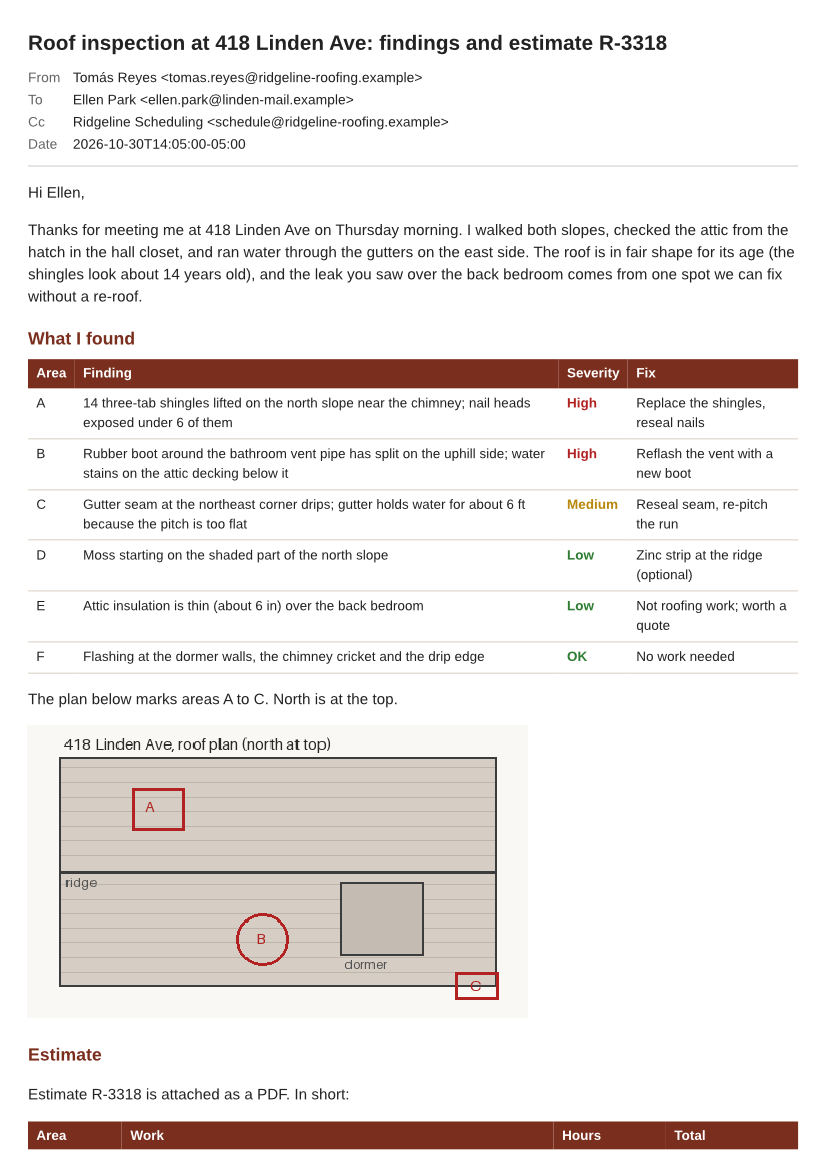
POST an .eml file to /v2/convert/eml/to/tiff and the pages of the message come back as a single multi-page TIFF. The two-page sample, sent with ImageResolution=100, returned roof-inspection-418-linden.tiff: 283,089 bytes, two 826 × 1169 frames, LZW, 100 dpi.
- Endpoint
- POST /v2/
convert/ eml/ to/ tiff - Accepts
- eml
- Sample timing
- 79 ms median of 5 runsHow we measure
- Request size
- Up to 10 MB on the Free plan or 100 MB on paid plans, all files together
Request and response
Every sample below ran against the API before this page was published. Set PDFCONVERSIONAPI_KEY to your key and run it as is.
curl -sS -X POST \
  https://api.pdfconversionapi.com/v2/convert/eml/to/tiff \
  -H "Authorization: Bearer $PDFCONVERSIONAPI_KEY" \
  -F File=@roof-inspection-418-linden.eml \
  --form-string ImageResolution=100 \
  -o response.json

# FileData is base64. Save the first file in converted/,
# or print the JSON error.
if jq -e '.Files' response.json > /dev/null; then
  mkdir -p converted
  name=$(jq -r '.Files[0].FileName' response.json)
  jq -r '.Files[0].FileData' response.json \
    | base64 --decode > "converted/$name"
else
  cat response.json
fi
import base64
import os
import requests
key = os.environ["PDFCONVERSIONAPI_KEY"]
response = requests.post(
"https://api.pdfconversionapi.com/v2/convert/eml/to/tiff",
headers={"Authorization": f"Bearer {key}"},
files=[
("File", open("roof-inspection-418-linden.eml", "rb")),
],
data={
"ImageResolution": "100",
},
timeout=180,
)
result = response.json()
if not response.ok:
raise SystemExit(f"{result['Code']}: {result['Message']}")
os.makedirs("converted", exist_ok=True)
for file in result["Files"]:
path = os.path.join("converted", file["FileName"])
with open(path, "wb") as out:
out.write(base64.b64decode(file["FileData"]))
print(path, file["FileSize"], "bytes")
import { mkdir, readFile, writeFile } from "node:fs/promises";
import { join } from "node:path";

const form = new FormData();
const file = "roof-inspection-418-linden.eml";
form.append("File", new Blob([await readFile(file)]), file);
form.append("ImageResolution", "100");

const url = "https://api.pdfconversionapi.com/v2/convert/eml/to/tiff";
const key = process.env.PDFCONVERSIONAPI_KEY;
const response = await fetch(url, {
  method: "POST",
  headers: { Authorization: `Bearer ${key}` },
  body: form,
});
const result = await response.json();
if (!response.ok) {
  throw new Error(`${result.Code}: ${result.Message}`);
}

await mkdir("converted", { recursive: true });
for (const file of result.Files) {
  const path = join("converted", file.FileName);
  await writeFile(path, Buffer.from(file.FileData, "base64"));
  console.log(path, file.FileSize, "bytes");
}
{
  "ConversionCost": 1,
  "ConversionTime": 0.079,
  "Files": [
    {
      "FileName": "roof-inspection-418-linden.tiff",
      "FileExt": "tiff",
      "FileSize": 283089,
      "FileData": "SUkqAMFDAgBkAAAAAQAAAGQA…"
    }
  ]
}
Response from our test run on 2026-11-03. ConversionTime shows the median of 5 runs. FileData is shortened here; the real response carries the whole file as base64.
The sample, converted
The same file the code sends. Download the input and the output and compare them yourself.
- Input
- roof-inspection-418-linden.eml (77 KB)
- Output
- roof-inspection-418-linden.tiff (276 KB)
- Source
- A fictional two-page roof inspection email with an inline roof plan and four attachments, written and drawn by us for this site. (CC0-1.0). How it was made
- Made by
- 2026-11-04, API build
9eeeb0640aba
Parameters
Send these as form fields next to the file. Names are case-insensitive. If you set one of the documented options below that we don't support yet, the request fails with a 400 that names it instead of returning a file made without it.
| Parameter | What it does |
|---|---|
MultiPageboolean, default true | With two or more pages, true puts them all in one TIFF named after the message. false returns -1.tiff, -2.tiff and so on, and each of those is stored uncompressed (723,786 bytes apiece for the sample at 50 dpi). |
ImageResolutioninteger, default 150 | Drawing resolution, written to the TIFF's resolution tags when you send it. At the default 150 dpi the two A4 frames are 1240 × 1753 and the file is 493,442 bytes, with resolution tags of 1 × 1 and no unit, so no dpi is recorded; the sample's 100 dpi gives 826 × 1169.Values: 36–600 |
PageRangestring | Pages to include. Selecting a single page leaves nothing to combine, so the result is a one-page TIFF without compression.Values: 1, 2, 1-2, 2- |
ImageWidthinteger | Frame width in pixels; the page is drawn at that width.Values: 1–20,000 |
ImageHeightinteger | Frame height in pixels, or the second side of a fit-inside box together with ImageWidth.Values: 1–20,000 |
ColorSpaceenum, default default | gray and monochrome store every frame as one 8-bit gray channel, in the combined TIFF too: 68,910 bytes for the sample at 50 dpi against 106,341 in color, and 7,579 in black and white. rgb gives the same three-channel frames as the default.Values: default, rgb, gray, monochrome |
ConvertHeaderboolean, default true | The subject and the From, To, Cc and Date rows open frame 1. false leaves them out. |
PageSizeenum, default a4 | Paper size for the layout, and so the shape of every frame. Records kept on US paper usually want letter.Values: a0–a9, b0–b5, letter, legal, ledger |
PageOrientationenum, default portrait | Sideways paper; wide HTML stays whole at the cost of more frames.Values: portrait, landscape |
PageWidthinteger | A paper width of your own, in millimeters.Values: 10–30,000 (mm) |
PageHeightinteger | A paper height of your own, in millimeters.Values: 10–30,000 (mm) |
MarginTopinteger, default 5 | White band above the content of each frame.Values: 0–500 (mm) |
MarginRightinteger, default 5 | White band on the right side.Values: 0–500 (mm) |
MarginBottominteger, default 5 | White band below the content.Values: 0–500 (mm) |
MarginLeftinteger, default 5 | White band on the left side; values over 500 return 400.Values: 0–500 (mm) |
BackgroundColorstring, default white | Fill behind each page where the email paints nothing.Values: Color names, #RRGGBB or R,G,B |
TransparentColorstring | Pixels of exactly this color get alpha 0. Only then do the frames carry an alpha channel; otherwise they are plain RGB.Values: Color names, #RRGGBB or R,G,B |
IgnoreAttachmentErrorsboolean, default false | Accepted; nothing about attachments can fail, because they are only named. |
Mergeboolean, default true | Accepted and ignored. Use MultiPage to choose one file or several. |
FileNamestring | Name for the TIFF without its extension (for the combined file) or the stem for the per-page files. |
StoreFileboolean, default false | true returns a link in Files[].Url that works for 3 hours, in place of the base64 TIFF. |
Not supported yet
Setting one of these to anything but its default returns 400.
| Option | What to do instead |
|---|---|
TemplateFile | Returns 400 with any value; there is one header layout. |
DateTimeFormat | Returns 400 with any value; the Date row is ISO 8601. |
ConvertAttachments | true returns 400. The TIFF holds the message only; the attachment list names the files. |
What carries over, and what doesn't
Kept
- All pages in one file, in reading order: the sample's two A4 pages became frames 1 and 2 of one TIFF
- The message header on frame 1 (subject, From with the decoded name Tomás Reyes, To, Cc and the Date as 2026-10-30T14:05:00-05:00)
- The HTML body's colors, tables and the inline roof plan, drawn from its cid: part
- Lossless frames: LZW keeps every pixel, and the combined file was smaller than one uncompressed page
- The resolution you ask for, stored as 100 × 100 dpi in the sample's tags
- The attachment names and sizes at the end of the last frame
Lost or not yet supported
- Compression for single pages. A one-page result, from
PageRange=1,MultiPage=falseor a short message, is written uncompressed: 3 bytes per pixel, about 6.5 MB for one A4 page at 150 dpi. - Fax encodings. Frames are LZW-compressed 8-bit samples; there is no CCITT Group 3 or Group 4 option, so a fax service may need its own conversion step.
- 1-bit pixels.
ColorSpace=monochromemakes every pixel black or white, but each one still takes a full byte in a gray channel. - Selectable text and clickable links; for those, ask
/v2/convert/eml/to/pdfinstead. - Images the HTML loads from the web, and presentational attributes such as bgcolor or the font tag's color, which our layout does not apply.
- The attachments' contents. They are named, not rendered as extra frames.
Limits
- One message per request; a second file returns 400.
- Requests up to 10 MB on the Free plan or 100 MB on paid plans, all files and fields together.
- Up to 2,000 pages per request, all of which can go into one TIFF.
- A frame over 16,000 px on a side or over 100,000,000 pixels returns 413; at 600 dpi that rules out A0 but not A4 (4960 × 7015).
- Output files up to 512 MB each. A single uncompressed page stays below that: the 100,000,000-pixel cap is 300 MB at 3 bytes a pixel, or 400 MB with the alpha channel
TransparentColoradds. - Non-email uploads return 422, and each conversion has 120 seconds.
Where teams use it
Filing email with scanned paperwork
Records and document management systems that hold scanned letters as multi-page TIFF can take the email in the same form: one file, one frame per page, with the sender, recipients and date printed on frame 1.
Imaging workflows keyed on TIFF
Capture, redaction and stamping tools built for scanned pages often read TIFF frames directly. Converting the message first lets those steps treat it like any other scanned document.
Questions
Do I get one TIFF or one per page?
One, whenever the message has two or more pages and MultiPage is left at true. It is named after the upload (roof-inspection-418-linden.tiff), not numbered. With MultiPage=false you get roof-inspection-418-linden-1.tiff, -2.tiff and so on.
Why is my one-page TIFF so large?
Only the combined multi-page file is compressed. A single page, or each page with MultiPage=false, is stored as raw RGB: 1240 × 1753 × 3 bytes, about 6.5 MB, for an A4 page at the default 150 dpi. Lower ImageResolution, or use PNG, which is lossless and compressed.
Can I get black-and-white TIFFs for a fax or archive system?
Partly. ColorSpace=monochrome makes every pixel black or white and stores each frame as one 8-bit gray channel (7,579 bytes for the sample's two frames at 50 dpi), but there is no 1-bit storage and no Group 4 compression. Systems that require bilevel G4 TIFF will need to re-encode it.
Which resolution does the TIFF say it has?
The one you send in ImageResolution, written as X and Y resolution in inches: the sample reports 100 dpi. Leave it out and the pages are still drawn at 150 dpi, but the tags then hold 1 × 1 with no unit, so no dpi is recorded.
Convert your first EML file in a minute.