MSG to TIFF API
POST an Outlook .msg file to /v2/convert/msg/to/tiff and receive the laid-out message as TIFF. The two-page site report, sent with ImageResolution=120, came back as one file of 308,642 bytes holding two 992 × 1403 LZW frames tagged 120 dpi.
- Endpoint
- POST /v2/
convert/ msg/ to/ tiff - Accepts
- msg
- Sample timing
- 0.102 s median of 5 runsHow we measure
- Request size
- Up to 10 MB on the Free plan or 100 MB on paid plans, all files together
Request and response
Every sample below ran against the API before this page was published. Set PDFCONVERSIONAPI_KEY to your key and run it as is.
curl -sS -X POST \
  https://api.pdfconversionapi.com/v2/convert/msg/to/tiff \
  -H "Authorization: Bearer $PDFCONVERSIONAPI_KEY" \
  -F File=@site-report-week-9.msg \
  --form-string ImageResolution=120 \
  -o response.json

# FileData is base64. Save the first file in converted/,
# or print the JSON error.
if jq -e '.Files' response.json > /dev/null; then
  mkdir -p converted
  name=$(jq -r '.Files[0].FileName' response.json)
  jq -r '.Files[0].FileData' response.json \
    | base64 --decode > "converted/$name"
else
  cat response.json
fi
import base64
import os
import requests
key = os.environ["PDFCONVERSIONAPI_KEY"]
response = requests.post(
"https://api.pdfconversionapi.com/v2/convert/msg/to/tiff",
headers={"Authorization": f"Bearer {key}"},
files=[("File", open("site-report-week-9.msg", "rb"))],
data={
"ImageResolution": "120",
},
timeout=180,
)
result = response.json()
if not response.ok:
raise SystemExit(f"{result['Code']}: {result['Message']}")
os.makedirs("converted", exist_ok=True)
for file in result["Files"]:
path = os.path.join("converted", file["FileName"])
with open(path, "wb") as out:
out.write(base64.b64decode(file["FileData"]))
print(path, file["FileSize"], "bytes")
import { mkdir, readFile, writeFile } from "node:fs/promises";
import { join } from "node:path";

const form = new FormData();
const file = "site-report-week-9.msg";
form.append("File", new Blob([await readFile(file)]), file);
form.append("ImageResolution", "120");

const url = "https://api.pdfconversionapi.com/v2/convert/msg/to/tiff";
const key = process.env.PDFCONVERSIONAPI_KEY;
const response = await fetch(url, {
  method: "POST",
  headers: { Authorization: `Bearer ${key}` },
  body: form,
});
const result = await response.json();
if (!response.ok) {
  throw new Error(`${result.Code}: ${result.Message}`);
}

await mkdir("converted", { recursive: true });
for (const file of result.Files) {
  const path = join("converted", file.FileName);
  await writeFile(path, Buffer.from(file.FileData, "base64"));
  console.log(path, file.FileSize, "bytes");
}
{
  "ConversionCost": 1,
  "ConversionTime": 0.102,
  "Files": [
    {
      "FileName": "site-report-week-9.tiff",
      "FileExt": "tiff",
      "FileSize": 308642,
      "FileData": "SUkqAIGbAwB4AAAAAQAAAHgA…"
    }
  ]
}
Response from our test run on 2026-11-03. ConversionTime shows the median of 5 runs. FileData is shortened here; the real response carries the whole file as base64.
The sample, converted
The same file the code sends. Download the input and the output and compare them yourself.
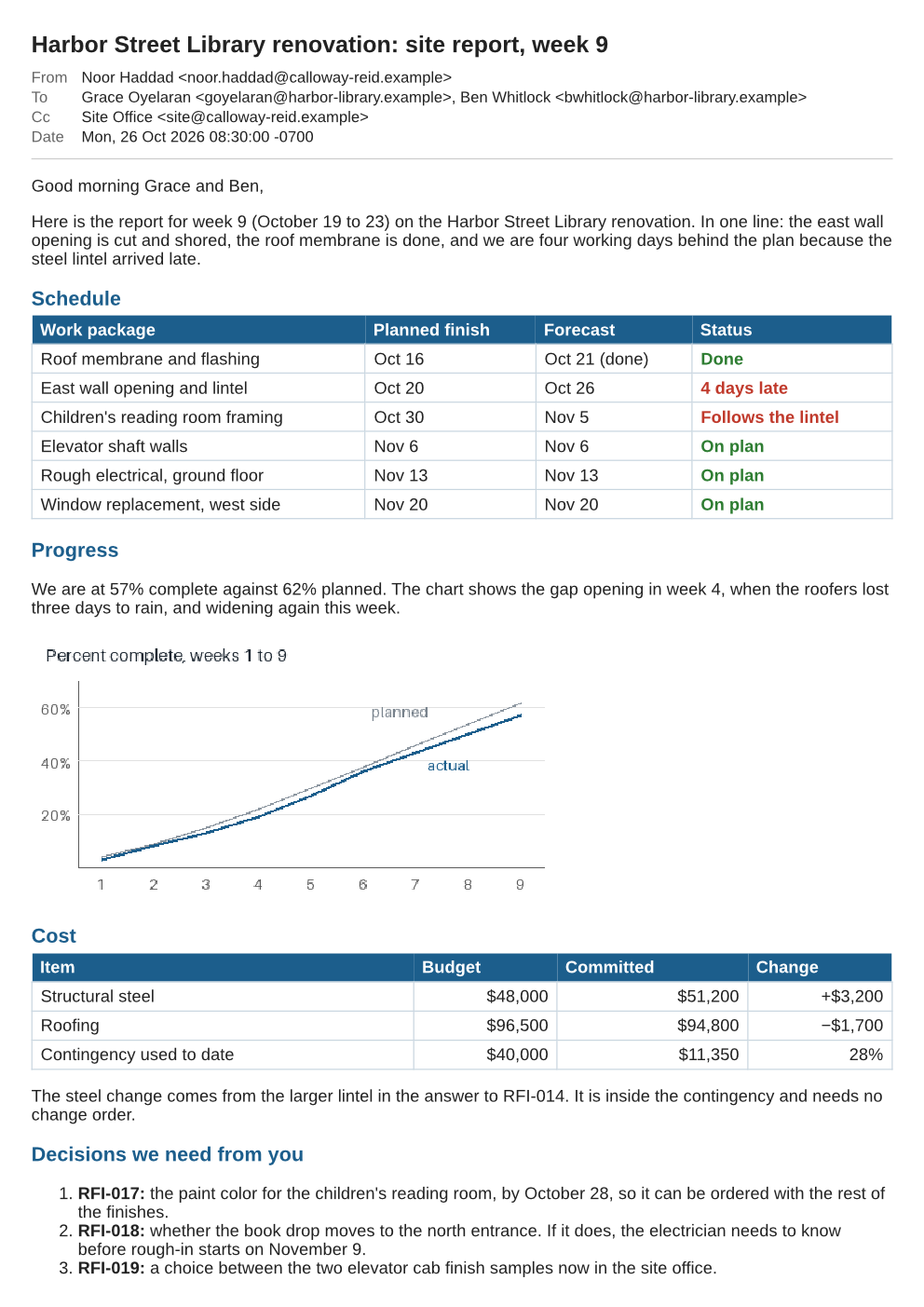
- Input
- site-report-week-9.msg (48 KB)
- Output
- site-report-week-9.tiff (301 KB)
- Source
- A fictional Outlook message with a weekly building site report, an inline chart and two attachments, written by us and saved to the Outlook file layout by our own script. (CC0-1.0). How it was made
- Made by
- 2026-11-04, API build
9eeeb0640aba
Parameters
Send these as form fields next to the file. Names are case-insensitive. If you set one of the documented options below that we don't support yet, the request fails with a 400 that names it instead of returning a file made without it.
| Parameter | What it does |
|---|---|
ImageResolutioninteger, default 150 | Scan-like resolution of the frames, stored in the TIFF when you send it. 120 gives the sample's 992 × 1403 frames; with no value the frames are 1240 × 1753 and the file is 415,682 bytes, its resolution tags set to 1 × 1 with no unit.Values: 36–600 |
MultiPageboolean, default true | Keeps a message of two or more pages in one TIFF called site-report-week-9.tiff. false returns a separate, uncompressed TIFF for each page. |
PageRangestring | Frames to include. Picking one page returns a single-page TIFF, which is stored uncompressed.Values: 1, 2, 1-2, 2- |
ImageWidthinteger | Frame width in pixels, overriding the resolution's pixel count.Values: 1–20,000 |
ImageHeightinteger | Frame height in pixels.Values: 1–20,000 |
ColorSpaceenum, default default | Grayscale or black-and-white pixels, written as one 8-bit channel in the combined file as well: gray with the sample at 120 dpi came to 193,626 bytes against 308,642 in color, and monochrome to 39,942.Values: default, rgb, gray, monochrome |
ConvertHeaderboolean, default true | Print the subject and the sender, To, Cc and Date rows at the top of frame 1. |
PageSizeenum, default a4 | Paper for the layout; letter makes frames 8.5 × 11 inches.Values: a0–a9, b0–b5, letter, legal, ledger |
PageOrientationenum, default portrait | Landscape frames for wide messages.Values: portrait, landscape |
PageWidthinteger | Frame paper width in millimeters.Values: 10–30,000 (mm) |
PageHeightinteger | Frame paper height in millimeters.Values: 10–30,000 (mm) |
MarginTopinteger, default 5 | Top margin of every frame.Values: 0–500 (mm) |
MarginRightinteger, default 5 | Right margin of every frame.Values: 0–500 (mm) |
MarginBottominteger, default 5 | Bottom margin of every frame.Values: 0–500 (mm) |
MarginLeftinteger, default 5 | Left margin of every frame.Values: 0–500 (mm) |
BackgroundColorstring, default white | Color under the page content.Values: Color names, #RRGGBB or R,G,B |
TransparentColorstring | Color turned fully transparent; the frames then carry an alpha channel instead of being plain RGB.Values: Color names, #RRGGBB or R,G,B |
IgnoreAttachmentErrorsboolean, default false | Ignored after reading; no attachment is converted. |
Mergeboolean, default true | Ignored after reading; MultiPage controls combining. |
FileNamestring | Output name without .tiff. |
StoreFileboolean, default false | Hand back a URL valid for 3 hours instead of the TIFF bytes. |
Not supported yet
Setting one of these to anything but its default returns 400.
| Option | What to do instead |
|---|---|
TemplateFile | Not accepted with any value. |
DateTimeFormat | Not accepted with any value; the Date row is the saved header text. |
ConvertAttachments | Not accepted as true; use /v2/convert/email/to/extract for the files. |
What carries over, and what doesn't
Kept
- Both pages of the sample in one file, as frames 1 and 2, at 120 dpi
- The Outlook HTML body with its blue table headings, colored status words and cost table
- The progress chart carried as an attachment with a content ID, drawn inside the body
- The header rows from the message's properties and saved internet headers, including the Date as written: Mon, 26 Oct 2026 08:30:00 -0700
- Every pixel exactly: the combined TIFF is LZW-compressed and lossless
- The two ordinary attachments, named with their sizes at the end of frame 2
Lost or not yet supported
- Compression on one-page results. A one-page Outlook message we tested came back as an uncompressed 6,521,426-byte TIFF at the default 150 dpi;
MultiPage=falseand single-pagePageRangevalues give the same kind of file. - Bilevel fax encodings: there is no CCITT Group 4 option, and even
ColorSpace=monochromekeeps 8 bits per sample. - Attachment contents: the CSV and the JPEG photo are listed, not added as frames.
- The Date row for messages saved without internet headers, and the Bcc line for every message.
- Rich formatting held only in an RTF body that was not made from HTML; the plain-text body is used then.
- Text you can search or copy. For that, convert to PDF with
/v2/convert/msg/to/pdf.
Limits
- One .msg per request; two files return 400.
- Requests up to 10 MB on the Free plan or 100 MB on paid plans, all files and fields together.
- Each output file up to 512 MB. An uncompressed page grows with the square of the resolution: an A4 page at 300 dpi is about 26 MB.
- Up to 2,000 pages per request; a frame over 16,000 px a side or 100,000,000 pixels returns 413.
- A damaged .msg, or another Office 97-2003 file such as .ppt, returns 422.
- 120 seconds per conversion.
Where teams use it
Retention copies of Outlook mail
Records programs that keep correspondence as image files can turn each exported .msg into one TIFF. Frame 1 carries the sender, recipients and date, so the image still identifies the message on its own.
Feeding a scanning or capture system
Capture and indexing software built around scanned TIFF batches can take Outlook messages as just another document. Choose the resolution your system expects, such as 200 or 300 dpi, with ImageResolution.
Questions
Why is a short message's TIFF so much bigger than a long one's?
Only TIFFs with two or more frames are LZW-compressed. A message that fits on one page is written as raw RGB, 3 bytes per pixel: our one-page test message was 6,521,426 bytes at 150 dpi, while the two-page sample is 415,682 bytes in one file. Lower ImageResolution, or use msg/to/png for single pages.
Can I get one TIFF per page?
Yes, with MultiPage=false: the sample then returns site-report-week-9-1.tiff and -2.tiff. Each of those is uncompressed, so expect much larger files than the combined TIFF.
Which dpi will my archive see?
The ImageResolution you send, stored as the X and Y resolution in inches (120 for the sample). If you send none, the pages are drawn at 150 dpi but the TIFF's resolution tags say 1 × 1 with no unit, so set it whenever the receiving system reads dpi.
Is an Outlook-only body format a problem?
Not when the file has an HTML body, as the sample does: that is what is drawn. When the HTML exists only inside the compressed RTF body (marked \fromhtml1), it is taken back out and drawn as HTML. Other RTF bodies fall back to the plain-text body, without their formatting.
Convert your first MSG file in a minute.