MSG to JPG API
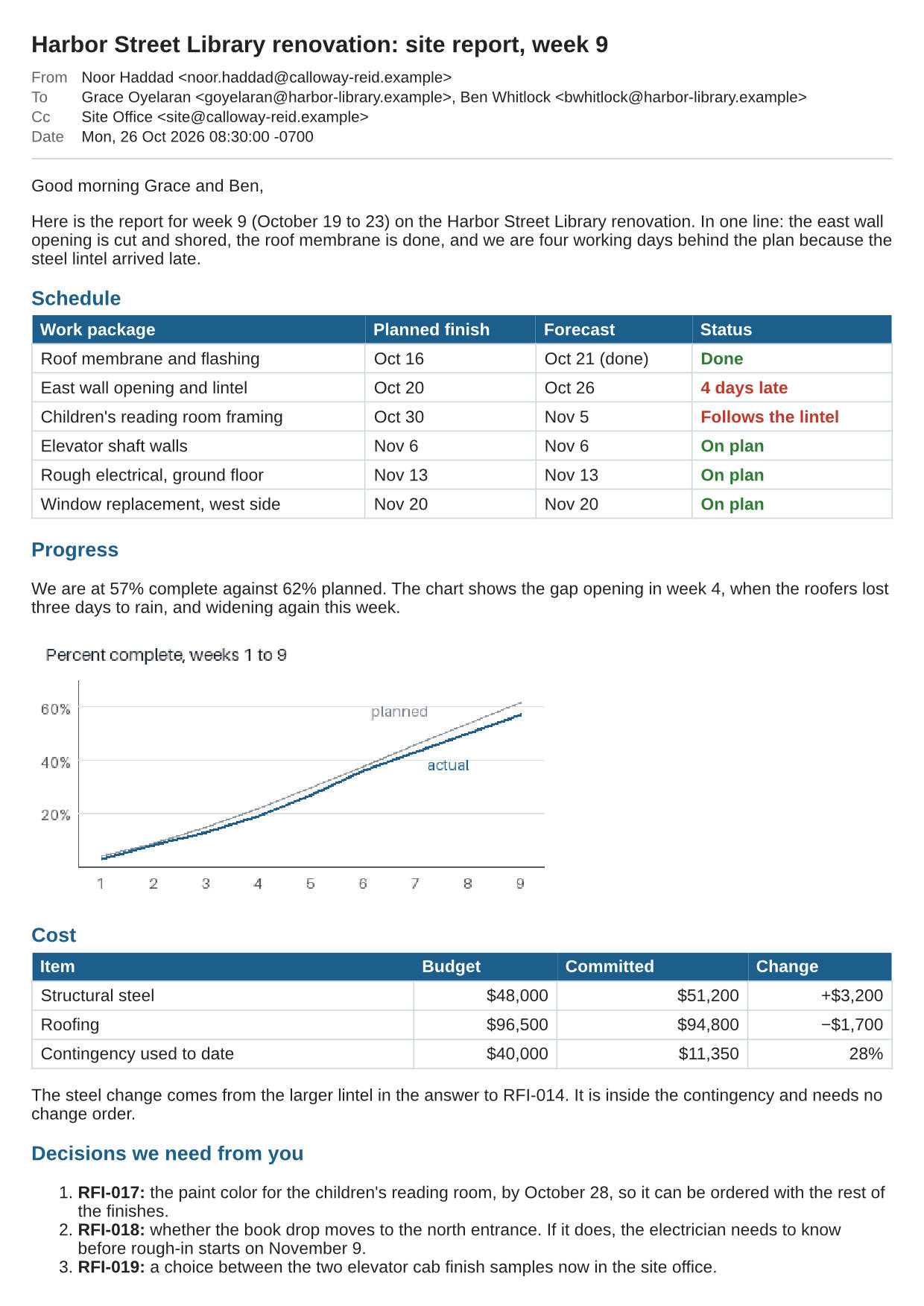
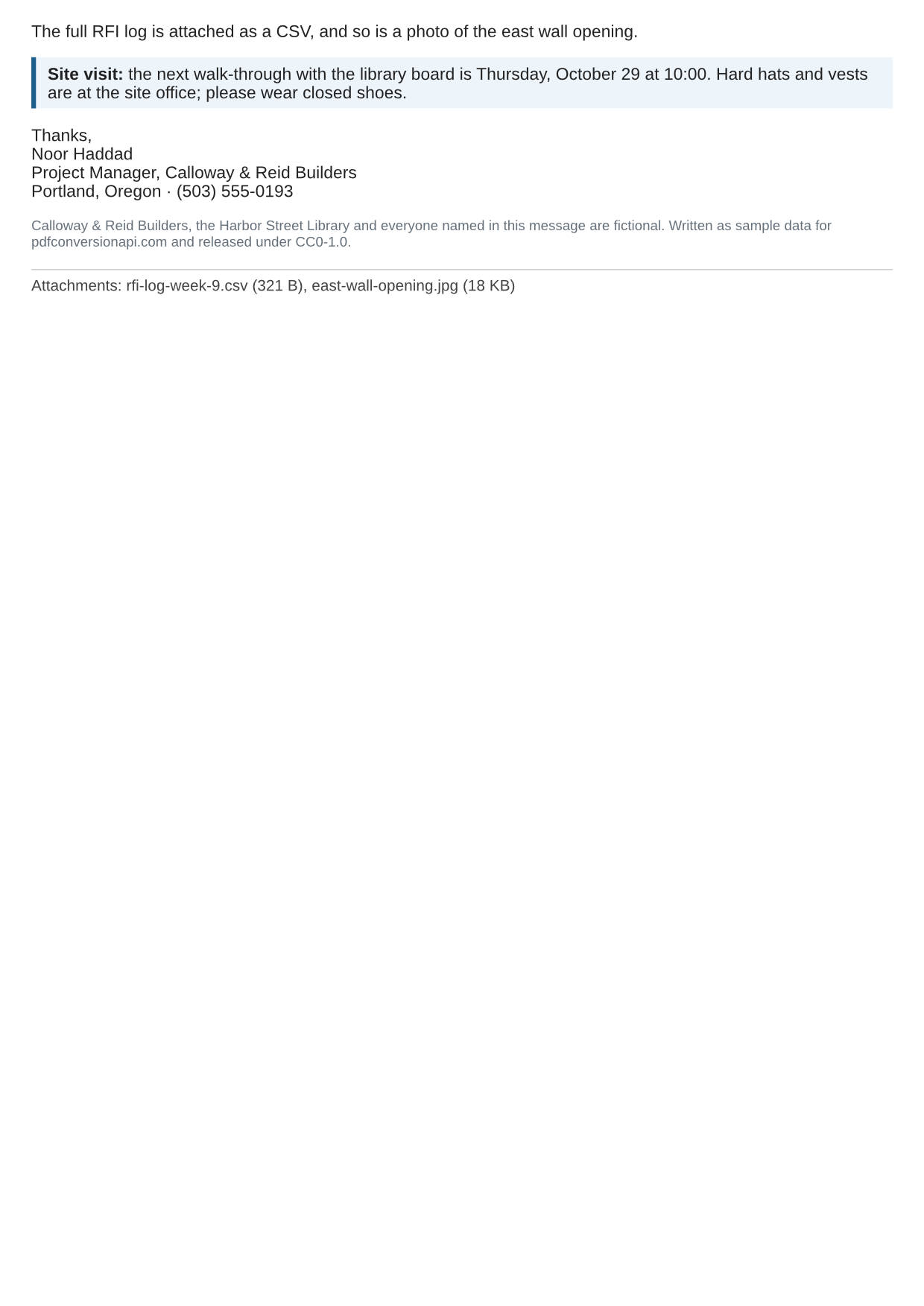
POST an Outlook .msg file to /v2/convert/msg/to/jpg and every page of the message comes back as a JPEG. At ImageQuality=70 the sample site report gave two 1240 × 1753 A4 pages of 262,306 and 106,295 bytes.
- Endpoint
- POST /v2/
convert/ msg/ to/ jpg - Accepts
- msg
- Sample timing
- 81 ms median of 5 runsHow we measure
- Request size
- Up to 10 MB on the Free plan or 100 MB on paid plans, all files together
Request and response
Every sample below ran against the API before this page was published. Set PDFCONVERSIONAPI_KEY to your key and run it as is.
curl -sS -X POST \
  https://api.pdfconversionapi.com/v2/convert/msg/to/jpg \
  -H "Authorization: Bearer $PDFCONVERSIONAPI_KEY" \
  -F File=@site-report-week-9.msg \
  --form-string ImageQuality=70 \
  -o response.json

# FileData is base64. Save the first file in converted/,
# or print the JSON error.
if jq -e '.Files' response.json > /dev/null; then
  mkdir -p converted
  name=$(jq -r '.Files[0].FileName' response.json)
  jq -r '.Files[0].FileData' response.json \
    | base64 --decode > "converted/$name"
else
  cat response.json
fi
import base64
import os
import requests
key = os.environ["PDFCONVERSIONAPI_KEY"]
response = requests.post(
"https://api.pdfconversionapi.com/v2/convert/msg/to/jpg",
headers={"Authorization": f"Bearer {key}"},
files=[("File", open("site-report-week-9.msg", "rb"))],
data={
"ImageQuality": "70",
},
timeout=180,
)
result = response.json()
if not response.ok:
raise SystemExit(f"{result['Code']}: {result['Message']}")
os.makedirs("converted", exist_ok=True)
for file in result["Files"]:
path = os.path.join("converted", file["FileName"])
with open(path, "wb") as out:
out.write(base64.b64decode(file["FileData"]))
print(path, file["FileSize"], "bytes")
import { mkdir, readFile, writeFile } from "node:fs/promises";
import { join } from "node:path";

const form = new FormData();
const file = "site-report-week-9.msg";
form.append("File", new Blob([await readFile(file)]), file);
form.append("ImageQuality", "70");

const url = "https://api.pdfconversionapi.com/v2/convert/msg/to/jpg";
const key = process.env.PDFCONVERSIONAPI_KEY;
const response = await fetch(url, {
  method: "POST",
  headers: { Authorization: `Bearer ${key}` },
  body: form,
});
const result = await response.json();
if (!response.ok) {
  throw new Error(`${result.Code}: ${result.Message}`);
}

await mkdir("converted", { recursive: true });
for (const file of result.Files) {
  const path = join("converted", file.FileName);
  await writeFile(path, Buffer.from(file.FileData, "base64"));
  console.log(path, file.FileSize, "bytes");
}
{
  "ConversionCost": 1,
  "ConversionTime": 0.081,
  "Files": [
    {
      "FileName": "site-report-week-9-1.jpg",
      "FileExt": "jpg",
      "FileSize": 262306,
      "FileData": "/9j/4AAQSkZJRgABAgAAAQAB…"
    },
    {
      "FileName": "site-report-week-9-2.jpg",
      "FileExt": "jpg",
      "FileSize": 106295,
      "FileData": "/9j/4AAQSkZJRgABAgAAAQAB…"
    }
  ]
}
Response from our test run on 2026-11-03. ConversionTime shows the median of 5 runs. FileData is shortened here; the real response carries the whole file as base64.
The sample, converted
The same file the code sends. Download the input and the output and compare them yourself.
- Input
- site-report-week-9.msg (48 KB)
- Output
- site-report-week-9-1.jpg (256 KB)site-report-week-9-2.jpg (104 KB)
- Source
- A fictional Outlook message with a weekly building site report, an inline chart and two attachments, written by us and saved to the Outlook file layout by our own script. (CC0-1.0). How it was made
- Made by
- 2026-11-04, API build
9eeeb0640aba
Parameters
Send these as form fields next to the file. Names are case-insensitive. If you set one of the documented options below that we don't support yet, the request fails with a 400 that names it instead of returning a file made without it.
| Parameter | What it does |
|---|---|
ImageQualityinteger, default 85 | JPEG compression quality. For the sample, 70 gave 262,306 and 106,295 bytes and our default 85 gave 341,461 and 125,187. ConvertAPI documents 75 as its default.Values: 1–100 |
ImageResolutioninteger, default 150 | Pixels per inch of paper; A4 at 150 dpi is 1240 × 1753. When you send it, the value is also written to the JFIF header as the image density.Values: 36–600 |
ImageWidthinteger | Exact width in pixels, with the height following the page. Smaller widths give smaller files with text drawn at that size.Values: 1–20,000 |
ImageHeightinteger | Exact height in pixels, alone or with ImageWidth as a box.Values: 1–20,000 |
PageRangestring | Pages to return, numbered from 1. A page number beyond the end gives 400 naming the page count.Values: 1, 2, 1-2, 2- |
ConvertHeaderboolean, default true | Keep or drop the block with the subject, sender, recipients and date. |
PageSizeenum, default a4 | Named paper for the page breaks.Values: a0–a9, b0–b5, letter, legal, ledger |
PageOrientationenum, default portrait | Portrait or landscape paper.Values: portrait, landscape |
PageWidthinteger | Paper width in millimeters, replacing the PageSize width.Values: 10–30,000 (mm) |
PageHeightinteger | Paper height in millimeters, replacing the PageSize height.Values: 10–30,000 (mm) |
MarginTopinteger, default 5 | Margin above the content.Values: 0–500 (mm) |
MarginRightinteger, default 5 | Margin right of the content.Values: 0–500 (mm) |
MarginBottominteger, default 5 | Margin below the content.Values: 0–500 (mm) |
MarginLeftinteger, default 5 | Margin left of the content.Values: 0–500 (mm) |
ColorSpaceenum, default default | gray gives a single-channel grayscale JPEG; monochrome thresholds it to black and white first.Values: default, rgb, gray, monochrome |
BackgroundColorstring, default white | Page color behind areas the message leaves unpainted.Values: Color names, #RRGGBB or R,G,B |
IgnoreAttachmentErrorsboolean, default false | No effect; accepted so ConvertAPI-style requests pass. |
Mergeboolean, default true | No effect; one JPEG per page either way. |
FileNamestring | Base name for the JPEGs; the page number and .jpg are added. |
StoreFileboolean, default false | Keep the JPEGs on our side for 3 hours and get links instead of data. |
Not supported yet
Setting one of these to anything but its default returns 400.
| Option | What to do instead |
|---|---|
TemplateFile | Refused whatever its value; the header block has a single design. |
DateTimeFormat | Refused whatever its value; the date is printed as Outlook saved it. |
ConvertAttachments | Refused when true; the attachments are named on the last page only. |
What carries over, and what doesn't
Kept
- Page 1 of the sample with the subject, sender, both To names, the Site Office Cc and the Date row from the saved headers
- The HTML body's tables, including right-aligned budget figures and the red text for late work
- The inline progress chart, drawn where the HTML places it
- Colors at full resolution; the JPEGs use 4:4:4 sampling with no chroma subsampling
- A short page 2 with the sign-off, the boxed site-visit note and the two listed attachments
Lost or not yet supported
- Detail, a little: JPEG is lossy. At quality 70 the sample's text is readable, and its page 1 is 23% smaller than at the default 85.
- The attachments. The CSV and the photo are named with their sizes, not drawn.
- Text in some older ANSI-format .msg files: the message parser drops an 8-bit text field whose bytes are not valid UTF-8, so an accented subject can go missing. Unicode .msg files, like the sample, are not affected.
- Bcc, and the Date row on messages saved without internet headers, such as drafts.
- Remote images and other web content the HTML refers to.
- Searchable text and links, which a JPEG cannot hold.
Limits
- One .msg per request.
- Requests up to 10 MB on the Free plan or 100 MB on paid plans, all files and fields together.
- Damaged files return 422 "the Outlook message is damaged"; other Office compound files, such as .ppt, return 422 "this is not an Outlook message".
ImageQualityfrom 1 to 100; 0 or 101 returns 400.- Up to 2,000 pages per request, each at most 16,000 px on a side and 100,000,000 pixels.
- 120 seconds per conversion, then 504.
Where teams use it
Project and site logs
Construction, facilities and field teams keep daily logs that accept photos. A JPEG of a weekly report email, like the sample, can sit in the same log entry as the site photos and be read on a tablet.
Messages in slides and reports
Drop page 1 of an Outlook message into a presentation or a written report as an image, with the sender and date visible, instead of retyping or screenshotting it by hand.
Bulk previews from a mailbox export
Loop over a folder of exported .msg files and keep a JPEG of page 1 for each at ImageWidth=480, so a review screen can show many messages at once.
Questions
What quality should I pick for a readable email image?
In our test both 70 and 85 kept the sample's text and tables easy to read. Page 1 was 262,306 bytes at 70 and 341,461 at 85, so 70 saved 23%. Go lower only after checking small gray text, such as the header labels.
How do I get only the first page?
Send PageRange=1. For the sample that returns one JPEG with the header, both tables, the chart and the decisions list. Page 2 holds the closing paragraph about the attachments, the boxed site-visit note, the sign-off, a note that the data is fictional and the attachment line.
Does it convert meeting requests or contacts?
The converter does not look at the item type, so any .msg is drawn the same way: subject, sender, recipients and whatever body text it has. Fields that only those item types have, such as a meeting's time and location or a contact's phone numbers, are not read or printed.
Where does the date on the image come from?
From the internet headers Outlook keeps with a received message, copied as text, so the sample shows "Mon, 26 Oct 2026 08:30:00 -0700". There is no option to reformat it, and DateTimeFormat returns 400.
Convert your first MSG file in a minute.