GIF to GIF API
Sending a GIF to POST /v2/convert/gif/to/gif returns a new single-frame GIF built from frame 1, after any resize, ColorSpace or TransparentColor change you ask for. Animated input loses its other frames.
- Endpoint
- POST /v2/
convert/ gif/ to/ gif - Accepts
- gif
- Sample timing
- 2 ms median of 5 runsHow we measure
- Request size
- Up to 10 MB on the Free plan or 100 MB on paid plans, all files together
Request and response
Every sample below ran against the API before this page was published. Set PDFCONVERSIONAPI_KEY to your key and run it as is.
curl -sS -X POST \
  https://api.pdfconversionapi.com/v2/convert/gif/to/gif \
  -H "Authorization: Bearer $PDFCONVERSIONAPI_KEY" \
  -F File=@parcel-tracker.gif \
  -o response.json

# FileData is base64. Save the first file in converted/,
# or print the JSON error.
if jq -e '.Files' response.json > /dev/null; then
  mkdir -p converted
  name=$(jq -r '.Files[0].FileName' response.json)
  jq -r '.Files[0].FileData' response.json \
    | base64 --decode > "converted/$name"
else
  cat response.json
fi
import base64
import os
import requests
key = os.environ["PDFCONVERSIONAPI_KEY"]
response = requests.post(
"https://api.pdfconversionapi.com/v2/convert/gif/to/gif",
headers={"Authorization": f"Bearer {key}"},
files=[("File", open("parcel-tracker.gif", "rb"))],
timeout=180,
)
result = response.json()
if not response.ok:
raise SystemExit(f"{result['Code']}: {result['Message']}")
os.makedirs("converted", exist_ok=True)
for file in result["Files"]:
path = os.path.join("converted", file["FileName"])
with open(path, "wb") as out:
out.write(base64.b64decode(file["FileData"]))
print(path, file["FileSize"], "bytes")
import { mkdir, readFile, writeFile } from "node:fs/promises";
import { join } from "node:path";

const form = new FormData();
const file = "parcel-tracker.gif";
form.append("File", new Blob([await readFile(file)]), file);

const url = "https://api.pdfconversionapi.com/v2/convert/gif/to/gif";
const key = process.env.PDFCONVERSIONAPI_KEY;
const response = await fetch(url, {
  method: "POST",
  headers: { Authorization: `Bearer ${key}` },
  body: form,
});
const result = await response.json();
if (!response.ok) {
  throw new Error(`${result.Code}: ${result.Message}`);
}

await mkdir("converted", { recursive: true });
for (const file of result.Files) {
  const path = join("converted", file.FileName);
  await writeFile(path, Buffer.from(file.FileData, "base64"));
  console.log(path, file.FileSize, "bytes");
}
{
  "ConversionCost": 1,
  "ConversionTime": 0.002,
  "Files": [
    {
      "FileName": "parcel-tracker.gif",
      "FileExt": "gif",
      "FileSize": 3388,
      "FileData": "R0lGODlhkAGgAIAAAAAAAAAA…"
    }
  ]
}
Response from our test run on 2026-11-03. ConversionTime shows the median of 5 runs. FileData is shortened here; the real response carries the whole file as base64.
The sample, converted
The same file the code sends. Download the input and the output and compare them yourself.
- Input
- parcel-tracker.gif (8.7 KB)
- Output
- parcel-tracker.gif (3.3 KB)
- Source
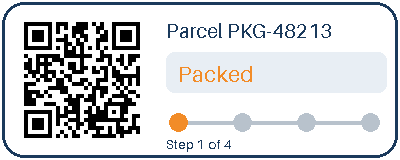
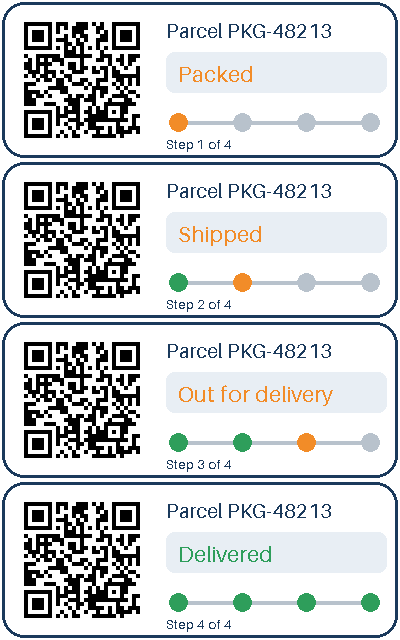
- A four-frame animated parcel-tracking card with a transparent outside and a QR code, drawn by us for this page. (CC0-1.0). How it was made
- Made by
- 2026-11-04, API build
9eeeb0640aba
Parameters
Send these as form fields next to the file. Names are case-insensitive. If you set one of the documented options below that we don't support yet, the request fails with a 400 that names it instead of returning a file made without it.
| Parameter | What it does |
|---|---|
ImageWidthinteger | New width in pixels. 200 turned the card into 200 × 80 with 141 colors, up from 7, because scaling blends neighboring pixels into new shades.Values: 1–20000 |
ImageHeightinteger | New height. ImageHeight=100 produced 250 × 100. With ImageWidth too, the image is fitted inside both.Values: 1–20000 |
ScaleProportionsboolean, default true | false stretches to the exact width and height instead of fitting: a 300 × 300 request gave a 300 × 300 GIF rather than 300 × 120. |
ScaleIfLargerboolean, default false | When true, sizes bigger than the GIF are ignored; ImageWidth=800 then returned the original 400 × 160. |
ScaleImageboolean, default true | false cuts out the top-left area instead: 150 × 100 gave a 1,212-byte GIF with 4 colors. |
TransparentColorstring | Makes an extra color clear. #FFFFFF emptied the white card face, leaving the outline, text and QR code (3,240 bytes).Values: Color name, #RRGGBB or R,G,B |
ColorSpaceenum, default default | gray maps the palette to gray levels (orange became 154, 154, 154). monochrome leaves black, white and transparent only, 2,519 bytes.Values: default, rgb, gray, monochrome |
ImageResolutioninteger | Accepted and validated, but a GIF has no DPI field, so the file is unchanged.Values: 10–800 |
FileNamestring | Name of the new GIF, extension added for you. |
StoreFileboolean, default false | Keep the result for 3 hours and return its URL. |
Not supported yet
Setting one of these to anything but its default returns 400.
| Option | What to do instead |
|---|---|
PersistAnimation | Only the ConvertAPI default, true, is accepted, and even then the output has one frame. false returns 400. |
AnimationDelay | 100 is accepted; any other delay returns 400. |
AnimationIterations | 0 is accepted; any other count returns 400. |
What carries over, and what doesn't
Kept
- Frame 1 exactly when you change nothing: the output matched it on every pixel
- Transparency: clear pixels stay clear, written with a transparent palette index
- A palette sized to the content: the 7-color frame got an 8-entry color table
- A smaller file: 8,956 bytes became 3,388, with three frames and the 256-entry global color table gone
Lost or not yet supported
- The animation, with no warning. The four-step tracker becomes the Packed card only, and there is no loop extension in the output.
- Frame delays: the single frame is written with a delay of 0.
- Clean edges after a resize. Scaling mixes the color stored under clear pixels into the edge, and any pixel that is not fully clear is written as solid. At 200 px wide the sample got a ring of 536 opaque magenta pixels, the key color of its transparent index.
- Color precision on busy images: more than 256 colors are reduced with a neural-net quantizer, without dithering.
Limits
- One GIF in, one single-frame GIF out.
- Requests up to 10 MB on the Free plan or 100 MB on paid plans, all files and fields together.
- Inputs and resize targets above 100,000,000 pixels get a 413.
- Width and height from 1 to 20,000.
- A request that runs for more than 120 seconds is stopped with a 504.
Where teams use it
Shrinking a still GIF
Logos, pixel art and diagrams saved as single-frame GIFs can be resized here without changing format, for systems that require GIF.
Black and white for simple displays
ColorSpace=monochrome reduces a GIF to black, white and transparent, a starting point for e-paper screens and thermal label printers.
Knocking out a background color
A GIF with a solid white or green backdrop can have that exact color made transparent with TransparentColor.
Questions
Can I resize an animated GIF and keep it animated?
Not today. The output always has one frame. ConvertAPI documents PersistAnimation as true by default; our API accepts that value but still writes a single frame, and refuses false, AnimationDelay and AnimationIterations with other values.
Why did my resized GIF get pink or odd-colored edges?
Resizing blends each edge pixel with its clear neighbors, including the color the GIF stores for its transparent index. GIF has no partial transparency, so those blended pixels are written solid. The fringe takes on whatever color the GIF stores under its transparent index, which in the sample is magenta. Converting to PNG or WebP instead keeps those edge pixels mostly transparent.
Does converting GIF to GIF reduce quality?
Not when you leave the image alone: frame 1 came back with identical pixels. Quality changes only when you resize or when the frame has more than 256 colors after your changes.
What does monochrome do with transparency?
It keeps it. The sample came back with exactly three entries in use: black, white and the transparent corners.
Convert your first GIF file in a minute.