HEIC to GIF API
POST a HEIC to /v2/convert/heic/to/gif and get a still GIF89a. The decoded photo is mapped onto one palette of at most 256 colors without dithering: the sample, scaled to 320 px wide, went from 17,563 colors to 246, held in 254 palette entries because some repeat.
- Endpoint
- POST /v2/
convert/ heic/ to/ gif - Accepts
- heic
- Sample timing
- 0.11 s median of 5 runsHow we measure
- Request size
- Up to 10 MB on the Free plan or 100 MB on paid plans, all files together
Request and response
Every sample below ran against the API before this page was published. Set PDFCONVERSIONAPI_KEY to your key and run it as is.
curl -sS -X POST \
  https://api.pdfconversionapi.com/v2/convert/heic/to/gif \
  -H "Authorization: Bearer $PDFCONVERSIONAPI_KEY" \
  -F File=@harbor-dusk.heic \
  --form-string ImageWidth=320 \
  -o response.json

# FileData is base64. Save the first file in converted/,
# or print the JSON error.
if jq -e '.Files' response.json > /dev/null; then
  mkdir -p converted
  name=$(jq -r '.Files[0].FileName' response.json)
  jq -r '.Files[0].FileData' response.json \
    | base64 --decode > "converted/$name"
else
  cat response.json
fi
import base64
import os
import requests
key = os.environ["PDFCONVERSIONAPI_KEY"]
response = requests.post(
"https://api.pdfconversionapi.com/v2/convert/heic/to/gif",
headers={"Authorization": f"Bearer {key}"},
files=[("File", open("harbor-dusk.heic", "rb"))],
data={
"ImageWidth": "320",
},
timeout=180,
)
result = response.json()
if not response.ok:
raise SystemExit(f"{result['Code']}: {result['Message']}")
os.makedirs("converted", exist_ok=True)
for file in result["Files"]:
path = os.path.join("converted", file["FileName"])
with open(path, "wb") as out:
out.write(base64.b64decode(file["FileData"]))
print(path, file["FileSize"], "bytes")
import { mkdir, readFile, writeFile } from "node:fs/promises";
import { join } from "node:path";

const form = new FormData();
const file = "harbor-dusk.heic";
form.append("File", new Blob([await readFile(file)]), file);
form.append("ImageWidth", "320");

const url = "https://api.pdfconversionapi.com/v2/convert/heic/to/gif";
const key = process.env.PDFCONVERSIONAPI_KEY;
const response = await fetch(url, {
  method: "POST",
  headers: { Authorization: `Bearer ${key}` },
  body: form,
});
const result = await response.json();
if (!response.ok) {
  throw new Error(`${result.Code}: ${result.Message}`);
}

await mkdir("converted", { recursive: true });
for (const file of result.Files) {
  const path = join("converted", file.FileName);
  await writeFile(path, Buffer.from(file.FileData, "base64"));
  console.log(path, file.FileSize, "bytes");
}
{
  "ConversionCost": 1,
  "ConversionTime": 0.11,
  "Files": [
    {
      "FileName": "harbor-dusk.gif",
      "FileExt": "gif",
      "FileSize": 41982,
      "FileData": "R0lGODlhQAHwAIAAAAAAAAAA…"
    }
  ]
}
Response from our test run on 2026-11-03. ConversionTime shows the median of 5 runs. FileData is shortened here; the real response carries the whole file as base64.
The sample, converted
The same file the code sends. Download the input and the output and compare them yourself.
- Input
- harbor-dusk.heic (22 KB)
- Output
- harbor-dusk.gif (41 KB)
- Source
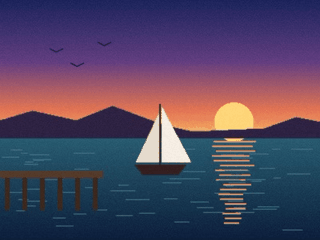
- A harbor at dusk that we drew ourselves, saved as a 400 x 300 HEIC stored sideways with a rotation flag and made-up camera and GPS tags. (CC0-1.0). How it was made
- Made by
- 2026-11-04, API build
9eeeb0640aba

Parameters
Send these as form fields next to the file. Names are case-insensitive. If you set one of the documented options below that we don't support yet, the request fails with a 400 that names it instead of returning a file made without it.
| Parameter | What it does |
|---|---|
ImageWidthinteger | Width of the GIF in pixels. The sample sends 320: the GIF is 320 × 240 and 41,982 bytes, against 62,720 at the photo's own 400 × 300.Values: 1–20000 |
ImageHeightinteger | Height in pixels; with ImageWidth it sets a box the photo fits inside.Values: 1–20000 |
ScaleProportionsboolean, default true | false stretches the photo to both sizes exactly instead of keeping 4:3. |
ScaleIfLargerboolean, default false | true keeps photos that are already smaller than the requested size as they are, rather than enlarging them. |
ScaleImageboolean, default true | false crops the top-left area at the requested size, with no scaling. |
ColorSpaceenum, default default | monochrome thresholds every pixel to black or white, which shrank the full-size GIF to 1,589 bytes. gray made it larger, 80,386 bytes.Values: default, rgb, gray, monochrome |
TransparentColorstring | Pixels of exactly this color become the GIF's transparent index. On a photo few pixels match: at full size 13,32,62, the commonest color of the decoded photo, cleared 718 of 120,000 pixels. At the sample's 320 px width it clears 408 of 76,800.Values: #RRGGBB, R,G,B or white, black, red, green, blue, gray |
FileNamestring | Base name of the result; the HEIC's own name otherwise. |
StoreFileboolean, default false | true gives a 3-hour download link in Files[].Url instead of base64. |
What carries over, and what doesn't
Kept
- The upright view: the sideways-stored sample comes out 320 × 240 at the sample's width
- Solid shapes such as the sail, the pier and the hills, which map onto single palette entries
- A plain still: one frame, no loop block, no transparency unless you name a color
Lost or not yet supported
- Colors. 17,563 distinct colors became 246, in 254 palette entries; one column of sky with 89 shades kept 55, so the dusk gradient shows bands.
- Accuracy in busy areas: 2,506 of the 76,800 pixels moved more than 8 levels in some channel, the worst by 59.
- The camera, time and GPS tags from the HEIC's EXIF.
- Tones of Display P3-tagged HEIC files, which the decoder stretches: a gray of 235 came out at 255.
Limits
- One HEIC per request and one frame per GIF; a two-image HEIC gave a GIF of its first picture.
- Up to 100,000,000 pixels after decoding, requests up to 10 MB on the Free plan or 100 MB on paid plans, and 120 seconds per conversion.
- A GIF side can't exceed 65,535 px: a 65,536 × 16 HEIC returned 413 'GIF images can be at most 65,535 pixels on a side, and this one is 65,536×16', and 65,535 × 16 converted.
ImageWidthstops at 20,000, so only very wide or tall photos hit this. - HEIC files saved at a desktop encoder's top quality setting returned 422 'malformed data' in our tests.
Where teams use it
Places that accept GIF but not HEIC
Upload forms that list GIF, JPEG and PNG but not HEIC turn phone photos away. A converted still gets through, at the cost of its color depth.
Small previews with few colors
Scale the photo down with ImageWidth and the 256-color limit matters less; at 320 px the sample is 41,982 bytes. For photos with smooth skies, compare against heic/to/png first.
Questions
Is the GIF dithered?
No. We checked with a smooth horizontal gradient saved as HEIC: every column of the GIF is one solid color from top to bottom, which a dithered GIF would not be. The trade-off is visible banding in skies and other gradients.
Will grayscale make the GIF smaller?
Not for the sample. ColorSpace=gray gave 80,386 bytes against 62,720 in color at full size. ColorSpace=monochrome is the small option: 1,589 bytes, with every pixel black or white.
Can a HEIC with several pictures become an animated GIF?
No. This route writes one frame. A test HEIC holding two pictures came back as a GIF of the first one only, with no error.
How do I make the background transparent?
Send TransparentColor with the exact color to clear. It matches values exactly, so on a photo with grain it removes scattered pixels rather than a whole area: 718 of 120,000 pixels for the commonest color of the full-size photo, and 408 at the sample's 320 px width.
Convert your first HEIC file in a minute.