HEIC to SVG API
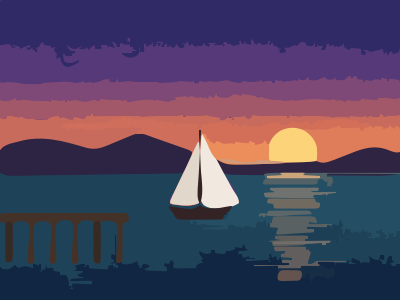
POST a HEIC to /v2/convert/heic/to/svg and get the decoded photo traced into stacked, filled paths. Tracing is heavy: a 4032 × 3024 photo is refused unless scaled down, and the sample uses Preset=photo, which kept the dusk sky as bands in 34 paths.
- Endpoint
- POST /v2/
convert/ heic/ to/ svg - Accepts
- heic
- Sample timing
- 0.19 s median of 5 runsHow we measure
- Request size
- Up to 10 MB on the Free plan or 100 MB on paid plans, all files together
Request and response
Every sample below ran against the API before this page was published. Set PDFCONVERSIONAPI_KEY to your key and run it as is.
curl -sS -X POST \
  https://api.pdfconversionapi.com/v2/convert/heic/to/svg \
  -H "Authorization: Bearer $PDFCONVERSIONAPI_KEY" \
  -F File=@harbor-dusk.heic \
  --form-string Preset=photo \
  -o response.json

# FileData is base64. Save the first file in converted/,
# or print the JSON error.
if jq -e '.Files' response.json > /dev/null; then
  mkdir -p converted
  name=$(jq -r '.Files[0].FileName' response.json)
  jq -r '.Files[0].FileData' response.json \
    | base64 --decode > "converted/$name"
else
  cat response.json
fi
import base64
import os
import requests
key = os.environ["PDFCONVERSIONAPI_KEY"]
response = requests.post(
"https://api.pdfconversionapi.com/v2/convert/heic/to/svg",
headers={"Authorization": f"Bearer {key}"},
files=[("File", open("harbor-dusk.heic", "rb"))],
data={
"Preset": "photo",
},
timeout=180,
)
result = response.json()
if not response.ok:
raise SystemExit(f"{result['Code']}: {result['Message']}")
os.makedirs("converted", exist_ok=True)
for file in result["Files"]:
path = os.path.join("converted", file["FileName"])
with open(path, "wb") as out:
out.write(base64.b64decode(file["FileData"]))
print(path, file["FileSize"], "bytes")
import { mkdir, readFile, writeFile } from "node:fs/promises";
import { join } from "node:path";

const form = new FormData();
const file = "harbor-dusk.heic";
form.append("File", new Blob([await readFile(file)]), file);
form.append("Preset", "photo");

const url = "https://api.pdfconversionapi.com/v2/convert/heic/to/svg";
const key = process.env.PDFCONVERSIONAPI_KEY;
const response = await fetch(url, {
  method: "POST",
  headers: { Authorization: `Bearer ${key}` },
  body: form,
});
const result = await response.json();
if (!response.ok) {
  throw new Error(`${result.Code}: ${result.Message}`);
}

await mkdir("converted", { recursive: true });
for (const file of result.Files) {
  const path = join("converted", file.FileName);
  await writeFile(path, Buffer.from(file.FileData, "base64"));
  console.log(path, file.FileSize, "bytes");
}
{
  "ConversionCost": 1,
  "ConversionTime": 0.19,
  "Files": [
    {
      "FileName": "harbor-dusk.svg",
      "FileExt": "svg",
      "FileSize": 85651,
      "FileData": "PD94bWwgdmVyc2lvbj0iMS4w…"
    }
  ]
}
Response from our test run on 2026-11-03. ConversionTime shows the median of 5 runs. FileData is shortened here; the real response carries the whole file as base64.
The sample, converted
The same file the code sends. Download the input and the output and compare them yourself.
- Input
- harbor-dusk.heic (22 KB)
- Output
- harbor-dusk.svg (84 KB)
- Source
- A harbor at dusk that we drew ourselves, saved as a 400 x 300 HEIC stored sideways with a rotation flag and made-up camera and GPS tags. (CC0-1.0). How it was made
- Made by
- 2026-11-04, API build
9eeeb0640aba

Parameters
Send these as form fields next to the file. Names are case-insensitive. If you set one of the documented options below that we don't support yet, the request fails with a 400 that names it instead of returning a file made without it.
| Parameter | What it does |
|---|---|
Presetenum, default none | Starting settings. photo (the sample) gave 34 paths in 85,651 bytes with the sky in bands; poster 238 paths in 233,718 bytes; bw two black-and-white paths. With none, the sample's whole sky became one flat purple shape.Values: none, bw, poster, photo |
FilterSpeckleinteger, default 4 | Drops patches whose area is under this value squared: the default 4 drops patches of under 16 pixels. 0 kept the photo's grain as 8,387 paths and 680,378 bytes; 16 left 25 paths.Values: 0–128 |
ColorPrecisioninteger, default 6 | Bits per channel used to group colors. 3 reduced the harbor to 10 paths; 8 kept 238.Values: 1–8 |
GradientStepinteger, default 16 | Color difference between stacked layers; larger values mean fewer layers (32 gave 138 paths). 0 is refused on the sample at the default settings with 422 'this image could not be traced with GradientStep=0; use 1 or more'; with Preset=photo it traced.Values: 0–128 |
CornerThresholdinteger, default 60 | A change of direction of at least this many degrees is kept as a corner; gentler turns are smoothed into curves. 120 made the file 125,912 bytes.Values: 0–180 |
CurveModeenum, default spline | polygon writes straight segments (28,808 bytes for the default trace); pixel follows pixel edges.Values: spline, polygon, pixel |
Layeringenum, default stacked | cutout cuts each shape out of the ones below instead of stacking them: 102 paths, 62,103 bytes.Values: stacked, cutout |
ColorModeenum, default color | bw traces a black-and-white version.Values: color, bw |
SegmentLengthnumber, default 4 | Curves are subdivided and smoothed until each segment is at most this many pixels long; 8 gave 77,364 bytes for the default trace instead of 89,870.Values: 3.5–10 |
SpliceThresholdinteger, default 45 | Angle in degrees at which a curve is split into two splines.Values: 0–180 |
ImageWidthinteger | Scales the photo before tracing; the way to bring a large HEIC under the 12-megapixel tracing limit. 1600 made a 4032 × 3024 photo traceable.Values: 1–20000 |
ImageHeightinteger | Height to scale to, or a box together with ImageWidth.Values: 1–20000 |
FileNamestring | Base name of the .svg. |
StoreFileboolean, default false | true returns a 3-hour link instead of the SVG in base64. |
Not supported yet
Setting one of these to anything but its default returns 400.
| Option | What to do instead |
|---|---|
ImageResolution | An SVG carries no DPI. ConvertAPI's default of 200 is accepted; 300 returns 400. |
ColorSpace | Any value except default, ConvertAPI's default, returns 400, rgb included. Use ColorMode=bw for black and white. |
ImageQuality | Only 75, ConvertAPI's default, is accepted. |
What carries over, and what doesn't
Kept
- The canvas size:
width="400" height="300", the photo's upright dimensions - Large shapes with clear edges: hills, sail, hull, pier and the sun
- The sky's color steps with
Preset=photo, in place of one flat shape at the default settings
Lost or not yet supported
- Thin detail: the three gulls, drawn two pixels thick, no longer read as birds; they merge into the edges of the sky bands.
- Some hues: the sun's orange reflection on the water was traced as gray bands.
- Compactness: 85,651 bytes, almost four times the HEIC.
- A
viewBox. The root element has onlywidthandheight, so CSS scaling needs one added. - EXIF, XMP and the photo's GPS position.
Limits
- Tracing stops at 12,000,000 pixels. A 4032 × 3024 (12-megapixel) photo is just over and returns 413 'vectorizing is limited to 12,000,000 pixels, and this image is 4,032×3,024; set ImageWidth or ImageHeight to scale it down'.
- One HEIC per request; requests up to 10 MB on the Free plan or 100 MB on paid plans.
- 120 seconds per conversion.
- HEIC files saved at the top quality setting of a desktop encoder returned 422 'the input file could not be read: the HEIC image is damaged, or encoded in a way that can't be read yet'.
Where teams use it
Poster-style artwork from phone photos
Print shops and merchandise tools turn customer photos into flat-color graphics that scale to any size. Preset=poster or photo gives a starting point you can tune with ColorPrecision and FilterSpeckle.
Silhouettes and cut paths
With ColorMode=bw, a high-contrast HEIC becomes black shapes a plotter or vinyl cutter can follow. The harbor reduced to 2 paths.
Questions
Why was my 12-megapixel photo refused with 413?
Tracing is limited to 12,000,000 pixels, and a 12-megapixel camera's 4032 × 3024 frame is 12,192,768. Add ImageWidth=1600 (or any size under the limit): our 4032 × 3024 test HEIC then traced into 276 paths and 122,946 bytes.
Why did my sky turn into one color?
By default colors are grouped at 6 bits per channel, and on the sample that merged the whole gradient into one shape. At 8 bits the sky stays in bands: ColorPrecision=8, Preset=poster and Preset=photo all use it.
Which settings make the smallest file?
For the sample image at the default settings, not the sample's Preset=photo: ColorMode=bw (7,244 bytes), ColorPrecision=3 (4,246 bytes) or CurveMode=polygon (28,808 bytes). Each removes something: color, shading or smooth curves.
Can I use the SVG at any size on a web page?
Add viewBox="0 0 400 300" (the width and height of your file) to the root element first. The drawing uses the photo's pixel grid as its coordinates, so the viewBox lets it scale to any box.
Convert your first HEIC file in a minute.