NUMBERS to TIFF API
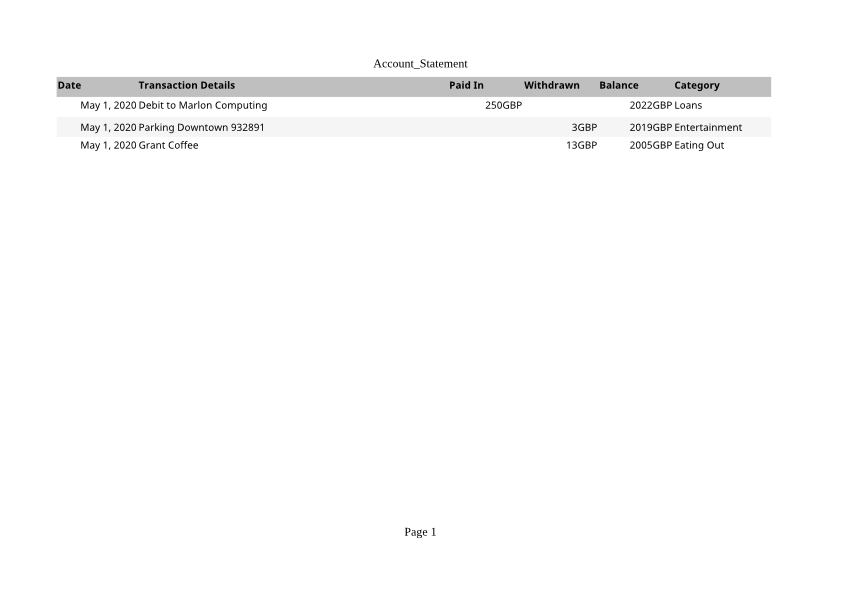
Send a .numbers spreadsheet to /v2/convert/numbers/to/tiff and get one uncompressed TIFF per printed page. The sample asks for landscape, grayscale, 72 DPI: one 841 × 595 page of 500,593 bytes.
- Endpoint
- POST /v2/
convert/ numbers/ to/ tiff - Accepts
- numbers
- Sample timing
- 0.875 s median of 5 runsHow we measure
- Request size
- Up to 10 MB on the Free plan or 100 MB on paid plans, all files together
Request and response
Every sample below ran against the API before this page was published. Set PDFCONVERSIONAPI_KEY to your key and run it as is.
curl -sS -X POST \
  https://api.pdfconversionapi.com/v2/convert/numbers/to/tiff \
  -H "Authorization: Bearer $PDFCONVERSIONAPI_KEY" \
  -F File=@account-statement.numbers \
  --form-string PageOrientation=landscape \
  --form-string ColorSpace=gray \
  --form-string ImageResolution=72 \
  -o response.json

# FileData is base64. Save the first file in converted/,
# or print the JSON error.
if jq -e '.Files' response.json > /dev/null; then
  mkdir -p converted
  name=$(jq -r '.Files[0].FileName' response.json)
  jq -r '.Files[0].FileData' response.json \
    | base64 --decode > "converted/$name"
else
  cat response.json
fi
import base64
import os
import requests
key = os.environ["PDFCONVERSIONAPI_KEY"]
response = requests.post(
"https://api.pdfconversionapi.com/v2/convert/numbers/to/tiff",
headers={"Authorization": f"Bearer {key}"},
files=[("File", open("account-statement.numbers", "rb"))],
data={
"PageOrientation": "landscape",
"ColorSpace": "gray",
"ImageResolution": "72",
},
timeout=180,
)
result = response.json()
if not response.ok:
raise SystemExit(f"{result['Code']}: {result['Message']}")
os.makedirs("converted", exist_ok=True)
for file in result["Files"]:
path = os.path.join("converted", file["FileName"])
with open(path, "wb") as out:
out.write(base64.b64decode(file["FileData"]))
print(path, file["FileSize"], "bytes")
import { mkdir, readFile, writeFile } from "node:fs/promises";
import { join } from "node:path";

const form = new FormData();
const file = "account-statement.numbers";
form.append("File", new Blob([await readFile(file)]), file);
form.append("PageOrientation", "landscape");
form.append("ColorSpace", "gray");
form.append("ImageResolution", "72");

const url = "https://api.pdfconversionapi.com/v2/convert/numbers/to/tiff";
const key = process.env.PDFCONVERSIONAPI_KEY;
const response = await fetch(url, {
  method: "POST",
  headers: { Authorization: `Bearer ${key}` },
  body: form,
});
const result = await response.json();
if (!response.ok) {
  throw new Error(`${result.Code}: ${result.Message}`);
}

await mkdir("converted", { recursive: true });
for (const file of result.Files) {
  const path = join("converted", file.FileName);
  await writeFile(path, Buffer.from(file.FileData, "base64"));
  console.log(path, file.FileSize, "bytes");
}
{
  "ConversionCost": 1,
  "ConversionTime": 0.875,
  "Files": [
    {
      "FileName": "account-statement-1.tiff",
      "FileExt": "tiff",
      "FileSize": 500593,
      "FileData": "SUkqAMOiBwBIAAAAAQAAAEgA…"
    }
  ]
}
Response from our test run on 2026-11-03. ConversionTime shows the median of 5 runs. FileData is shortened here; the real response carries the whole file as base64.
The sample, converted
The same file the code sends. Download the input and the output and compare them yourself.
- Input
- account-statement.numbers (102 KB)
- Output
- account-statement-1.tiff (489 KB)
- Source
- A three-row account statement table saved by Numbers 12, taken from the MIT-licensed test files of an open-source Numbers reader; not made by us (MIT). How it was made
- Made by
- 2026-11-04, API build
9eeeb0640aba
Parameters
Send these as form fields next to the file. Names are case-insensitive. If you set one of the documented options below that we don't support yet, the request fails with a 400 that names it instead of returning a file made without it.
| Parameter | What it does |
|---|---|
ColorSpaceenum, default default | gray stores one 8-bit channel, a third of the bytes of a color page; monochrome uses only black and white; rgb gives the same three-channel color file as the default.Values: rgb, gray, monochrome |
ImageResolutioninteger, default 150 | Pixels per inch, written into the TIFF when sent: the sample's file says 72 pixels per inch.Values: 36–600 |
PageOrientationenum, default default | The sample's landscape keeps all six columns on one page.Values: default, portrait, landscape |
FitToPageboolean, default false | One page wide on portrait paper. |
PageSizeenum, default default | Paper size, A4 by default.Values: letter, legal, tabloid, ledger, statement, executive, lettersmall, a3, a4, a4small, a5, b4, b5 |
Scaleinteger | Print zoom in percent.Values: 10–300 |
PageRangestring | Only these pages.Values: e.g. 1 |
ImageWidthinteger | Width of each TIFF in pixels.Values: 1–20000 |
ImageHeightinteger | Height of each TIFF in pixels.Values: 1–20000 |
TransparentColorstring | Exact color made transparent. The TIFF is then RGBA, holding gray values if you also send ColorSpace=gray.Values: a color name, #RRGGBB or R,G,B |
BackgroundColorstring, default white | Color behind the page.Values: a color name, #RRGGBB or R,G,B |
MultiPageboolean, default false | true returns one LZW-compressed TIFF with a frame per page, account-statement.tiff, when there are two or more pages. Without other options that is 77,080 bytes for the two A4 color pages. |
FileNamestring | Stem for the TIFF names. |
StoreFileboolean, default false | Links valid for 3 hours. |
Not supported yet
Setting one of these to anything but its default returns 400.
Refused when set: AutoFitColumns, ThousandsSeparator, DecimalSeparator, DateFormat.
What carries over, and what doesn't
Kept
- The whole statement on one landscape A4 page
- Header shading and row bands as levels of gray
- Formatted dates and amounts, as printed
- 72 pixels per inch stored in the TIFF
Lost or not yet supported
- Color, as requested with
ColorSpace=gray. - Compression: 500,593 bytes for an 841 × 595 page, since TIFF pages are stored raw.
- Fine detail at 72 DPI; small text is legible but soft. Raise
ImageResolutionfor print. - Pence on the amounts, printed rounded (13.25 as 13GBP).
Limits
- One Numbers file per request.
- Requests up to 10 MB on the Free plan or 100 MB on paid plans, all files and fields together.
- Up to 2,000 page images per request.
- A page image can't exceed 16,000 pixels per side or 100,000,000 pixels (413).
- 120 seconds per conversion, then 504.
Where teams use it
Statements into a records system
Systems that store scanned documents as TIFF can take Numbers statements the same way, filed as one image per page.
A gray copy for black-and-white printing
Gray output turns the table's shading into gray levels in one channel, ready for printers and archives that work without color.
Page images at a set DPI
When a workflow expects pages at a fixed resolution, send ImageResolution and the TIFF records it.
Questions
How large will the TIFF be?
Width × height bytes in gray, three times that in color, because the pages are uncompressed. The sample's gray landscape page at 72 DPI is 500,593 bytes; one color A4 page at the default 150 DPI is about 6.5 MB.
Can I get all pages in one TIFF?
Yes, send MultiPage=true. Sent with no other options, the sample's two A4 color pages come back as one LZW-compressed file of 77,080 bytes, against 6,521,426 bytes for each separate page. Fitting the table on one page with PageOrientation=landscape or FitToPage=true, as the sample does, also gives a single file.
Can I get pure black and white?
Send ColorSpace=monochrome: every pixel becomes black or white at the halfway mark. On the sample the text stays, but the light gray header band and row shading turn white, so the table loses its stripes.
Convert your first NUMBERS file in a minute.