NUMBERS to WebP API
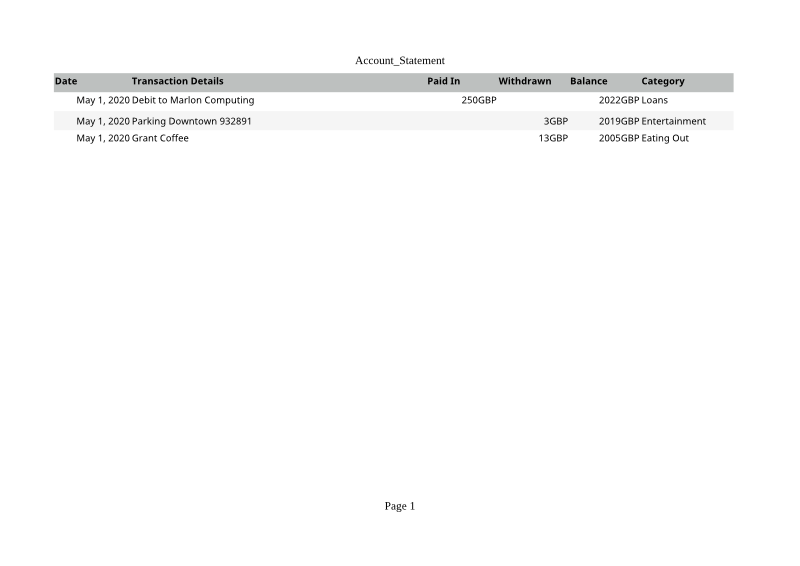
POST a .numbers file to /v2/convert/numbers/to/webp and get each printed page as a lossless WebP. The sample asks for landscape at 800 pixels wide and returns one 800 × 566 image of 11,546 bytes.
- Endpoint
- POST /v2/
convert/ numbers/ to/ webp - Accepts
- numbers
- Sample timing
- 0.768 s median of 5 runsHow we measure
- Request size
- Up to 10 MB on the Free plan or 100 MB on paid plans, all files together
Request and response
Every sample below ran against the API before this page was published. Set PDFCONVERSIONAPI_KEY to your key and run it as is.
curl -sS -X POST \
  https://api.pdfconversionapi.com/v2/convert/numbers/to/webp \
  -H "Authorization: Bearer $PDFCONVERSIONAPI_KEY" \
  -F File=@account-statement.numbers \
  --form-string PageOrientation=landscape \
  --form-string ImageWidth=800 \
  -o response.json

# FileData is base64. Save the first file in converted/,
# or print the JSON error.
if jq -e '.Files' response.json > /dev/null; then
  mkdir -p converted
  name=$(jq -r '.Files[0].FileName' response.json)
  jq -r '.Files[0].FileData' response.json \
    | base64 --decode > "converted/$name"
else
  cat response.json
fi
import base64
import os
import requests
key = os.environ["PDFCONVERSIONAPI_KEY"]
response = requests.post(
"https://api.pdfconversionapi.com/v2/convert/numbers/to/webp",
headers={"Authorization": f"Bearer {key}"},
files=[("File", open("account-statement.numbers", "rb"))],
data={
"PageOrientation": "landscape",
"ImageWidth": "800",
},
timeout=180,
)
result = response.json()
if not response.ok:
raise SystemExit(f"{result['Code']}: {result['Message']}")
os.makedirs("converted", exist_ok=True)
for file in result["Files"]:
path = os.path.join("converted", file["FileName"])
with open(path, "wb") as out:
out.write(base64.b64decode(file["FileData"]))
print(path, file["FileSize"], "bytes")
import { mkdir, readFile, writeFile } from "node:fs/promises";
import { join } from "node:path";

const form = new FormData();
const file = "account-statement.numbers";
form.append("File", new Blob([await readFile(file)]), file);
form.append("PageOrientation", "landscape");
form.append("ImageWidth", "800");

const url = "https://api.pdfconversionapi.com/v2/convert/numbers/to/webp";
const key = process.env.PDFCONVERSIONAPI_KEY;
const response = await fetch(url, {
  method: "POST",
  headers: { Authorization: `Bearer ${key}` },
  body: form,
});
const result = await response.json();
if (!response.ok) {
  throw new Error(`${result.Code}: ${result.Message}`);
}

await mkdir("converted", { recursive: true });
for (const file of result.Files) {
  const path = join("converted", file.FileName);
  await writeFile(path, Buffer.from(file.FileData, "base64"));
  console.log(path, file.FileSize, "bytes");
}
{
  "ConversionCost": 1,
  "ConversionTime": 0.768,
  "Files": [
    {
      "FileName": "account-statement-1.webp",
      "FileExt": "webp",
      "FileSize": 11546,
      "FileData": "UklGRhItAABXRUJQVlA4TAUt…"
    }
  ]
}
Response from our test run on 2026-11-03. ConversionTime shows the median of 5 runs. FileData is shortened here; the real response carries the whole file as base64.
The sample, converted
The same file the code sends. Download the input and the output and compare them yourself.
- Input
- account-statement.numbers (102 KB)
- Output
- account-statement-1.webp (11 KB)
- Source
- A three-row account statement table saved by Numbers 12, taken from the MIT-licensed test files of an open-source Numbers reader; not made by us (MIT). How it was made
- Made by
- 2026-11-04, API build
9eeeb0640aba
Parameters
Send these as form fields next to the file. Names are case-insensitive. If you set one of the documented options below that we don't support yet, the request fails with a 400 that names it instead of returning a file made without it.
| Parameter | What it does |
|---|---|
ImageWidthinteger | Width of each image; the page is drawn at this width (800 in the sample), the height following the paper.Values: 1–20000 |
ImageHeightinteger | Height of each image instead of, or with, the width.Values: 1–20000 |
ImageResolutioninteger, default 150 | Pixels per inch when no size is given.Values: 36–600 |
PageOrientationenum, default default | landscape keeps the sample's six columns on one image.Values: default, portrait, landscape |
FitToPageboolean, default false | Fits the table to one page across. |
PageSizeenum, default default | Paper size; A4 if omitted.Values: letter, legal, tabloid, ledger, statement, executive, lettersmall, a3, a4, a4small, a5, b4, b5 |
Scaleinteger | Print zoom.Values: 10–300 |
PageRangestring | Only these pages.Values: e.g. 1 |
TransparentColorstring | Exact color made transparent, such as white.Values: a color name, #RRGGBB or R,G,B |
BackgroundColorstring, default white | Paper color.Values: a color name, #RRGGBB or R,G,B |
FileNamestring | Stem for the image names. |
StoreFileboolean, default false | Links valid for 3 hours. |
Not supported yet
Setting one of these to anything but its default returns 400.
Refused when set: AutoFitColumns, ThousandsSeparator, DecimalSeparator, DateFormat.
What carries over, and what doesn't
Kept
- Every pixel of the drawn page, since WebP output is lossless
- The full table on one landscape image, header row shaded
- Dates and currency as printed: May 1, 2020 and 250GBP
Lost or not yet supported
- DPI, which WebP can't hold.
- Lossy compression:
ImageQualitymakes no difference (the sample is the same 11,546 bytes at quality 5). - Decimal places in the currency cells.
- The table's original fonts.
Limits
- One Numbers file per request.
- Requests up to 10 MB on the Free plan or 100 MB on paid plans, all files and fields together.
- Up to 2,000 page images per request.
- A page image can't exceed 16,000 pixels per side or 100,000,000 pixels (413).
- 120 seconds per conversion, then 504.
Where teams use it
Inline previews on a website
Show the contents of a .numbers attachment right on the page, as a small lossless image that browsers display directly.
Upload confirmations
After a user uploads a Numbers file, show an 800-pixel picture of it so they can confirm it's the right one.
Light images for many files
A short table like the sample is about 11.5 KB at 800 pixels, small enough to show dozens on a page.
Questions
What width should I pick?
The width you will display, or double it for high-density screens. The page is drawn at that width, so text stays sharp; the sample's landscape page at 800 pixels is 566 pixels tall.
Why is there so much white space?
The image shows the whole printed page, and the sample's table is only four rows. There is no crop option; trim the white margins in your own code if you want only the table.
Is the output lossy like a JPEG?
No, it is lossless WebP, and ImageQuality has no effect on this route. To make files smaller, lower ImageWidth.
Convert your first NUMBERS file in a minute.