ODP to TIFF API
POST /v2/convert/odp/to/tiff writes each visible slide of an OpenDocument presentation as its own TIFF. Asked for PageRange=2 and ImageWidth=480, our composting workshop returned the greens-and-browns table as one 480 × 270 TIFF of 389,010 bytes.
- Endpoint
- POST /v2/
convert/ odp/ to/ tiff - Accepts
- odp
- Sample timing
- 0.762 s median of 5 runsHow we measure
- Request size
- Up to 10 MB on the Free plan or 100 MB on paid plans, all files together
Request and response
Every sample below ran against the API before this page was published. Set PDFCONVERSIONAPI_KEY to your key and run it as is.
curl -sS -X POST \
  https://api.pdfconversionapi.com/v2/convert/odp/to/tiff \
  -H "Authorization: Bearer $PDFCONVERSIONAPI_KEY" \
  -F File=@compost-workshop.odp \
  --form-string PageRange=2 \
  --form-string ImageWidth=480 \
  -o response.json

# FileData is base64. Save the first file in converted/,
# or print the JSON error.
if jq -e '.Files' response.json > /dev/null; then
  mkdir -p converted
  name=$(jq -r '.Files[0].FileName' response.json)
  jq -r '.Files[0].FileData' response.json \
    | base64 --decode > "converted/$name"
else
  cat response.json
fi
import base64
import os
import requests
key = os.environ["PDFCONVERSIONAPI_KEY"]
response = requests.post(
"https://api.pdfconversionapi.com/v2/convert/odp/to/tiff",
headers={"Authorization": f"Bearer {key}"},
files=[("File", open("compost-workshop.odp", "rb"))],
data={
"PageRange": "2",
"ImageWidth": "480",
},
timeout=180,
)
result = response.json()
if not response.ok:
raise SystemExit(f"{result['Code']}: {result['Message']}")
os.makedirs("converted", exist_ok=True)
for file in result["Files"]:
path = os.path.join("converted", file["FileName"])
with open(path, "wb") as out:
out.write(base64.b64decode(file["FileData"]))
print(path, file["FileSize"], "bytes")
import { mkdir, readFile, writeFile } from "node:fs/promises";
import { join } from "node:path";

const form = new FormData();
const file = "compost-workshop.odp";
form.append("File", new Blob([await readFile(file)]), file);
form.append("PageRange", "2");
form.append("ImageWidth", "480");

const url = "https://api.pdfconversionapi.com/v2/convert/odp/to/tiff";
const key = process.env.PDFCONVERSIONAPI_KEY;
const response = await fetch(url, {
  method: "POST",
  headers: { Authorization: `Bearer ${key}` },
  body: form,
});
const result = await response.json();
if (!response.ok) {
  throw new Error(`${result.Code}: ${result.Message}`);
}

await mkdir("converted", { recursive: true });
for (const file of result.Files) {
  const path = join("converted", file.FileName);
  await writeFile(path, Buffer.from(file.FileData, "base64"));
  console.log(path, file.FileSize, "bytes");
}
{
  "ConversionCost": 1,
  "ConversionTime": 0.762,
  "Files": [
    {
      "FileName": "compost-workshop-2.tiff",
      "FileExt": "tiff",
      "FileSize": 389010,
      "FileData": "SUkqAOTuBQABAAAAAQAAAAEA…"
    }
  ]
}
Response from our test run on 2026-11-03. ConversionTime shows the median of 5 runs. FileData is shortened here; the real response carries the whole file as base64.
The sample, converted
The same file the code sends. Download the input and the output and compare them yourself.
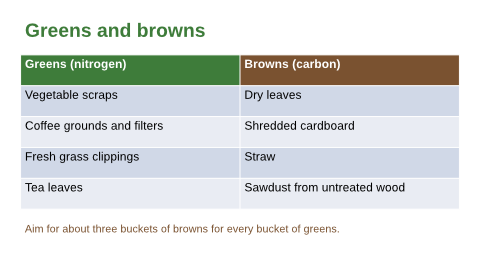
- Input
- compost-workshop.odp (40 KB)
- Output
- compost-workshop-2.tiff (380 KB)
- Source
- Five OpenDocument slides for a composting workshop at a fictional community garden, with a table, a diagram drawn from shapes and one hidden slide. We made them for this page. (CC0-1.0). How it was made
- Made by
- 2026-11-04, API build
9eeeb0640aba
Parameters
Send these as form fields next to the file. Names are case-insensitive. If you set one of the documented options below that we don't support yet, the request fails with a 400 that names it instead of returning a file made without it.
| Parameter | What it does |
|---|---|
PageRangestring | Slides to convert, after hidden ones are removed; each becomes a file named after its page, like compost-workshop-2.tiff.Values: e.g. 2, 1-4 |
MultiPageboolean, default false | true puts the slides in one LZW-compressed TIFF, a page each: 419,807 bytes for the four slides at 150 DPI, against 18,448,480 as separate files. |
ImageWidthinteger | Exact width, height in proportion: 480 gives 480 × 270.Values: 1–20,000 |
ImageHeightinteger | Exact height, width in proportion.Values: 1–20,000 |
ImageResolutioninteger, default 150 | Pixels per inch when no size is set, and the TIFF's resolution tag when sent. At 150 each slide is 1,653 × 930, 4,612,120 bytes; at 96 it is 1,058 × 595, 1,888,756 bytes.Values: 36–600 |
ConvertHiddenSlidesboolean, default false | Adds the hidden facilitator checklist as a fifth file. |
ColorSpaceenum, default default | gray writes one-channel pages, a third of the size of color ones.Values: default, rgb, gray, monochrome |
Passwordstring | For a password-protected .odp. |
FileNamestring | Stem of the file names, before -2.tiff. |
Not supported yet
Setting one of these to anything but its default returns 400.
| Option | What to do instead |
|---|---|
ConvertSpeakerNotes | Notes are not drawn; values other than Disabled return 400 "ConvertSpeakerNotes is not supported yet for ODP files". |
PageSize | Pages keep the slide's 16:9 shape; PageSize returns 400 "PageSize is not supported yet for ODP files". |
What carries over, and what doesn't
Kept
- Every pixel as drawn, with no compression at all
- Three 8-bit channels per pixel (red, green, blue) and no alpha
- The table's header colors and the diagram's shadows
- Slide numbers in the file names
Lost or not yet supported
- Compression on single files: each is raw, 3 bytes per pixel, so four slides at 150 DPI come to 18,448,480 bytes. Only
MultiPage=trueis LZW-compressed. - One file for the whole talk, unless you ask: by default each slide is its own TIFF.
- A resolution tag, unless you send
ImageResolution: the sample says 1 × 1 with no unit. - Speaker notes, and the hidden slide by default.
Limits
- At most 2,000 slides per request.
- 16,000 pixels per side and 100 million per image.
- Each output file up to 512 MB; 10 MB on the Free plan or 100 MB on paid plans per request; 120 seconds per conversion.
Where teams use it
Single slides for systems that only take TIFF
Some print and document workflows accept TIFF images only. Pull one slide, such as the table, at the exact width the layout needs.
Pixel comparisons between versions
Uncompressed pages are easy to compare byte for byte or with an image diff, so you can see which slides changed between two versions of a talk.
Questions
How do I get one multi-page TIFF?
Send MultiPage=true. The visible slides come back as one LZW-compressed TIFF with a page per slide: 75,398 bytes for the four workshop slides at 36 DPI. With ColorSpace=gray as well, each page has a single channel and the file is 37,673 bytes.
Why are the files so large?
Single files are written without compression. Size is width × height × 3 bytes plus a small header: 480 × 270 gives 389,010 bytes. Send MultiPage=true for a compressed file, or use a smaller ImageWidth, ColorSpace=gray, or PNG.
Why isn't MultiPage on by default here?
ConvertAPI doesn't list MultiPage for ODP to TIFF, so our route keeps one file per slide unless you send MultiPage=true. On the PowerPoint show and template routes, where it is listed, one combined file is the default.
Convert your first ODP file in a minute.