PDF to SVG API
Send a PDF to POST /v2/convert/pdf/to/svg and get one SVG per page, sized in points like the page. Lines, fills and letters are drawn as vector paths, so a chart from a report stays sharp at any size in a browser.
- Endpoint
- POST /v2/
convert/ pdf/ to/ svg - Accepts
- Sample timing
- 9 ms median of 5 runsHow we measure
- Request size
- Up to 10 MB on the Free plan or 100 MB on paid plans, all files together
Request and response
Every sample below ran against the API before this page was published. Set PDFCONVERSIONAPI_KEY to your key and run it as is.
curl -sS -X POST \
  https://api.pdfconversionapi.com/v2/convert/pdf/to/svg \
  -H "Authorization: Bearer $PDFCONVERSIONAPI_KEY" \
  -F File=@greenhouse-inspection.pdf \
  --form-string PageRange=2 \
  -o response.json

# FileData is base64. Save the first file in converted/,
# or print the JSON error.
if jq -e '.Files' response.json > /dev/null; then
  mkdir -p converted
  name=$(jq -r '.Files[0].FileName' response.json)
  jq -r '.Files[0].FileData' response.json \
    | base64 --decode > "converted/$name"
else
  cat response.json
fi
import base64
import os
import requests
key = os.environ["PDFCONVERSIONAPI_KEY"]
response = requests.post(
"https://api.pdfconversionapi.com/v2/convert/pdf/to/svg",
headers={"Authorization": f"Bearer {key}"},
files=[("File", open("greenhouse-inspection.pdf", "rb"))],
data={
"PageRange": "2",
},
timeout=180,
)
result = response.json()
if not response.ok:
raise SystemExit(f"{result['Code']}: {result['Message']}")
os.makedirs("converted", exist_ok=True)
for file in result["Files"]:
path = os.path.join("converted", file["FileName"])
with open(path, "wb") as out:
out.write(base64.b64decode(file["FileData"]))
print(path, file["FileSize"], "bytes")
import { mkdir, readFile, writeFile } from "node:fs/promises";
import { join } from "node:path";

const form = new FormData();
const file = "greenhouse-inspection.pdf";
form.append("File", new Blob([await readFile(file)]), file);
form.append("PageRange", "2");

const url = "https://api.pdfconversionapi.com/v2/convert/pdf/to/svg";
const key = process.env.PDFCONVERSIONAPI_KEY;
const response = await fetch(url, {
  method: "POST",
  headers: { Authorization: `Bearer ${key}` },
  body: form,
});
const result = await response.json();
if (!response.ok) {
  throw new Error(`${result.Code}: ${result.Message}`);
}

await mkdir("converted", { recursive: true });
for (const file of result.Files) {
  const path = join("converted", file.FileName);
  await writeFile(path, Buffer.from(file.FileData, "base64"));
  console.log(path, file.FileSize, "bytes");
}
{
  "ConversionCost": 1,
  "ConversionTime": 0.009,
  "Files": [
    {
      "FileName": "greenhouse-inspection-2.svg",
      "FileExt": "svg",
      "FileSize": 168379,
      "FileData": "PHN2ZyB2aWV3Qm94PSIwIDAg…"
    }
  ]
}
Response from our test run on 2026-11-03. ConversionTime shows the median of 5 runs. FileData is shortened here; the real response carries the whole file as base64.
The sample, converted
The same file the code sends. Download the input and the output and compare them yourself.
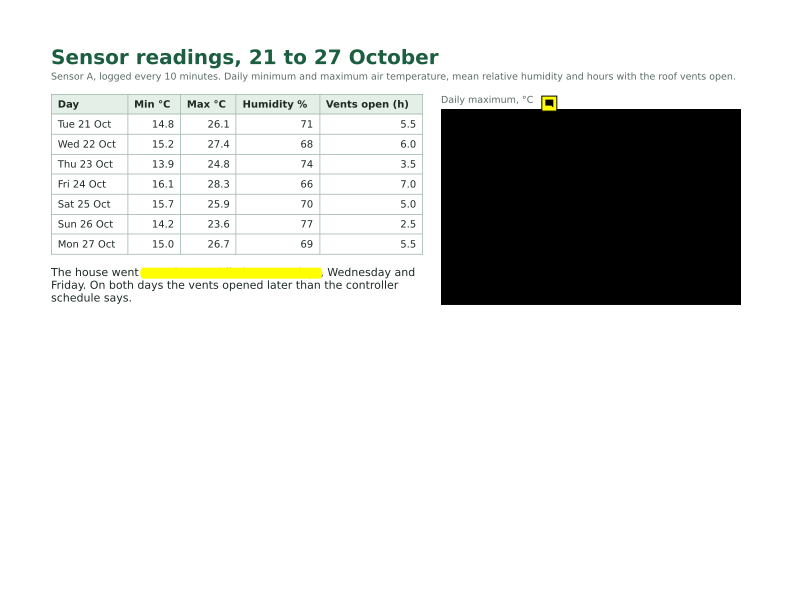
- Input
- greenhouse-inspection.pdf (115 KB)
- Output
- greenhouse-inspection-2.svg (164 KB)
- Source
- A three-page greenhouse inspection report for a fictional nursery, with form fields, comments and attached files, made by us for this site. (CC0-1.0). How it was made
- Made by
- 2026-11-04, API build
9eeeb0640aba
Parameters
Send these as form fields next to the file. Names are case-insensitive. If you set one of the documented options below that we don't support yet, the request fails with a 400 that names it instead of returning a file made without it.
| Parameter | What it does |
|---|---|
PageRangestring | Convert only these pages. Each file keeps its page number in the name, so PageRange=2 returns greenhouse-inspection-2.svg. A page past the end returns 400 with the page count.Values: Pages and ranges such as 2, 1-3,5 or 4-last |
Passwordstring | Opens a PDF that needs a password to open; the open password is enough. Files that only restrict printing, copying or editing, and signed files, convert without one. |
FileNamestring | Stem of the SVG names: FileName=house3 gives house3-1.svg, house3-2.svg and so on. Left out, the upload's name is used. |
StoreFileboolean, default false | Return one download link per SVG (Url and FileId) instead of the data, valid for 3 hours. |
Not supported yet
Setting one of these to anything but its default returns 400.
| Option | What to do instead |
|---|---|
ImageResolution | An SVG has no pixel resolution: the sample page is 792 x 612 units, one per PDF point. The documented default, 200, is accepted. |
ImageWidth | Scale the drawing where you show it, for example with CSS width; the viewBox keeps the proportions. |
Rotate | Turn the pages first with /v2/convert/pdf/to/rotate, then convert. |
Also refused when set: ImageHeight, ImageAntialiasing, TransparentColor.
What carries over, and what doesn't
Kept
- Vector artwork as paths: the 7 bars, the axis, the dashed limit line and the table rules of the sample page
- Exact colors from the PDF, including the yellow (#ffff00) of the highlight comment
- The page size, as a viewBox of 792 x 612 for the wide sample page and 612 x 792 for portrait pages
- The look of the letters: 79 glyph outlines from the embedded fonts, defined once and reused 525 times on the sample page
- What form fields and comments show: J. Marlow, the dates and the checkmark on page 1, the highlight and the note icon on page 2
- Pictures at their full stored size: the photo as a 640 x 400 image and the logo with its transparency
Lost or not yet supported
- Text as text. Letters are shapes, so the SVG cannot be searched, selected or read aloud, and words cannot be edited.
- JPEG compression. Pictures are embedded as PNG: the 27,153-byte photo becomes a 204,018-byte PNG, which is why page 1 is a 402,496-byte SVG.
- Links, form fields and comments as working objects; they are drawn, not interactive.
- Document-level parts: bookmarks, attachments and document properties have no place in an SVG.
Limits
- One SVG per page, up to 2,000 pages per request; more returns 413 "conversion is limited to 2,000 pages per request".
- A PDF that needs a password returns 422 "the input file is password-protected" until
Passwordis sent. - Photo-heavy pages make large files, since each picture is stored losslessly: page 1 of the sample is a 402,496-byte SVG and a 213,763-byte JPEG from
/v2/convert/pdf/to/jpgat its default 150 DPI. - One PDF per request, up to 10 MB on the Free plan or 100 MB on paid plans; up to 120 seconds per request.
Where teams use it
Show a chart from a report on a web page
Convert the page that holds a chart and place the SVG with an img tag. The sample's bar chart keeps its exact colors (#3f8f62 bars, a #d62828 limit line) and stays sharp on high-density screens and when zoomed.
Bring drawings into vector tools
Floor plans, diagrams and charts made in other programs often survive only as PDF. As SVG, their lines and shapes can be opened, restyled or reused in a vector editor or in code.
Zoomable page previews
An SVG preview of a document page scales to any size in a browser without turning blurry, so one file serves both a thumbnail and a full-screen view in a document viewer.
Questions
Can I select or search the text in the SVG?
No. Every letter is drawn as a shape copied from the embedded font, which keeps the exact look but drops the text. Get the words separately with /v2/convert/pdf/to/txt, or use /v2/convert/pdf/to/html for text with structure.
Why is one page's SVG so much bigger than the others?
Pictures are stored as PNG inside the SVG. On page 1 of the sample, a 27 KB JPEG photo became a 204 KB PNG, so that page is 402,496 bytes against 168,379 for the chart page and 81,787 for the text-only page.
How do I set the output size?
You don't need to: an SVG scales to whatever size you display it at. ImageWidth and ImageHeight return 400 here. For a fixed pixel size, use /v2/convert/pdf/to/png with ImageResolution.
Does it work on PDFs with copy or print restrictions?
Yes. Restrictions on printing, copying and editing don't block this route: our owner-restricted copy converted without a password, and so did a signed copy. Only files that need a password to open require Password.
Convert your first PDF file in a minute.