PNM to SVG API
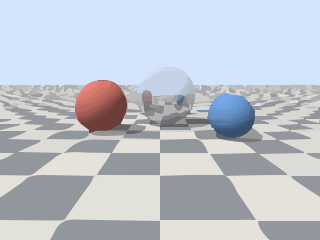
POST a netpbm image to /v2/convert/pnm/to/svg and get an SVG of filled paths. The sample render, traced with ColorPrecision=8 and GradientStep=6, came back as 243 paths in 190 colors and 112,616 bytes.
- Endpoint
- POST /v2/
convert/ pnm/ to/ svg - Accepts
- pnm
- Sample timing
- 29 ms median of 5 runsHow we measure
- Request size
- Up to 10 MB on the Free plan or 100 MB on paid plans, all files together
Request and response
Every sample below ran against the API before this page was published. Set PDFCONVERSIONAPI_KEY to your key and run it as is.
curl -sS -X POST \
  https://api.pdfconversionapi.com/v2/convert/pnm/to/svg \
  -H "Authorization: Bearer $PDFCONVERSIONAPI_KEY" \
  -F File=@three-spheres-render.ppm \
  --form-string ColorPrecision=8 \
  --form-string GradientStep=6 \
  -o response.json

# FileData is base64. Save the first file in converted/,
# or print the JSON error.
if jq -e '.Files' response.json > /dev/null; then
  mkdir -p converted
  name=$(jq -r '.Files[0].FileName' response.json)
  jq -r '.Files[0].FileData' response.json \
    | base64 --decode > "converted/$name"
else
  cat response.json
fi
import base64
import os
import requests
key = os.environ["PDFCONVERSIONAPI_KEY"]
response = requests.post(
"https://api.pdfconversionapi.com/v2/convert/pnm/to/svg",
headers={"Authorization": f"Bearer {key}"},
files=[("File", open("three-spheres-render.ppm", "rb"))],
data={
"ColorPrecision": "8",
"GradientStep": "6",
},
timeout=180,
)
result = response.json()
if not response.ok:
raise SystemExit(f"{result['Code']}: {result['Message']}")
os.makedirs("converted", exist_ok=True)
for file in result["Files"]:
path = os.path.join("converted", file["FileName"])
with open(path, "wb") as out:
out.write(base64.b64decode(file["FileData"]))
print(path, file["FileSize"], "bytes")
import { mkdir, readFile, writeFile } from "node:fs/promises";
import { join } from "node:path";

const form = new FormData();
const file = "three-spheres-render.ppm";
form.append("File", new Blob([await readFile(file)]), file);
form.append("ColorPrecision", "8");
form.append("GradientStep", "6");

const url = "https://api.pdfconversionapi.com/v2/convert/pnm/to/svg";
const key = process.env.PDFCONVERSIONAPI_KEY;
const response = await fetch(url, {
  method: "POST",
  headers: { Authorization: `Bearer ${key}` },
  body: form,
});
const result = await response.json();
if (!response.ok) {
  throw new Error(`${result.Code}: ${result.Message}`);
}

await mkdir("converted", { recursive: true });
for (const file of result.Files) {
  const path = join("converted", file.FileName);
  await writeFile(path, Buffer.from(file.FileData, "base64"));
  console.log(path, file.FileSize, "bytes");
}
{
  "ConversionCost": 1,
  "ConversionTime": 0.029,
  "Files": [
    {
      "FileName": "three-spheres-render.svg",
      "FileExt": "svg",
      "FileSize": 112616,
      "FileData": "PD94bWwgdmVyc2lvbj0iMS4w…"
    }
  ]
}
Response from our test run on 2026-11-03. ConversionTime shows the median of 5 runs. FileData is shortened here; the real response carries the whole file as base64.
The sample, converted
The same file the code sends. Download the input and the output and compare them yourself.
- Input
- three-spheres-render.ppm (225 KB)
- Output
- three-spheres-render.svg (110 KB)
- Source
- A 320 x 240 frame from a small ray tracer we wrote for this page (three spheres on a checkered floor), saved as a binary PPM (P6) with 8 bits per channel. (CC0-1.0). How it was made
- Made by
- 2026-11-04, API build
9eeeb0640aba
Parameters
Send these as form fields next to the file. Names are case-insensitive. If you set one of the documented options below that we don't support yet, the request fails with a 400 that names it instead of returning a file made without it.
| Parameter | What it does |
|---|---|
Presetenum, default none | Base settings for the trace. On the render: bw 5 paths (2,757 bytes), poster 188 paths, photo 55 paths (75,318 bytes). Other options you send override it.Values: none, bw, poster, photo |
ColorModeenum, default color | bw traces in black and white, the natural choice for PBM bitmaps.Values: color, bw |
Layeringenum, default stacked | cutout makes shapes that don't overlap; for the render that meant 98 paths and 53,548 bytes instead of 175 and 91,789.Values: stacked, cutout |
FilterSpeckleinteger, default 4 | Drops patches smaller than this many pixels across. 0 keeps the aliasing in the distant checkerboard: 3,034 paths, 310,154 bytes. 20 leaves 34 paths.Values: 0–128 |
ColorPrecisioninteger, default 6 | How many bits per channel decide whether two colors are the same. The sample uses 8; 1 collapses the render into a single path of 286 bytes.Values: 1–8 |
GradientStepinteger, default 16 | Color step between gradient layers. The sample sends 6 to keep more of the shading on the spheres and in the sky; 0 gave 198 paths.Values: 0–128 |
CurveModeenum, default spline | Curves (91,789 bytes), straight segments (26,932 bytes) or pixel-edge steps (73,730 bytes) for the render with other options left out.Values: spline, polygon, pixel |
CornerThresholdinteger, default 60 | Bends sharper than this angle stay corners; 55 gave 89,950 bytes on the render.Values: 0–180 |
SegmentLengthnumber, default 4 | Segment length used when fitting curves; values outside the range return 400.Values: 3.5–10 |
SpliceThresholdinteger, default 45 | Angle at which a curve is split; 35 produced 93,985 bytes.Values: 0–180 |
ImageWidthinteger | Rescales the image before tracing, which sets the detail level: 128 px wide gives 80 paths. The limit is 12,000,000 pixels; 4000 × 3000 sits exactly at it and returned 3,357 paths in 1.4 MB.Values: 1–20000 |
ImageHeightinteger | Height before tracing, or with a width the box the image is fitted into.Values: 1–20000 |
ScaleImageboolean, default true | false with a size traces only that top-left part of the image. |
FileNamestring | Base name of the .svg; the upload's name otherwise. |
StoreFileboolean, default false | Link to the SVG, kept 3 hours, instead of base64. |
What carries over, and what doesn't
Kept
- Large shapes and their edges: floor tiles, spheres and horizon are separate paths
- Flat colors closely: on the sample, the traced image differs from the PPM by 4.4 levels on average
- The canvas size, 320 × 240, as the SVG's width and height
Lost or not yet supported
- Smooth shading, which becomes bands of flat color.
- The mirror sphere's outline: with the default settings its upper half, which reflects the sky, merges into the sky, and the spheres reflected in it become soft blobs.
- 16-bit depth, reduced to 8 bits before tracing.
Limits
- One file per request.
- Tracing is limited to 12,000,000 pixels after resizing; above that the API returns 413.
- Requests up to 10 MB on the Free plan or 100 MB on paid plans, all files and fields together.
- 120 seconds per conversion, then 504.
Where teams use it
Tracing bitmaps of line art
Black-and-white bitmaps such as a scanned signature, stamp or logo can be traced straight from PBM. A 320 × 240 test bitmap traced to 5 paths in 2,746 bytes.
Stylized vector versions of renders
Color frames become flat-color poster art. Lower ColorPrecision or raise FilterSpeckle for fewer, bolder shapes; do the opposite for more shading.
Questions
Which settings work for a black-and-white PBM?
The defaults already handle it, since a bitmap has two colors. Our test bitmap, the render thresholded so that the spheres' dark sides and their shadows are black on white, traced to a white base with 4 black shapes on it: 5 paths in 2,746 bytes. ColorMode=bw draws only the black areas, here 5 black paths (2,769 bytes), and leaves the rest of the canvas empty.
Why do gradients turn into bands?
The tracer groups pixels into regions of similar color and fills each region with one color. GradientStep sets how far apart those layers are, so lower values give more, narrower bands.
How large an image can be traced?
Up to 12,000,000 pixels after any resize; larger requests return 413. A 4,000 × 3,001 bitmap sent without size options got "vectorizing is limited to 12,000,000 pixels, and this image is 4,000×3,001; set ImageWidth or ImageHeight to scale it down". When ImageWidth or ImageHeight made the image too large, the message ends in "; lower ImageWidth or ImageHeight" instead.
Convert your first PNM file in a minute.