PPTX to PNG API
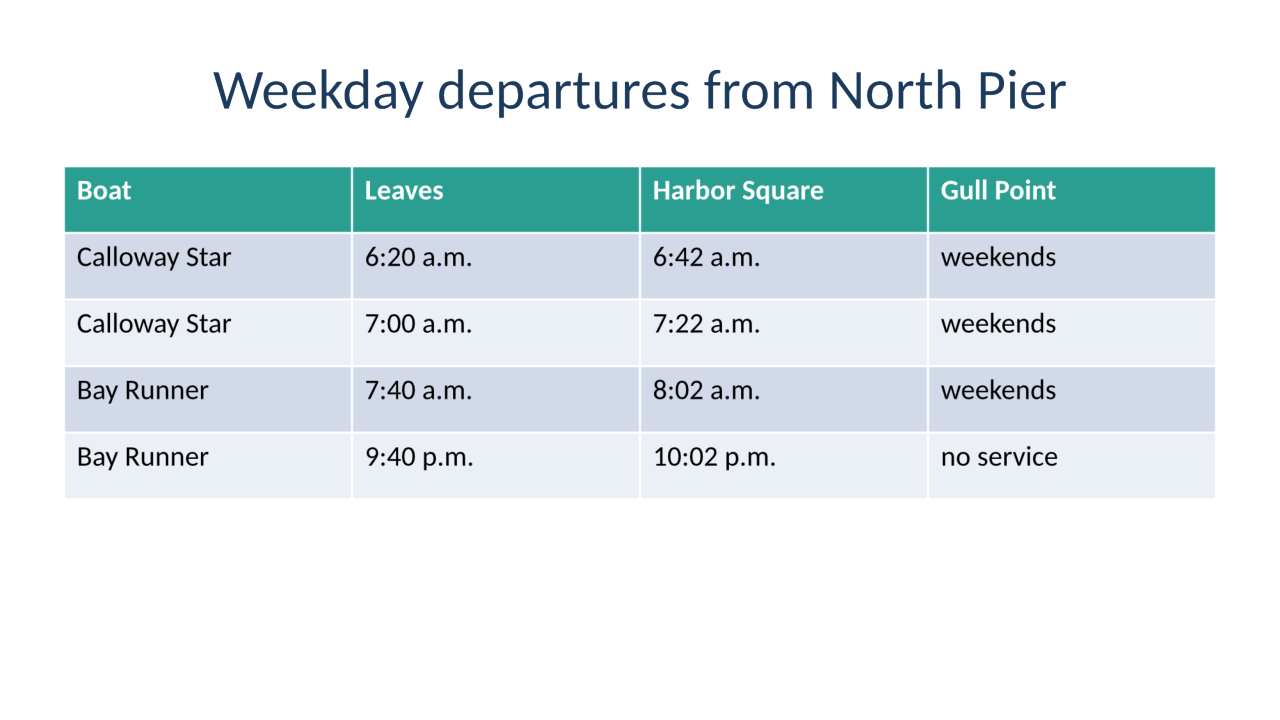
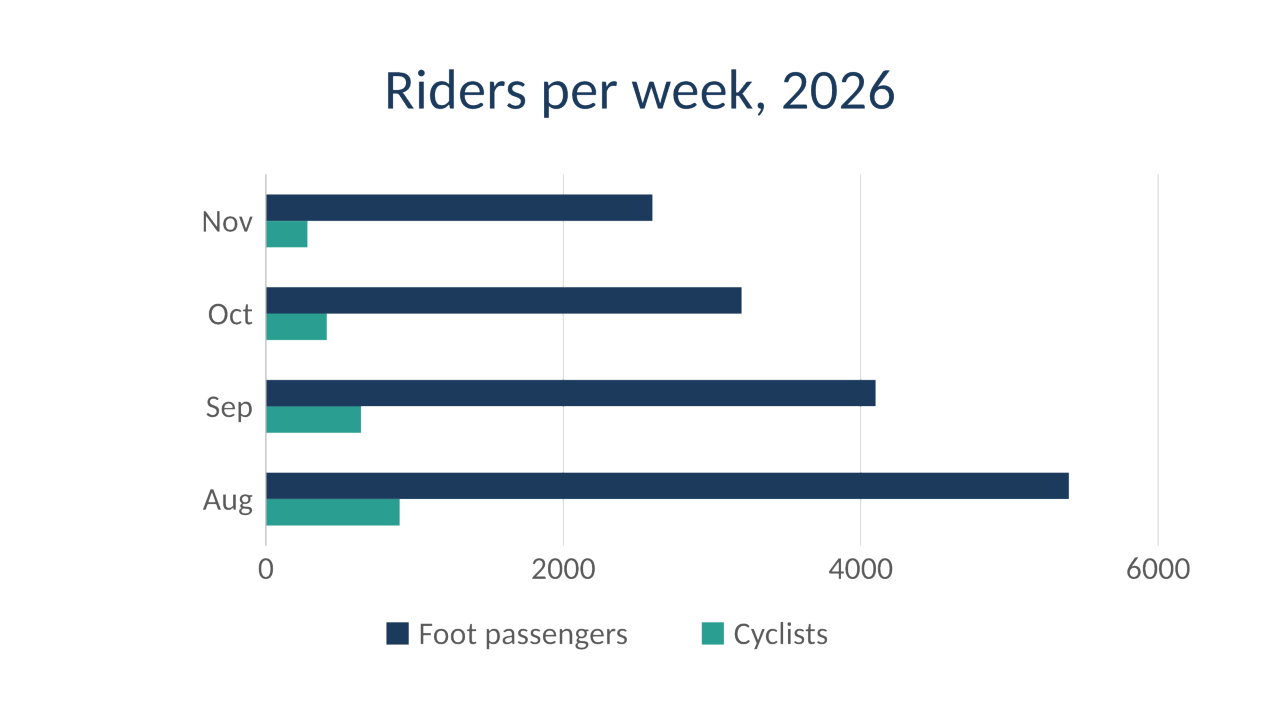
POST /v2/convert/pptx/to/png draws the visible slides of a deck and returns each as a lossless PNG. Our sample sends PageRange=2-4 and ImageWidth=1280, so slides 2, 3 and 4 come back at 1,280 × 720 as calloway-ferry-winter-2.png to -4.png.
- Endpoint
- POST /v2/
convert/ pptx/ to/ png - Accepts
- pptx
- Sample timing
- 0.282 s median of 5 runsHow we measure
- Request size
- Up to 10 MB on the Free plan or 100 MB on paid plans, all files together
Request and response
Every sample below ran against the API before this page was published. Set PDFCONVERSIONAPI_KEY to your key and run it as is.
curl -sS -X POST \
  https://api.pdfconversionapi.com/v2/convert/pptx/to/png \
  -H "Authorization: Bearer $PDFCONVERSIONAPI_KEY" \
  -F File=@calloway-ferry-winter.pptx \
  --form-string PageRange=2-4 \
  --form-string ImageWidth=1280 \
  -o response.json

# FileData is base64. Save the first file in converted/,
# or print the JSON error.
if jq -e '.Files' response.json > /dev/null; then
  mkdir -p converted
  name=$(jq -r '.Files[0].FileName' response.json)
  jq -r '.Files[0].FileData' response.json \
    | base64 --decode > "converted/$name"
else
  cat response.json
fi
import base64
import os
import requests
key = os.environ["PDFCONVERSIONAPI_KEY"]
response = requests.post(
"https://api.pdfconversionapi.com/v2/convert/pptx/to/png",
headers={"Authorization": f"Bearer {key}"},
files=[("File", open("calloway-ferry-winter.pptx", "rb"))],
data={
"PageRange": "2-4",
"ImageWidth": "1280",
},
timeout=180,
)
result = response.json()
if not response.ok:
raise SystemExit(f"{result['Code']}: {result['Message']}")
os.makedirs("converted", exist_ok=True)
for file in result["Files"]:
path = os.path.join("converted", file["FileName"])
with open(path, "wb") as out:
out.write(base64.b64decode(file["FileData"]))
print(path, file["FileSize"], "bytes")
import { mkdir, readFile, writeFile } from "node:fs/promises";
import { join } from "node:path";

const form = new FormData();
const file = "calloway-ferry-winter.pptx";
form.append("File", new Blob([await readFile(file)]), file);
form.append("PageRange", "2-4");
form.append("ImageWidth", "1280");

const url = "https://api.pdfconversionapi.com/v2/convert/pptx/to/png";
const key = process.env.PDFCONVERSIONAPI_KEY;
const response = await fetch(url, {
  method: "POST",
  headers: { Authorization: `Bearer ${key}` },
  body: form,
});
const result = await response.json();
if (!response.ok) {
  throw new Error(`${result.Code}: ${result.Message}`);
}

await mkdir("converted", { recursive: true });
for (const file of result.Files) {
  const path = join("converted", file.FileName);
  await writeFile(path, Buffer.from(file.FileData, "base64"));
  console.log(path, file.FileSize, "bytes");
}
{
  "ConversionCost": 1,
  "ConversionTime": 0.282,
  "Files": [
    {
      "FileName": "calloway-ferry-winter-2.png",
      "FileExt": "png",
      "FileSize": 141382,
      "FileData": "iVBORw0KGgoAAAANSUhEUgAA…"
    },
    {
      "FileName": "calloway-ferry-winter-3.png",
      "FileExt": "png",
      "FileSize": 117589,
      "FileData": "iVBORw0KGgoAAAANSUhEUgAA…"
    },
    {
      "FileName": "calloway-ferry-winter-4.png",
      "FileExt": "png",
      "FileSize": 59910,
      "FileData": "iVBORw0KGgoAAAANSUhEUgAA…"
    }
  ]
}
Response from our test run on 2026-11-03. ConversionTime shows the median of 5 runs. FileData is shortened here; the real response carries the whole file as base64.
The sample, converted
The same file the code sends. Download the input and the output and compare them yourself.

- Input
- calloway-ferry-winter.pptx (46 KB)
- Output
- calloway-ferry-winter-2.png (138 KB)calloway-ferry-winter-3.png (115 KB)calloway-ferry-winter-4.png (59 KB)
- Source
- A six-slide winter timetable deck for a fictional ferry operator, made by us for this site; slide 5 is hidden and slide 2 has speaker notes. (CC0-1.0). How it was made
- Made by
- 2026-11-04, API build
9eeeb0640aba
Parameters
Send these as form fields next to the file. Names are case-insensitive. If you set one of the documented options below that we don't support yet, the request fails with a 400 that names it instead of returning a file made without it.
| Parameter | What it does |
|---|---|
PageRangestring | Which visible slides to draw. File names keep each slide's position, so 2-4 returns -2, -3 and -4. A start past the last visible slide returns 400.Values: e.g. 2-4, 1,3, 2-last |
ImageWidthinteger | Exact width in pixels; the height follows the slide's exact 16:9 shape. The sample's 1,280 gives 1,280 × 720, and adding ImageResolution=96 changes only the DPI stored in the file.Values: 1–20000 |
ImageHeightinteger | Exact height in pixels. ImageHeight=360 gave 640 × 360. With ImageWidth=800 as well, the slide fits in the 800 × 800 box at 800 × 450.Values: 1–20000 |
ScaleProportionsboolean, default true | false stretches each slide to the full ImageWidth × ImageHeight: 800 × 800 in our test, with the text stretched upward. |
ScaleIfLargerboolean, default false | true only ever shrinks. ImageWidth=3000 then leaves the slides at the 1,500 × 843 they have at 150 DPI. |
ScaleImageboolean, default true | false cuts the requested size out of the top-left corner of the slide drawn at ImageResolution, with no scaling. |
ImageResolutioninteger, default 150 | Pixels per inch when no width or height is sent: 1,500 × 843 per slide at 150, 960 × 540 at 96. A value you send is stored in the PNG's pHYs chunk; at the default the PNG carries no DPI.Values: 36–600 |
TransparentColorstring | Pixels of exactly this color become transparent. At 150 DPI, white cleared 94.8% of slide 2; #1B3A5C cleared the navy background of slide 1.Values: A color name, #RRGGBB or R,G,B |
ColorSpaceenum, default default | gray writes an 8-bit grayscale PNG (slide 2 at 150 DPI: 66,690 bytes instead of 174,928); monochrome keeps only black and white pixels (20,977 bytes); rgb returns the same RGB file as the default.Values: default, rgb, gray, monochrome |
ConvertHiddenSlidesboolean, default false | Include slides marked hidden in PowerPoint, in their place in the deck. |
Passwordstring | Needed for an encrypted deck. The sample locked with Tide-Table-2026 gave the same 93,308-byte first slide with that password. |
What carries over, and what doesn't
Kept
- Each pixel as drawn: PNG is lossless, so table borders and small text have no compression noise
- The deck's slide size: images keep the 16:9 shape of the 10 × 5.625 in slides (1,500 × 843 at 150 DPI, exactly 1,280 × 720 at the sample's width), unless
ScaleProportions=falseorScaleImage=falsesets another - Slide position in the file name, also when
PageRangepicks a few - Table fills, the rounded callout with its soft shadow, the drawn map and the bar chart
Lost or not yet supported
- File size. At 150 DPI the five slides total 592,911 bytes as PNG, against 448,288 as JPEG and 302,946 as WebP.
- Real transparency in the slide itself. The PNGs are RGB with no alpha channel.
TransparentColoradds one, but it leaves anti-aliased text edges in their light color. - Speaker notes and any slide marked hidden, unless
ConvertHiddenSlides=true. - Detail above 200 pixels per inch. The whole slide, text too, is first drawn as a 200 pixels-per-inch picture, so above
ImageResolution=200it is only enlarged: at 400 DPI, every pixel of each slide was the 200 DPI image doubled.
Limits
- Requests up to 10 MB on the Free plan or 100 MB on paid plans; 120 seconds per conversion, then 504.
- No more than 2,000 slides drawn per request.
- 16,000 pixels per side and 100 million pixels per slide image.
Where teams use it
Slides as figures in documentation
Export the chart or table slide at the exact width of your docs column with PageRange and ImageWidth. PNG keeps the 16-point table text and thin chart lines without blur.
Overlaying a slide on video or another design
Send TransparentColor with the slide's background color to cut it out. It works on flat backgrounds; gradients and photos keep their pixels.
Checking that a generated deck looks right
If your code writes .pptx files, render them to PNG in your test suite and compare the images with stored ones. Lossless pixels mean a changed pixel is a real change.
Questions
Can I get a slide with a transparent background?
For flat backgrounds, yes: send the background color as TransparentColor. On slide 2 of the sample drawn at 150 DPI, TransparentColor=white made 94.8% of the pixels transparent. Text edges are blended with white when the slide is drawn, so they keep a light fringe on dark backdrops.
Why are the PNG files so much larger than JPEG?
PNG stores every pixel exactly. For the sample at 150 DPI that is 592,911 bytes for five slides; JPEG at quality 85 was 448,288 bytes and lossless WebP 302,946. If you want lossless and smaller, use /v2/convert/pptx/to/webp.
How do I get one slide only?
Send PageRange with its number, such as PageRange=3. Numbers count visible slides only; with the sample's hidden fifth slide skipped, PageRange=5 is the last slide of the deck.
Does the PNG record a DPI?
Only when you send ImageResolution. With ImageResolution=96 the PNG says 96 DPI in its pHYs chunk; left out, the file stores no physical size at all, and each program falls back on its own default.
Convert your first PPTX file in a minute.