PPTX to WebP API
POST /v2/convert/pptx/to/webp returns one lossless WebP per visible slide. With ImageHeight=540 the sample's five slides arrive at 960 × 540 and 172,292 bytes together, where the same slides as PNG take 323,260 bytes.
- Endpoint
- POST /v2/
convert/ pptx/ to/ webp - Accepts
- pptx
- Sample timing
- 0.324 s median of 5 runsHow we measure
- Request size
- Up to 10 MB on the Free plan or 100 MB on paid plans, all files together
Request and response
Every sample below ran against the API before this page was published. Set PDFCONVERSIONAPI_KEY to your key and run it as is.
curl -sS -X POST \
  https://api.pdfconversionapi.com/v2/convert/pptx/to/webp \
  -H "Authorization: Bearer $PDFCONVERSIONAPI_KEY" \
  -F File=@calloway-ferry-winter.pptx \
  --form-string ImageHeight=540 \
  -o response.json

# FileData is base64. Save the first file in converted/,
# or print the JSON error.
if jq -e '.Files' response.json > /dev/null; then
  mkdir -p converted
  name=$(jq -r '.Files[0].FileName' response.json)
  jq -r '.Files[0].FileData' response.json \
    | base64 --decode > "converted/$name"
else
  cat response.json
fi
import base64
import os
import requests
key = os.environ["PDFCONVERSIONAPI_KEY"]
response = requests.post(
"https://api.pdfconversionapi.com/v2/convert/pptx/to/webp",
headers={"Authorization": f"Bearer {key}"},
files=[("File", open("calloway-ferry-winter.pptx", "rb"))],
data={
"ImageHeight": "540",
},
timeout=180,
)
result = response.json()
if not response.ok:
raise SystemExit(f"{result['Code']}: {result['Message']}")
os.makedirs("converted", exist_ok=True)
for file in result["Files"]:
path = os.path.join("converted", file["FileName"])
with open(path, "wb") as out:
out.write(base64.b64decode(file["FileData"]))
print(path, file["FileSize"], "bytes")
import { mkdir, readFile, writeFile } from "node:fs/promises";
import { join } from "node:path";

const form = new FormData();
const file = "calloway-ferry-winter.pptx";
form.append("File", new Blob([await readFile(file)]), file);
form.append("ImageHeight", "540");

const url = "https://api.pdfconversionapi.com/v2/convert/pptx/to/webp";
const key = process.env.PDFCONVERSIONAPI_KEY;
const response = await fetch(url, {
  method: "POST",
  headers: { Authorization: `Bearer ${key}` },
  body: form,
});
const result = await response.json();
if (!response.ok) {
  throw new Error(`${result.Code}: ${result.Message}`);
}

await mkdir("converted", { recursive: true });
for (const file of result.Files) {
  const path = join("converted", file.FileName);
  await writeFile(path, Buffer.from(file.FileData, "base64"));
  console.log(path, file.FileSize, "bytes");
}
{
  "ConversionCost": 1,
  "ConversionTime": 0.324,
  "Files": [
    {
      "FileName": "calloway-ferry-winter-1.webp",
      "FileExt": "webp",
      "FileSize": 33818,
      "FileData": "UklGRhKEAABXRUJQVlA4TAaE…"
    },
    {
      "FileName": "calloway-ferry-winter-2.webp",
      "FileExt": "webp",
      "FileSize": 30894,
      "FileData": "UklGRqZ4AABXRUJQVlA4TJl4…"
    },
    {
      "FileName": "calloway-ferry-winter-3.webp",
      "FileExt": "webp",
      "FileSize": 50944,
      "FileData": "UklGRvjGAABXRUJQVlA4TOvG…"
    },
    … 2 more files
  ]
}
Response from our test run on 2026-11-03. ConversionTime shows the median of 5 runs. FileData is shortened here; the real response carries the whole file as base64.
The sample, converted
The same file the code sends. Download the input and the output and compare them yourself.

- Input
- calloway-ferry-winter.pptx (46 KB)
- Output
- calloway-ferry-winter-1.webp (33 KB)calloway-ferry-winter-2.webp (30 KB)calloway-ferry-winter-3.webp (50 KB)calloway-ferry-winter-4.webp (19 KB)calloway-ferry-winter-5.webp (37 KB)
- Source
- A six-slide winter timetable deck for a fictional ferry operator, made by us for this site; slide 5 is hidden and slide 2 has speaker notes. (CC0-1.0). How it was made
- Made by
- 2026-11-04, API build
9eeeb0640aba

Parameters
Send these as form fields next to the file. Names are case-insensitive. If you set one of the documented options below that we don't support yet, the request fails with a 400 that names it instead of returning a file made without it.
| Parameter | What it does |
|---|---|
ImageHeightinteger | Height of every slide image in pixels, the width following the slide's exact 16:9 shape. The sample's 540 gives 960 × 540, whatever ImageResolution is.Values: 1–20000 |
ImageWidthinteger | Width in pixels instead, or together with ImageHeight as a box the slide must fit in.Values: 1–20000 |
ImageResolutioninteger, default 150 | Pixels per inch when neither size is sent; 150 makes the 10-inch slides 1,500 × 843. WebP has no field for a DPI, so the number is used for drawing only. When a width or height is given, it has no effect: the sample with ImageResolution set to 96, 100 or 300 gave the same files.Values: 36–600 |
PageRangestring | Visible slides to draw. Numbers skip hidden slides, so the sample has slides 1 to 5 here.Values: e.g. 1, 2-3, 4-last |
ConvertHiddenSlidesboolean, default false | true also draws the slides that PowerPoint hides during a show. |
TransparentColorstring | Turns every pixel of one exact color transparent; WebP keeps the alpha. white on slide 2 gave a 35,418-byte file with a clear background. |
ColorSpaceenum, default default | gray removes color while keeping the WebP format: the navy title slide fell from 33,818 to 15,194 bytes.Values: default, rgb, gray, monochrome |
Passwordstring | Password of an encrypted .pptx; without it such a deck returns 422. |
Not supported yet
Setting one of these to anything but its default returns 400.
| Option | What to do instead |
|---|---|
ImageQuality | Slides are always written as lossless WebP. Any value but 75, ConvertAPI's default, returns 400 "ImageQuality is not supported yet for PPTX → WebP". |
What carries over, and what doesn't
Kept
- Every pixel of the drawn slide: the files are lossless (VP8L), so decoding gives back exactly what was rendered
- All five visible slides, in order, named by position
- Transparency on request: the files are RGB, and
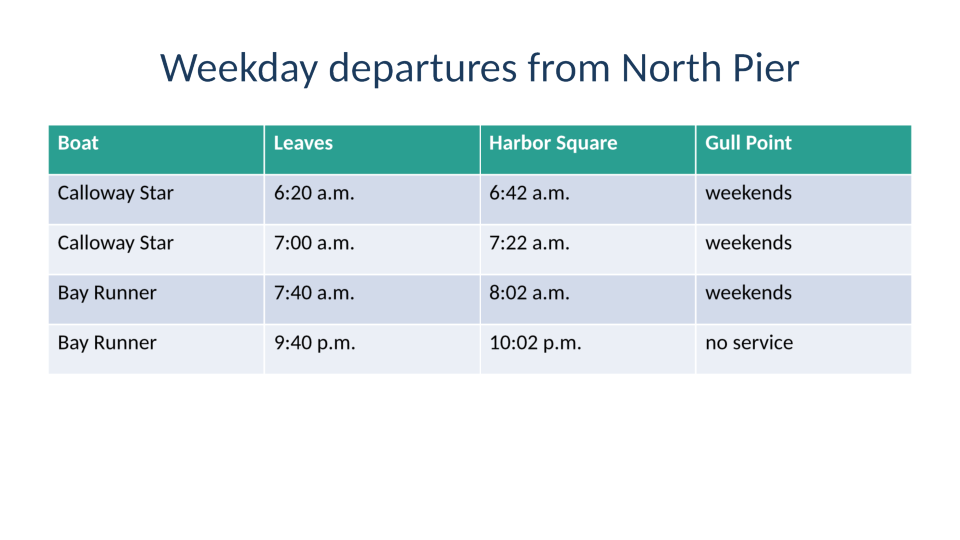
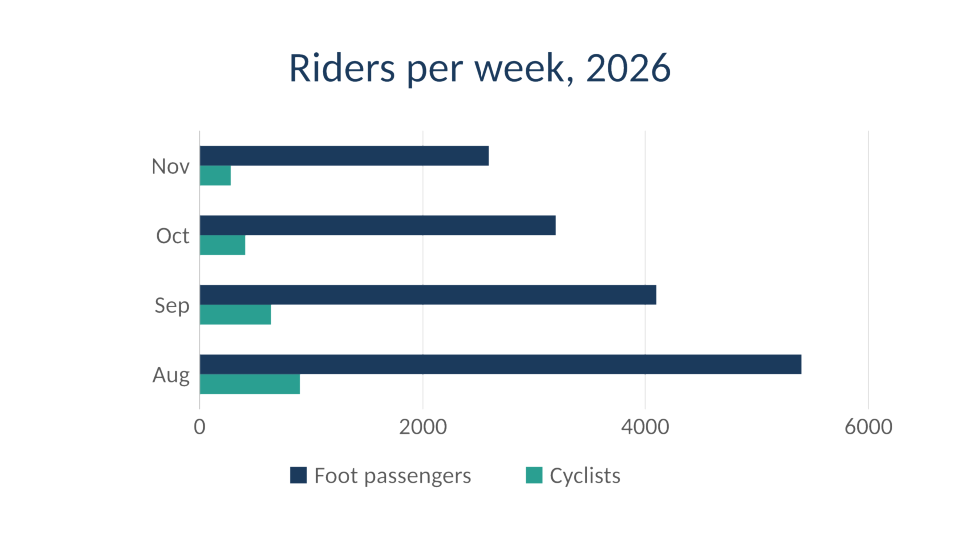
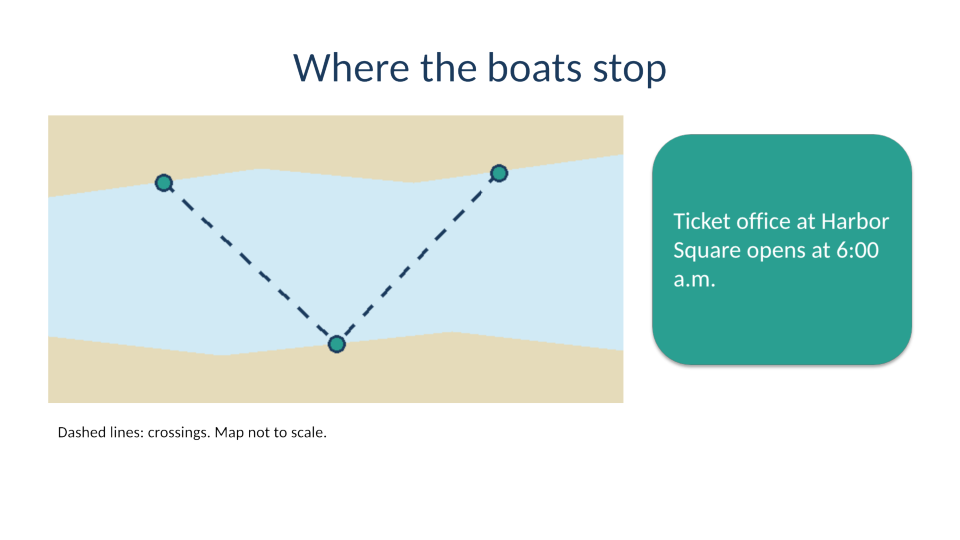
TransparentColoradds an alpha channel - The table text, chart bars and map lines without the fringes lossy formats add
Lost or not yet supported
- Lossy WebP. There is no quality setting, so you can't trade detail for a smaller file here;
/v2/convert/pptx/to/jpghasImageQuality. - A physical size. WebP files carry no DPI, whatever
ImageResolutionyou send. - Speaker notes, and hidden slides unless you ask for them.
- Detail above 200 pixels per inch. Every slide, its text as well, is drawn as a picture at that density first, so a larger size only enlarges it.
Limits
- Requests up to 10 MB on the Free plan or 100 MB on paid plans. Each conversion has 120 seconds before the API answers 504.
- At most 2,000 slides are drawn per request.
- A slide image can be at most 16,000 pixels on a side and 100 million pixels in total.
Where teams use it
Slide previews on a web page
Serve the 540-pixel-high images in a carousel and link the full deck below. Lossless WebP keeps the slide text crisp at about half the bytes of PNG, which matters on pages with dozens of slides.
A lighter archive of rendered slides
If you keep an image of every slide for search or audit screens, WebP stores the same pixels as PNG in less space: 302,946 against 592,911 bytes for the sample at 150 DPI.
Questions
Is the WebP lossy or lossless?
Lossless. Every file starts with a VP8L chunk, WebP's lossless format. That is why ImageQuality is refused for now: there is no lossy encoder behind this route yet.
How much smaller is WebP than PNG for slides?
For the sample at 960 × 540, the five WebP files take 172,292 bytes and the same slides as PNG 323,260, so 53% of the size. JPEG at its default quality was 235,048 bytes, larger than WebP here, and lossy.
Why do the slides differ so much in size?
Lossless files grow with detail. The sample's table slide, full of text and cell borders, is 50,944 bytes at 960 × 540, while the chart slide with its few flat bars is 19,126 bytes.
What does `ImageResolution` do when I send a size?
Nothing. With ImageWidth or ImageHeight the slide is drawn straight at that size from its exact 16:9 shape: with ImageHeight=540, resolutions of 96, 100, 150 and 300 all gave the same 960 × 540 files, 172,292 bytes for five. The resolution is never written into the WebP either.
Convert your first PPTX file in a minute.