Extract PDF pages API
Send a PDF and a PageRange such as 2 or 1-3,7 to POST /v2/convert/pdf/to/extract. You get one PDF holding just those pages, copied as they were, and nothing the other pages used.
- Endpoint
- POST /v2/
convert/ pdf/ to/ extract - Accepts
- Sample timing
- 1 ms median of 5 runsHow we measure
- Request size
- Up to 10 MB on the Free plan or 100 MB on paid plans, all files together
Request and response
Every sample below ran against the API before this page was published. Set PDFCONVERSIONAPI_KEY to your key and run it as is.
curl -sS -X POST \
  https://api.pdfconversionapi.com/v2/convert/pdf/to/extract \
  -H "Authorization: Bearer $PDFCONVERSIONAPI_KEY" \
  -F File=@greenhouse-inspection.pdf \
  --form-string PageRange=2 \
  -o response.json

# FileData is base64. Save the first file in converted/,
# or print the JSON error.
if jq -e '.Files' response.json > /dev/null; then
  mkdir -p converted
  name=$(jq -r '.Files[0].FileName' response.json)
  jq -r '.Files[0].FileData' response.json \
    | base64 --decode > "converted/$name"
else
  cat response.json
fi
import base64
import os
import requests
key = os.environ["PDFCONVERSIONAPI_KEY"]
response = requests.post(
"https://api.pdfconversionapi.com/v2/convert/pdf/to/extract",
headers={"Authorization": f"Bearer {key}"},
files=[("File", open("greenhouse-inspection.pdf", "rb"))],
data={
"PageRange": "2",
},
timeout=180,
)
result = response.json()
if not response.ok:
raise SystemExit(f"{result['Code']}: {result['Message']}")
os.makedirs("converted", exist_ok=True)
for file in result["Files"]:
path = os.path.join("converted", file["FileName"])
with open(path, "wb") as out:
out.write(base64.b64decode(file["FileData"]))
print(path, file["FileSize"], "bytes")
import { mkdir, readFile, writeFile } from "node:fs/promises";
import { join } from "node:path";

const form = new FormData();
const file = "greenhouse-inspection.pdf";
form.append("File", new Blob([await readFile(file)]), file);
form.append("PageRange", "2");

const url = "https://api.pdfconversionapi.com/v2/convert/pdf/to/extract";
const key = process.env.PDFCONVERSIONAPI_KEY;
const response = await fetch(url, {
  method: "POST",
  headers: { Authorization: `Bearer ${key}` },
  body: form,
});
const result = await response.json();
if (!response.ok) {
  throw new Error(`${result.Code}: ${result.Message}`);
}

await mkdir("converted", { recursive: true });
for (const file of result.Files) {
  const path = join("converted", file.FileName);
  await writeFile(path, Buffer.from(file.FileData, "base64"));
  console.log(path, file.FileSize, "bytes");
}
{
  "ConversionCost": 1,
  "ConversionTime": 0.001,
  "Files": [
    {
      "FileName": "greenhouse-inspection.pdf",
      "FileExt": "pdf",
      "FileSize": 42334,
      "FileData": "JVBERi0xLjcKJbutwN4KMSAw…"
    }
  ]
}
Response from our test run on 2026-11-03. ConversionTime shows the median of 5 runs. FileData is shortened here; the real response carries the whole file as base64.
The sample and the result
The same file the code sends. Download the input and the output and compare them yourself.
- Input
- greenhouse-inspection.pdf (115 KB)
- Output
- greenhouse-inspection.pdf (41 KB)
- Source
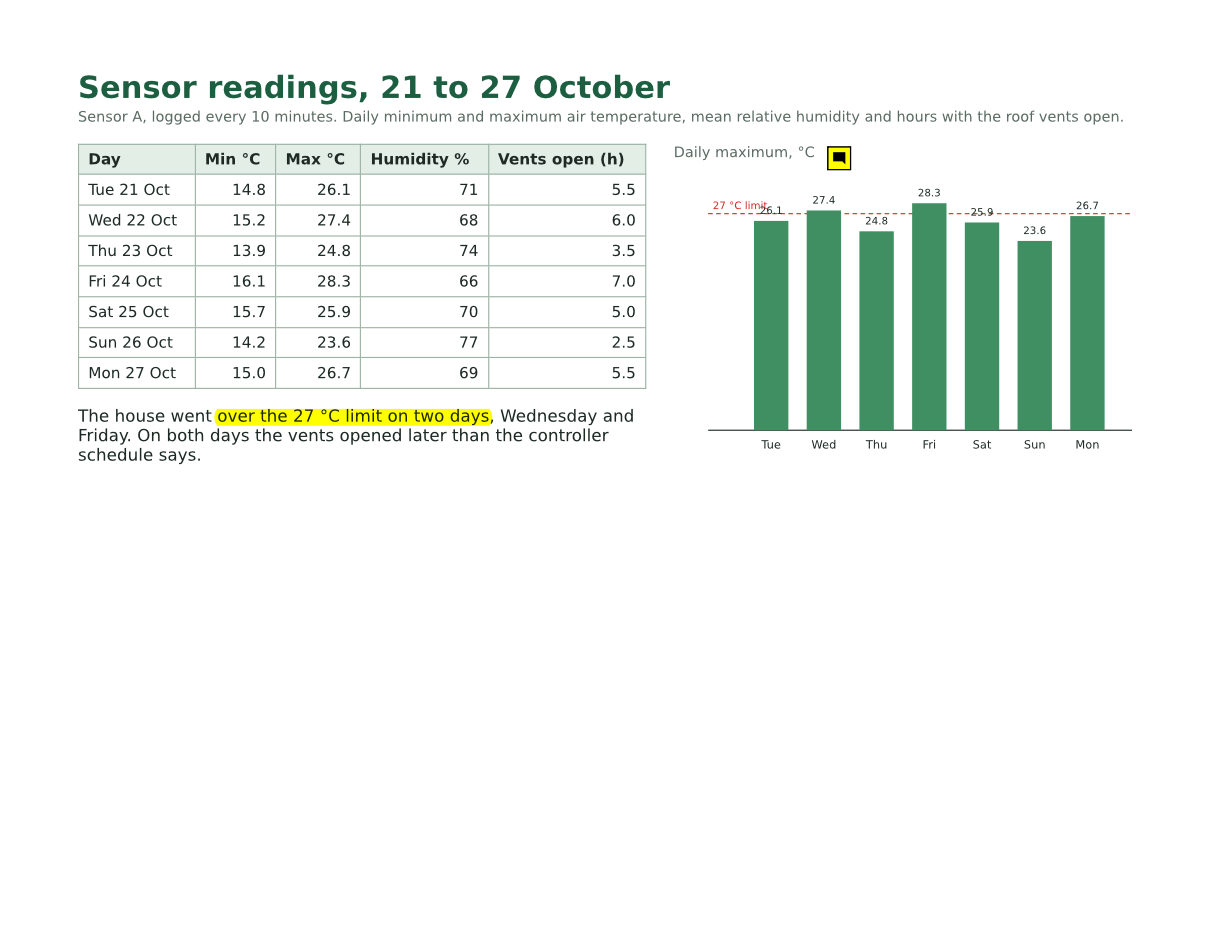
- A three-page greenhouse inspection report for a fictional nursery, with form fields, comments and attached files, made by us for this site. (CC0-1.0). How it was made
- Made by
- 2026-11-04, API build
9eeeb0640aba
Parameters
Send these as form fields next to the file. Names are case-insensitive. If you set one of the documented options below that we don't support yet, the request fails with a 400 that names it instead of returning a file made without it.
| Parameter | What it does |
|---|---|
PageRangestring | The pages to keep. Without it the API returns 400 "PageRange is required (example: 1-3,5)". -2 means pages 1 and 2, 4- means page 4 to the end. Pages always come out in document order: 3,1 gave page 1, then page 3.Values: Required. Pages and ranges such as 2, 1-3,7, -2, 4- or last |
Passwordstring | Opens a PDF that needs a password; the extracted file is not encrypted. When the owner also restricted changes, send the owner password, since the open password gets 422. The owner password also lifts restrictions on a file that opens without any password. |
FileNamestring | Name of the new PDF without the extension: FileName=readings-only gives readings-only.pdf. Left out, the upload's name is reused. |
StoreFileboolean, default false | Answer with a download link (Url and FileId) instead of the file data; the link expires after 3 hours. |
Not supported yet
Setting one of these to anything but its default returns 400.
| Option | What to do instead |
|---|---|
DocumentType | ConvertAPI documents this route for pulling invoice or receipt data into JSON. Ours copies pages, so its data options return 400 with any value other than the documented default (auto). |
MinimumConfidence | 0.5, the documented default, is accepted and changes nothing. |
Also refused when set: CustomExtractionData.
What carries over, and what doesn't
Kept
- The chosen page as drawn: the sample's readings page rendered pixel for pixel like page 2 of the input at 100 dpi
- Its size and orientation, 11 x 8.5 in landscape here, in a file whose other pages were portrait
- Selectable text, the embedded fonts, the vector chart and the table
- Comments on the page: the highlight and the sticky note on the sample page are still there with their text and author
- The document properties: Title, Author, Subject, Keywords, both dates and custom entries such as the sample's InspectionID
- Nothing from the pages you left out: the photo and logo of page 1 are not in the 1-page sample file, which has 22 objects
Lost or not yet supported
- Bookmarks, even ones that point at an extracted page.
- Files in the Attachments panel. A file pinned to an extracted page as a comment does come along.
- The form dictionary (AcroForm). Fields on extracted pages keep their printed values, and
/v2/convert/pdf/to/metastill finds them through the page annotations, but tools that read the field list from that dictionary find no form. The sample's readings page has no fields. - Size savings when you take everything:
PageRange=1-lastgave 123,219 bytes against the input's 117,855, because the new file is written without the compact object streams the input used.
Limits
- Pages come back in document order; to reorder, extract single pages and merge them in the order you want.
- A page past the end returns 400 "PageRange asks for page 4, but the document has 3 pages";
0returns 400 "PageRange '0' is not valid (example: 1-3,5)". - A digitally signed PDF returns 422 "this PDF is digitally signed, and rewriting it would invalidate the signature".
- A PDF that restricts printing, copying or editing returns 422 "this PDF has permission restrictions; send the owner password in Password, or remove them with /v2/convert/pdf/to/unprotect and the owner password". The owner password works on files that open without a password too.
- One PDF per request, up to 10 MB on the Free plan or 100 MB on paid plans; two files return 400 "this conversion takes exactly one file".
Where teams use it
Send only the page someone needs
A contractor needs the readings table, not the whole inspection file with its form and photo. PageRange=2 on the sample returns that one landscape page as a 42,334-byte PDF, with its two review comments still on it.
Cut files down before merging
Take pages 1 to 3 of one document and the last page of another, then join the pieces with /v2/convert/pdf/to/merge. Calling extract once per page and merging in your own order is also how to reorder pages.
Archive the pages that matter
Keep the signed summary or the approval page of a long generated document as its own small PDF for a records system, instead of storing the full file twice.
Questions
Why does the API say DocumentType is not supported?
On ConvertAPI, /pdf/to/extract reads invoice and receipt fields into JSON. Here the route extracts pages, so DocumentType, CustomExtractionData and MinimumConfidence return 400 unless they are left at their documented defaults. Send PageRange instead.
Can I change the page order?
Not in one call: PageRange=3,1 returns page 1 and then page 3. Extract each page on its own and send the files to /v2/convert/pdf/to/merge in the order you want. We did that with pages 3 and 1 of the sample and got them in that order.
How is this different from splitting?
Extract returns one PDF with all the pages you list. /v2/convert/pdf/to/split returns several PDFs, one per page or per SplitByPages pages. To drop a few pages and keep the rest, /v2/convert/pdf/to/delete-pages takes the shorter list.
Does the extracted page take the whole document's fonts and images with it?
No, only what the page uses. Our extracted readings page carries its own two font subsets and no pictures, since the photo and logo sit on page 1. That is why it is 42,334 bytes, about a third of the 117,855-byte original.
Convert your first PDF file in a minute.