GIF to SVG API
POST a GIF to /v2/convert/gif/to/svg and the first frame is traced into an SVG of filled paths. Flat-color GIFs such as logos and badges suit this best; transparent areas are left empty.
- Endpoint
- POST /v2/
convert/ gif/ to/ svg - Accepts
- gif
- Sample timing
- 11 ms median of 5 runsHow we measure
- Request size
- Up to 10 MB on the Free plan or 100 MB on paid plans, all files together
Request and response
Every sample below ran against the API before this page was published. Set PDFCONVERSIONAPI_KEY to your key and run it as is.
curl -sS -X POST \
  https://api.pdfconversionapi.com/v2/convert/gif/to/svg \
  -H "Authorization: Bearer $PDFCONVERSIONAPI_KEY" \
  -F File=@parcel-tracker.gif \
  --form-string FilterSpeckle=0 \
  -o response.json

# FileData is base64. Save the first file in converted/,
# or print the JSON error.
if jq -e '.Files' response.json > /dev/null; then
  mkdir -p converted
  name=$(jq -r '.Files[0].FileName' response.json)
  jq -r '.Files[0].FileData' response.json \
    | base64 --decode > "converted/$name"
else
  cat response.json
fi
import base64
import os
import requests
key = os.environ["PDFCONVERSIONAPI_KEY"]
response = requests.post(
"https://api.pdfconversionapi.com/v2/convert/gif/to/svg",
headers={"Authorization": f"Bearer {key}"},
files=[("File", open("parcel-tracker.gif", "rb"))],
data={
"FilterSpeckle": "0",
},
timeout=180,
)
result = response.json()
if not response.ok:
raise SystemExit(f"{result['Code']}: {result['Message']}")
os.makedirs("converted", exist_ok=True)
for file in result["Files"]:
path = os.path.join("converted", file["FileName"])
with open(path, "wb") as out:
out.write(base64.b64decode(file["FileData"]))
print(path, file["FileSize"], "bytes")
import { mkdir, readFile, writeFile } from "node:fs/promises";
import { join } from "node:path";

const form = new FormData();
const file = "parcel-tracker.gif";
form.append("File", new Blob([await readFile(file)]), file);
form.append("FilterSpeckle", "0");

const url = "https://api.pdfconversionapi.com/v2/convert/gif/to/svg";
const key = process.env.PDFCONVERSIONAPI_KEY;
const response = await fetch(url, {
  method: "POST",
  headers: { Authorization: `Bearer ${key}` },
  body: form,
});
const result = await response.json();
if (!response.ok) {
  throw new Error(`${result.Code}: ${result.Message}`);
}

await mkdir("converted", { recursive: true });
for (const file of result.Files) {
  const path = join("converted", file.FileName);
  await writeFile(path, Buffer.from(file.FileData, "base64"));
  console.log(path, file.FileSize, "bytes");
}
{
  "ConversionCost": 1,
  "ConversionTime": 0.011,
  "Files": [
    {
      "FileName": "parcel-tracker.svg",
      "FileExt": "svg",
      "FileSize": 45511,
      "FileData": "PD94bWwgdmVyc2lvbj0iMS4w…"
    }
  ]
}
Response from our test run on 2026-11-03. ConversionTime shows the median of 5 runs. FileData is shortened here; the real response carries the whole file as base64.
The sample, converted
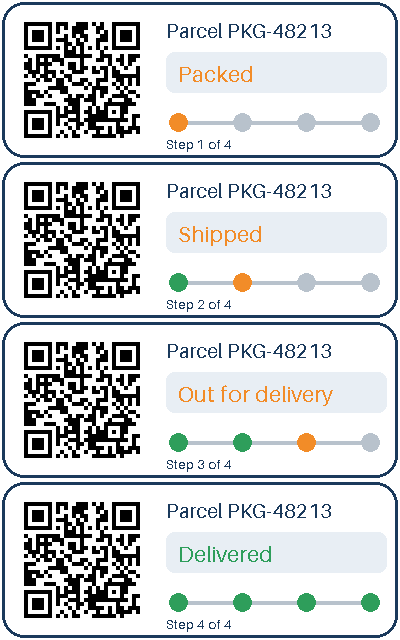
The same file the code sends. Download the input and the output and compare them yourself.
- Input
- parcel-tracker.gif (8.7 KB)
- Output
- parcel-tracker.svg (44 KB)
- Source
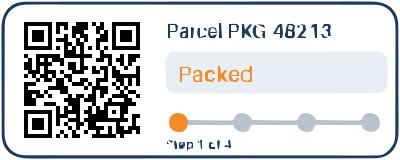
- A four-frame animated parcel-tracking card with a transparent outside and a QR code, drawn by us for this page. (CC0-1.0). How it was made
- Made by
- 2026-11-04, API build
9eeeb0640aba
Parameters
Send these as form fields next to the file. Names are case-insensitive. If you set one of the documented options below that we don't support yet, the request fails with a 400 that names it instead of returning a file made without it.
| Parameter | What it does |
|---|---|
FilterSpeckleinteger, default 4 | Merges patches of this value squared pixels or fewer into the color around them. The tracker's QR modules are 4 × 4 pixels, exactly 16, so the default 4 removed single modules and the traced code no longer scanned (77 paths). The sample sends 0: 150 paths, and the QR code reads again. 1 to 3 gave 122 paths and also kept it readable.Values: 0–128 |
Presetenum, default none | Loads a group of settings first; options you send override it. bw traced the card in black and white (71 paths); photo merged areas down to 32 paths; poster gave the same file as no preset for this GIF.Values: none, bw, poster, photo |
ColorModeenum, default color | bw traces a two-tone version: 26,049 bytes against 35,084 in color with no other options, and 28,315 against 45,511 with the sample's FilterSpeckle=0.Values: color, bw |
ColorPrecisioninteger, default 6 | Significant bits per color channel when grouping pixels. The card has only six colors in frame 1, so 3 changed little: 79 paths against 77 with no other options, 158 against 150 with the sample's FilterSpeckle=0.Values: 1–8 |
GradientStepinteger, default 16 | Color difference between stacked layers. Left out, we use 16; ConvertAPI documents 10, so send GradientStep=10 to match it.Values: 0–128 |
Layeringenum, default stacked | stacked draws shapes on top of each other; cutout makes non-overlapping shapes (45 paths, 41,899 bytes for the sample).Values: stacked, cutout |
CurveModeenum, default spline | polygon uses straight segments and was the smallest file, 10,578 bytes with no other options and 16,501 with the sample's FilterSpeckle=0; pixel follows pixel edges exactly (16,003 and 23,206 bytes); spline smooths with curves.Values: spline, polygon, pixel |
CornerThresholdinteger, default 60 | Angle in degrees above which a turn stays a sharp corner. We use 60 when it is left out; ConvertAPI documents 55.Values: 0–180 |
SegmentLengthnumber, default 4 | Length used when splitting curves; 8 gave 32,230 bytes with no other options, 42,545 with FilterSpeckle=0. Values under 3.5, such as 2, return 400.Values: 3.5–10 |
SpliceThresholdinteger, default 45 | Minimum angle at which a spline is split. Our default when omitted is 45; ConvertAPI documents 35.Values: 0–180 |
ImageWidthinteger | Rescales the frame before tracing and sets the SVG's width. At 200 px with no other options the SVG had 89 paths against 77 at full size, since scaling adds blended edge colors; with the sample's FilterSpeckle=0 it had 1,679 paths and 163,716 bytes.Values: 1–20000 |
ImageHeightinteger | Rescales to this height before tracing. ScaleProportions, ScaleIfLarger and ScaleImage work as on the raster routes; ScaleImage=false with 150 × 100 traced only that corner (34 paths).Values: 1–20000 |
FileNamestring | Name of the SVG without extension. |
StoreFileboolean, default false | Keep the SVG for 3 hours and send its URL. |
What carries over, and what doesn't
Kept
- The palette: the sample's paths use exactly six fills, the six opaque colors of frame 1 (#1B3A5C, #F28C28, #E8EEF4, #B8C2CC, black and white)
- Transparent areas stay empty; the card's corners are clear in a render of the SVG
- A scannable QR code with
FilterSpeckle=0: a render of the sample SVG decoded to https://example.com/t/PKG48213 - The 400 × 160 size as the SVG's width and height; rendered back at that size, 91% of pixels matched the GIF exactly
Lost or not yet supported
- Fine detail in small text. In the sample the dash of PKG-48213 vanished and the 13 px "Step 1 of 4" line came out with broken letters.
- Frames after the first.
- The QR code at default settings, as explained under
FilterSpeckle. - Size advantage: the traced sample is 45,511 bytes, five times the four-frame GIF.
Limits
- One GIF per request.
- Tracing is limited to 12,000,000 pixels after any resize; a 4000 × 3001 GIF returned 413 with a hint to set
ImageWidth. - Requests up to 10 MB on the Free plan or 100 MB on paid plans, all files and fields together.
- Inputs over 100,000,000 pixels are refused with 413 before decoding.
- 120 seconds per request, then 504.
Where teams use it
Recovering vector art from old GIF logos
Logos and icons that only survive as GIFs can be traced into SVG for use in responsive layouts or for further editing in a vector editor.
Badges and stamps that print at any size
Flat graphics like the sample card trace into a few dozen to a few hundred paths that render sharply at any size.
Questions
Is this real vector tracing or an embedded bitmap?
Real tracing. The SVG contains only filled path elements, 150 of them for the sample, with no embedded image.
Why did my QR code stop scanning after conversion?
With the default FilterSpeckle=4, any patch of 16 pixels or fewer is merged into its surroundings, and an isolated module of a code drawn with 4-pixel modules is exactly 16 pixels. Send FilterSpeckle=0, as this page's sample does, and the code survives.
Do the defaults match ConvertAPI's?
Most do. Three differ when left out: we use GradientStep 16, CornerThreshold 60 and SpliceThreshold 45, where ConvertAPI documents 10, 55 and 35. Send those values to get ConvertAPI's settings; each changed the sample output.
What GIFs trace well?
Few colors, solid fills and shapes several pixels wide. Photos or dithered GIFs produce many small paths and large files; scale them down with ImageWidth or use Preset=photo.
Convert your first GIF file in a minute.