PDN to GIF API
POST a .pdn to /v2/convert/pdn/to/gif and get a still GIF89a of the visible layers. Colors are reduced to one palette of up to 256 entries without dithering. Fully clear pixels get the GIF's transparent index; partly clear ones become solid.
- Endpoint
- POST /v2/
convert/ pdn/ to/ gif - Accepts
- pdn
- Sample timing
- 74 ms median of 5 runsHow we measure
- Request size
- Up to 10 MB on the Free plan or 100 MB on paid plans, all files together
Request and response
Every sample below ran against the API before this page was published. Set PDFCONVERSIONAPI_KEY to your key and run it as is.
curl -sS -X POST \
  https://api.pdfconversionapi.com/v2/convert/pdn/to/gif \
  -H "Authorization: Bearer $PDFCONVERSIONAPI_KEY" \
  -F File=@lemonade-stand-sign.pdn \
  -o response.json

# FileData is base64. Save the first file in converted/,
# or print the JSON error.
if jq -e '.Files' response.json > /dev/null; then
  mkdir -p converted
  name=$(jq -r '.Files[0].FileName' response.json)
  jq -r '.Files[0].FileData' response.json \
    | base64 --decode > "converted/$name"
else
  cat response.json
fi
import base64
import os
import requests
key = os.environ["PDFCONVERSIONAPI_KEY"]
response = requests.post(
"https://api.pdfconversionapi.com/v2/convert/pdn/to/gif",
headers={"Authorization": f"Bearer {key}"},
files=[("File", open("lemonade-stand-sign.pdn", "rb"))],
timeout=180,
)
result = response.json()
if not response.ok:
raise SystemExit(f"{result['Code']}: {result['Message']}")
os.makedirs("converted", exist_ok=True)
for file in result["Files"]:
path = os.path.join("converted", file["FileName"])
with open(path, "wb") as out:
out.write(base64.b64decode(file["FileData"]))
print(path, file["FileSize"], "bytes")
import { mkdir, readFile, writeFile } from "node:fs/promises";
import { join } from "node:path";

const form = new FormData();
const file = "lemonade-stand-sign.pdn";
form.append("File", new Blob([await readFile(file)]), file);

const url = "https://api.pdfconversionapi.com/v2/convert/pdn/to/gif";
const key = process.env.PDFCONVERSIONAPI_KEY;
const response = await fetch(url, {
  method: "POST",
  headers: { Authorization: `Bearer ${key}` },
  body: form,
});
const result = await response.json();
if (!response.ok) {
  throw new Error(`${result.Code}: ${result.Message}`);
}

await mkdir("converted", { recursive: true });
for (const file of result.Files) {
  const path = join("converted", file.FileName);
  await writeFile(path, Buffer.from(file.FileData, "base64"));
  console.log(path, file.FileSize, "bytes");
}
{
  "ConversionCost": 1,
  "ConversionTime": 0.074,
  "Files": [
    {
      "FileName": "lemonade-stand-sign.gif",
      "FileExt": "gif",
      "FileSize": 18532,
      "FileData": "R0lGODlhaAHwAIAAAAAAAAAA…"
    }
  ]
}
Response from our test run on 2026-11-03. ConversionTime shows the median of 5 runs. FileData is shortened here; the real response carries the whole file as base64.
The sample, converted
The same file the code sends. Download the input and the output and compare them yourself.
- Input
- lemonade-stand-sign.pdn (87 KB)
- Output
- lemonade-stand-sign.gif (18 KB)
- Source
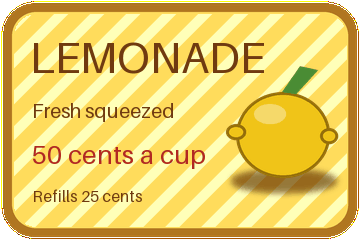
- A 360 x 240 price sign with rounded transparent corners that we drew and wrote as a layered PDN file ourselves: seven layers, including Overlay and Multiply blend modes, a semi-transparent shine and a hidden draft layer. (CC0-1.0). How it was made
- Made by
- 2026-11-04, API build
9eeeb0640aba
Parameters
Send these as form fields next to the file. Names are case-insensitive. If you set one of the documented options below that we don't support yet, the request fails with a 400 that names it instead of returning a file made without it.
| Parameter | What it does |
|---|---|
ImageWidthinteger | Width of the GIF. ImageWidth=180 gave 180 × 120 in 10,542 bytes, with 771 transparent pixels left at the corners.Values: 1–20000 |
ImageHeightinteger | Height of the GIF, or with a width the box it must fit.Values: 1–20000 |
ScaleProportionsboolean, default true | false stretches the merged sign to the exact box; 240 × 240 came to 18,694 bytes. |
ScaleIfLargerboolean, default false | true keeps the 360 px sign at its size when you ask for more. |
ScaleImageboolean, default true | false keeps only the top-left region: 180 × 90 gave a 3,907-byte GIF of the first letters. |
ColorSpaceenum, default default | gray gave 20,172 bytes. monochrome gave 3,533 bytes with three palette entries in use: black, white and the transparent one.Values: default, rgb, gray, monochrome (also srgb, truecolors, grayscale); cmyk returns 400 |
TransparentColorstring | Makes one more color transparent. #FFDC5C, the board's flat yellow, raised the clear pixels from 3,311 to 30,185.Values: #RRGGBB, R,G,B or white, black, red, green, blue, gray |
FileNamestring | Base name of the result; without it the file comes back as lemonade-stand-sign.gif. |
StoreFileboolean, default false | true puts the GIF behind a 3-hour link instead of base64. |
What carries over, and what doesn't
Kept
- Fully clear pixels: all 3,311 of the sign's clear pixels map to the GIF's transparent index
- Flat areas without noise: every run of 20 pixels that is one color in the merged image is one color in the GIF
- The 360 × 240 size, in 18,532 bytes against 72,204 for the PNG of the same file
Lost or not yet supported
- Soft edges. GIF transparency is on or off, so the 3,866 partly clear edge pixels became solid: a one-pixel yellow line and a brown one now ring the board on a dark page.
- Colors. The merged sign has 3,116 opaque colors and the GIF 174: it uses 193 of its 256 palette entries, one of them the transparent index, and some entries repeat a color. 783 pixels moved more than 8 levels, the worst by 37.
- Layers as frames. The GIF has one frame.
- DPI:
ImageResolutionis accepted and not written.
Limits
- One PDN per request; merged canvases up to 100,000,000 pixels.
- Requests up to 10 MB on the Free plan or 100 MB on paid plans, all files and fields together.
- 120 seconds per conversion, then 504.
- One frame and one palette of up to 256 colors per GIF.
- Tested with PDN files from our own writer only.
Where teams use it
Sites that take only GIF
Some forum signatures, older content systems and email builders accept GIF but not PNG or WebP. Flat-color signs and badges drawn in Paint.NET change little when cut to one palette.
Shapes without a box
Clear areas, like the rounded corners of the sample sign, stay clear in the GIF, so the shape sits on the page's own color.
Questions
Why does my GIF have a colored outline?
Anti-aliased edges are made of partly transparent pixels. GIF has no partial transparency, so those pixels turn solid in their own color. In the sample, 507 nearly invisible edge pixels became solid yellow. Clean the edge in Paint.NET, or use PNG or WebP, which keep soft edges.
Can Paint.NET layers become animation frames?
Not on this route. The visible layers are merged into one frame. For an animation, save each frame as its own image and assemble them with an animation tool.
Is the GIF dithered?
No. Each pixel takes a palette color with no noise pattern, so the board's flat yellow stays flat. Smooth shading loses steps instead: the area around the lemon's blurred shadow has 1,371 colors in the merged image and 98 in the GIF.
Convert your first PDN file in a minute.