XCF to GIF API
POST an XCF to /v2/convert/xcf/to/gif and get a still GIF89a of the merged layers. The image is cut down to a single palette of 256 entries with no dithering, so smooth gradients show steps.
- Endpoint
- POST /v2/
convert/ xcf/ to/ gif - Accepts
- xcf
- Sample timing
- 0.116 s median of 5 runsHow we measure
- Request size
- Up to 10 MB on the Free plan or 100 MB on paid plans, all files together
Request and response
Every sample below ran against the API before this page was published. Set PDFCONVERSIONAPI_KEY to your key and run it as is.
curl -sS -X POST \
  https://api.pdfconversionapi.com/v2/convert/xcf/to/gif \
  -H "Authorization: Bearer $PDFCONVERSIONAPI_KEY" \
  -F File=@gull-rock-lighthouse.xcf \
  -o response.json

# FileData is base64. Save the first file in converted/,
# or print the JSON error.
if jq -e '.Files' response.json > /dev/null; then
  mkdir -p converted
  name=$(jq -r '.Files[0].FileName' response.json)
  jq -r '.Files[0].FileData' response.json \
    | base64 --decode > "converted/$name"
else
  cat response.json
fi
import base64
import os
import requests
key = os.environ["PDFCONVERSIONAPI_KEY"]
response = requests.post(
"https://api.pdfconversionapi.com/v2/convert/xcf/to/gif",
headers={"Authorization": f"Bearer {key}"},
files=[("File", open("gull-rock-lighthouse.xcf", "rb"))],
timeout=180,
)
result = response.json()
if not response.ok:
raise SystemExit(f"{result['Code']}: {result['Message']}")
os.makedirs("converted", exist_ok=True)
for file in result["Files"]:
path = os.path.join("converted", file["FileName"])
with open(path, "wb") as out:
out.write(base64.b64decode(file["FileData"]))
print(path, file["FileSize"], "bytes")
import { mkdir, readFile, writeFile } from "node:fs/promises";
import { join } from "node:path";

const form = new FormData();
const file = "gull-rock-lighthouse.xcf";
form.append("File", new Blob([await readFile(file)]), file);

const url = "https://api.pdfconversionapi.com/v2/convert/xcf/to/gif";
const key = process.env.PDFCONVERSIONAPI_KEY;
const response = await fetch(url, {
  method: "POST",
  headers: { Authorization: `Bearer ${key}` },
  body: form,
});
const result = await response.json();
if (!response.ok) {
  throw new Error(`${result.Code}: ${result.Message}`);
}

await mkdir("converted", { recursive: true });
for (const file of result.Files) {
  const path = join("converted", file.FileName);
  await writeFile(path, Buffer.from(file.FileData, "base64"));
  console.log(path, file.FileSize, "bytes");
}
{
  "ConversionCost": 1,
  "ConversionTime": 0.116,
  "Files": [
    {
      "FileName": "gull-rock-lighthouse.gif",
      "FileExt": "gif",
      "FileSize": 17529,
      "FileData": "R0lGODlhkAEsAYAAAAAAAAAA…"
    }
  ]
}
Response from our test run on 2026-11-03. ConversionTime shows the median of 5 runs. FileData is shortened here; the real response carries the whole file as base64.
The sample, converted
The same file the code sends. Download the input and the output and compare them yourself.
- Input
- gull-rock-lighthouse.xcf (203 KB)
- Output
- gull-rock-lighthouse.gif (17 KB)
- Source
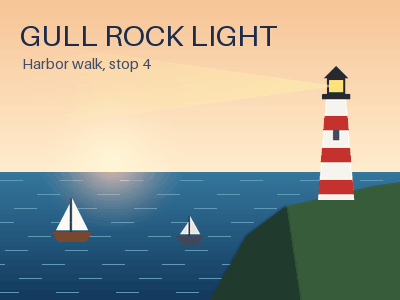
- A 400 x 300 harbor poster we drew and wrote as a layered XCF file ourselves: 11 layers, including a two-layer group, a layer mask, Multiply and Screen modes and a hidden guide layer. (CC0-1.0). How it was made
- Made by
- 2026-11-04, API build
9eeeb0640aba
Parameters
Send these as form fields next to the file. Names are case-insensitive. If you set one of the documented options below that we don't support yet, the request fails with a 400 that names it instead of returning a file made without it.
| Parameter | What it does |
|---|---|
ImageWidthinteger | Width in pixels of the GIF; a 200 px request gave 200 × 150 and 10,232 bytes.Values: 1–20000 |
ImageHeightinteger | Height in pixels, or with ImageWidth a box to fit the canvas into.Values: 1–20000 |
ScaleProportionsboolean, default true | false lets both sizes apply exactly, distorting the picture. |
ScaleIfLargerboolean, default false | true: shrink only, never enlarge. |
ScaleImageboolean, default true | false: cut the top-left area at the given size instead of scaling. |
ColorSpaceenum, default default | gray maps the palette to grays (19,705 bytes for the poster); monochrome leaves two colors (2,057 bytes).Values: default, rgb, gray, monochrome; cmyk returns 400 |
TransparentColorstring | Marks one color as the GIF's transparent index. #FFFFFF made the poster's 87 pure white pixels transparent.Values: #RRGGBB, R,G,B or a basic color name |
FileNamestring | Name for the .gif; the XCF's name otherwise. |
StoreFileboolean, default false | true returns a download link that lasts 3 hours. |
What carries over, and what doesn't
Kept
- The composite of all visible layers, including masks and the layer group, quantized from the full-color merge
- Flat areas stay flat: rows of the poster's sky that are one color in the PNG are one color in the GIF
- Size: 400 × 300 in and out, 17,529 bytes against 31,750 for the PNG
Lost or not yet supported
- Colors. The poster's 5,287 colors were reduced to 217: the GIF uses 241 of its 256 palette entries, and some entries repeat a color. A column of sky with 84 shades kept 48, so the gradient shows bands.
- Accuracy in busy areas: 1,343 of 120,000 pixels moved more than 8 levels, the worst by 58.
- Layers as frames. Each GIMP layer is merged, not turned into an animation frame.
- Bit depth, resolution and the color profile of the XCF.
Limits
- One XCF per request. The canvas may hold up to 67,108,864 pixels (8,192 × 8,192): 16,384 × 4,096 converts, 8,193 × 8,192 gets a 422.
- Requests up to 10 MB on the Free plan or 100 MB on paid plans, all files and fields together.
- 120 seconds per conversion, then 504.
- One frame per GIF.
Where teams use it
Systems that only take GIF
Some older forums, intranets and email builders still accept GIF but not PNG or WebP. A GIMP drawing with few colors, like a diagram or a badge, converts with little visible loss.
Stills for GIF-based tools
A GIMP frame can become a still GIF for tools that assemble animations from GIF frames. The route makes one frame per request; layers are not turned into frames.
Questions
Can GIMP layers become GIF animation frames?
Not on this route. The layers are flattened into one picture and the GIF has a single frame. To animate, export the frames from GIMP or send each frame as its own file.
Is the GIF dithered?
No. Rows that are one color in the merged image stay one color in the GIF, with no noise pattern added. That keeps flat areas clean but turns smooth gradients into visible steps, as in the sample's sky.
Will the GIF be transparent?
Only where the merged canvas is fully transparent, or where you name a color with TransparentColor. The sample's sky is opaque, so its GIF has no transparent index unless you send one.
Convert your first XCF file in a minute.