RTF to ODT API
Send a Rich Text Format file to POST /v2/convert/rtf/to/odt and get an OpenDocument text file: a compact ZIP with content, styles, metadata and pictures, ready for any editor that opens .odt.
- Endpoint
- POST /v2/
convert/ rtf/ to/ odt - Accepts
- rtf
- Sample timing
- 24 ms median of 5 runsHow we measure
- Request size
- Up to 10 MB on the Free plan or 100 MB on paid plans, all files together
Request and response
Every sample below ran against the API before this page was published. Set PDFCONVERSIONAPI_KEY to your key and run it as is.
curl -sS -X POST \
  https://api.pdfconversionapi.com/v2/convert/rtf/to/odt \
  -H "Authorization: Bearer $PDFCONVERSIONAPI_KEY" \
  -F File=@repair-estimate.rtf \
  -o response.json

# FileData is base64. Save the first file in converted/,
# or print the JSON error.
if jq -e '.Files' response.json > /dev/null; then
  mkdir -p converted
  name=$(jq -r '.Files[0].FileName' response.json)
  jq -r '.Files[0].FileData' response.json \
    | base64 --decode > "converted/$name"
else
  cat response.json
fi
import base64
import os
import requests
key = os.environ["PDFCONVERSIONAPI_KEY"]
response = requests.post(
"https://api.pdfconversionapi.com/v2/convert/rtf/to/odt",
headers={"Authorization": f"Bearer {key}"},
files=[("File", open("repair-estimate.rtf", "rb"))],
timeout=180,
)
result = response.json()
if not response.ok:
raise SystemExit(f"{result['Code']}: {result['Message']}")
os.makedirs("converted", exist_ok=True)
for file in result["Files"]:
path = os.path.join("converted", file["FileName"])
with open(path, "wb") as out:
out.write(base64.b64decode(file["FileData"]))
print(path, file["FileSize"], "bytes")
import { mkdir, readFile, writeFile } from "node:fs/promises";
import { join } from "node:path";

const form = new FormData();
const file = "repair-estimate.rtf";
form.append("File", new Blob([await readFile(file)]), file);

const url = "https://api.pdfconversionapi.com/v2/convert/rtf/to/odt";
const key = process.env.PDFCONVERSIONAPI_KEY;
const response = await fetch(url, {
  method: "POST",
  headers: { Authorization: `Bearer ${key}` },
  body: form,
});
const result = await response.json();
if (!response.ok) {
  throw new Error(`${result.Code}: ${result.Message}`);
}

await mkdir("converted", { recursive: true });
for (const file of result.Files) {
  const path = join("converted", file.FileName);
  await writeFile(path, Buffer.from(file.FileData, "base64"));
  console.log(path, file.FileSize, "bytes");
}
{
  "ConversionCost": 1,
  "ConversionTime": 0.024,
  "Files": [
    {
      "FileName": "repair-estimate.odt",
      "FileExt": "odt",
      "FileSize": 6825,
      "FileData": "UEsDBAoAAAAAAAAAIQBexjIM…"
    }
  ]
}
Response from our test run on 2026-11-03. ConversionTime shows the median of 5 runs. FileData is shortened here; the real response carries the whole file as base64.
The sample, converted
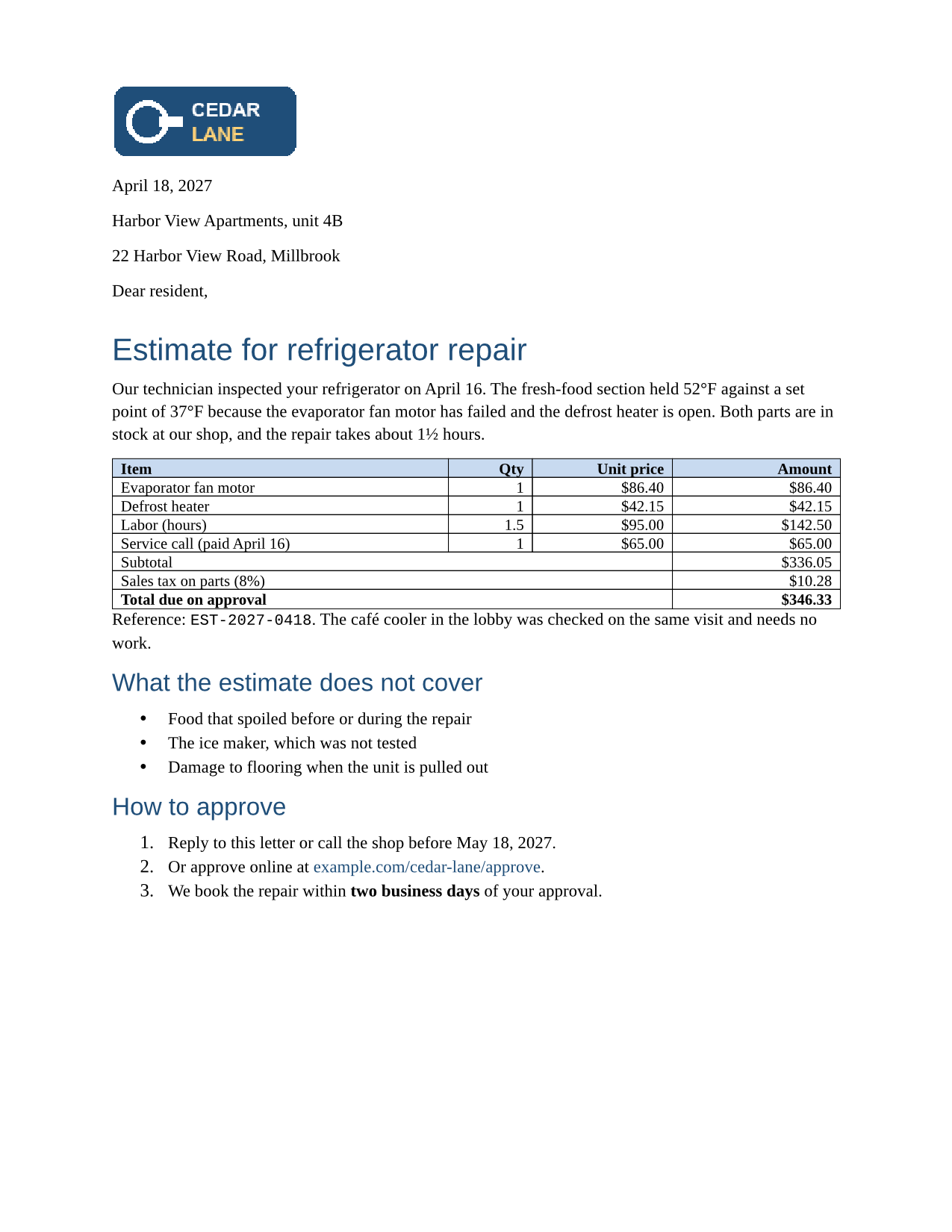
The same file the code sends. Download the input and the output and compare them yourself.
- Input
- repair-estimate.rtf (14 KB)
- Output
- repair-estimate.odt (6.7 KB)
- Source
- A two-page repair estimate letter from a fictional appliance shop, with a logo, a priced table, lists, a link, a footnote and a page-numbered footer. We wrote it for these pages in Rich Text Format. (CC0-1.0). How it was made
- Made by
- 2026-11-04, API build
9eeeb0640aba
Parameters
Send these as form fields next to the file. Names are case-insensitive. If you set one of the documented options below that we don't support yet, the request fails with a 400 that names it instead of returning a file made without it.
| Parameter | What it does |
|---|---|
FileNamestring | Stem of the OpenDocument file; without it repair-estimate.rtf returns repair-estimate.odt. |
StoreFileboolean, default false | Reply with a link to the .odt, removed after 3 hours, instead of base64 data. |
What carries over, and what doesn't
Kept
- The table with its merged totals cells (spanning 3 columns), light blue header shading and right-aligned amounts
- The logo PNG, unchanged, sized 120 × 48 points
- Headings as outline levels 1 and 2, so they appear in an OpenDocument editor's navigator
- Bulleted and numbered lists, the link, bold, italic, red text and the yellow highlight
- Letter paper with 0.75 inch top and bottom and 1 inch side margins, and the page break before "Terms"
- Title, subject, author, keyword and the creation date 2027-04-18T09:30:00 in meta.xml
- Revision marks, as tracked changes, in our test file
Lost or not yet supported
- The header and footer. The .odt has no header or footer at all, so the shop's address line and "Estimate 2027-0418, page 1 of 2" are gone.
- The footnote about how long parts prices are held.
- The blue border color: table borders become 0.5 pt black. Every cell also gets 4 pt of padding, and in a desktop office suite that made the rows taller than in the RTF.
- Comments.
Limits
- Requests up to 10 MB on the Free plan or 100 MB on paid plans, all files and fields together.
- A conversion stops after 120 seconds with 504.
- Fields (page numbers, tables of contents, page references) arrive as their stored text.
Where teams use it
Moving RTF documents into an OpenDocument office
Organizations that standardize on OpenDocument can convert old RTF letters and forms in bulk and keep editing them in their own suite. Metadata such as the title, author and creation date moves with each file.
Making RTF output editable in OpenDocument editors
If a program hands you RTF but your users edit in an OpenDocument editor, convert on download so they get a native .odt with real tables, lists and heading levels.
Questions
What is inside the .odt?
Six parts: mimetype, META-INF/manifest.xml, content.xml, styles.xml, meta.xml and Pictures/image1.png. There is no settings.xml or thumbnail, which is why the sample is only 6,825 bytes. Both are optional in the OpenDocument standard, and a desktop office suite opened the sample without complaint.
Where did the header and footer go?
This route does not carry them into the .odt. If the running text matters, convert to DOCX (/v2/convert/rtf/to/docx) or PDF, which keep the header and footer, with page numbers fixed at the values stored in the RTF.
Does the table keep its look?
Its structure and shading, yes; its borders and spacing change. Opened in a desktop office suite, the sample's table had black instead of blue lines and taller rows, because each cell gained 4 pt of padding.
Convert your first RTF file in a minute.