Resize PDF pages API
Send a PDF and a PageSize to POST /v2/convert/pdf/to/resize. Each page gets the new size, and its content is scaled to fit without changing its proportions, then centered. US Letter to A4 shrinks the sample's pages by 2.7%.
- Endpoint
- POST /v2/
convert/ pdf/ to/ resize - Accepts
- Sample timing
- 1 ms median of 5 runsHow we measure
- Request size
- Up to 10 MB on the Free plan or 100 MB on paid plans, all files together
Request and response
Every sample below ran against the API before this page was published. Set PDFCONVERSIONAPI_KEY to your key and run it as is.
curl -sS -X POST \
  https://api.pdfconversionapi.com/v2/convert/pdf/to/resize \
  -H "Authorization: Bearer $PDFCONVERSIONAPI_KEY" \
  -F File=@greenhouse-inspection.pdf \
  --form-string PageSize=a4 \
  -o response.json

# FileData is base64. Save the first file in converted/,
# or print the JSON error.
if jq -e '.Files' response.json > /dev/null; then
  mkdir -p converted
  name=$(jq -r '.Files[0].FileName' response.json)
  jq -r '.Files[0].FileData' response.json \
    | base64 --decode > "converted/$name"
else
  cat response.json
fi
import base64
import os
import requests
key = os.environ["PDFCONVERSIONAPI_KEY"]
response = requests.post(
"https://api.pdfconversionapi.com/v2/convert/pdf/to/resize",
headers={"Authorization": f"Bearer {key}"},
files=[("File", open("greenhouse-inspection.pdf", "rb"))],
data={
"PageSize": "a4",
},
timeout=180,
)
result = response.json()
if not response.ok:
raise SystemExit(f"{result['Code']}: {result['Message']}")
os.makedirs("converted", exist_ok=True)
for file in result["Files"]:
path = os.path.join("converted", file["FileName"])
with open(path, "wb") as out:
out.write(base64.b64decode(file["FileData"]))
print(path, file["FileSize"], "bytes")
import { mkdir, readFile, writeFile } from "node:fs/promises";
import { join } from "node:path";

const form = new FormData();
const file = "greenhouse-inspection.pdf";
form.append("File", new Blob([await readFile(file)]), file);
form.append("PageSize", "a4");

const url = "https://api.pdfconversionapi.com/v2/convert/pdf/to/resize";
const key = process.env.PDFCONVERSIONAPI_KEY;
const response = await fetch(url, {
  method: "POST",
  headers: { Authorization: `Bearer ${key}` },
  body: form,
});
const result = await response.json();
if (!response.ok) {
  throw new Error(`${result.Code}: ${result.Message}`);
}

await mkdir("converted", { recursive: true });
for (const file of result.Files) {
  const path = join("converted", file.FileName);
  await writeFile(path, Buffer.from(file.FileData, "base64"));
  console.log(path, file.FileSize, "bytes");
}
{
  "ConversionCost": 1,
  "ConversionTime": 0.001,
  "Files": [
    {
      "FileName": "greenhouse-inspection.pdf",
      "FileExt": "pdf",
      "FileSize": 125712,
      "FileData": "JVBERi0xLjcKJb/3ov4KMiAw…"
    }
  ]
}
Response from our test run on 2026-11-03. ConversionTime shows the median of 5 runs. FileData is shortened here; the real response carries the whole file as base64.
The sample and the result
The same file the code sends. Download the input and the output and compare them yourself.
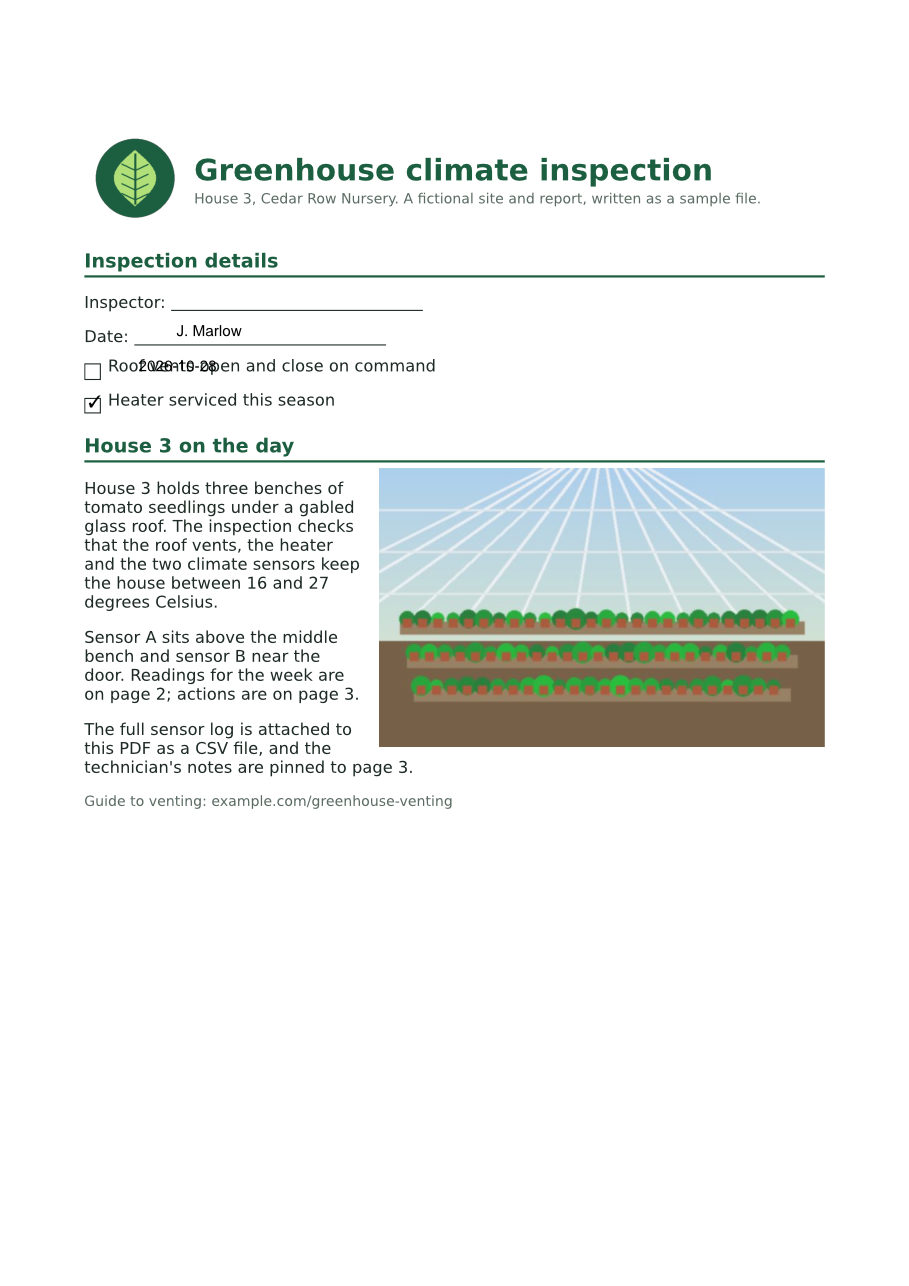
- Input
- greenhouse-inspection.pdf (115 KB)
- Output
- greenhouse-inspection.pdf (123 KB)
- Source
- A three-page greenhouse inspection report for a fictional nursery, with form fields, comments and attached files, made by us for this site. (CC0-1.0). How it was made
- Made by
- 2026-11-04, API build
9eeeb0640aba
Parameters
Send these as form fields next to the file. Names are case-insensitive. If you set one of the documented options below that we don't support yet, the request fails with a 400 that names it instead of returning a file made without it.
| Parameter | What it does |
|---|---|
PageSizeenum, default a4 | The new paper size. Left out, pages go to A4, as on ConvertAPI. Names are not case-sensitive; tabloid and other sizes return 400 with the list. custom takes PageWidth and PageHeight.Values: a2, a3, a4, a5, a6, letter, legal, custom |
PageOrientationenum, default default | default keeps each page's own orientation: on A4 the sample's landscape readings page became 841.89 x 595.28 points while the others became 595.28 x 841.89. portrait or landscape turns every page the same way and scales its content to fit.Values: default, portrait, landscape |
PageWidthnumber, default 10 | Width for PageSize=custom. Sent with any other PageSize it is not read, and returns 400 "PageWidth is not supported yet for pdf/to/resize".Values: 0.5 to 200 inches, in MeasurementUnit |
PageHeightnumber, default 10 | Height for PageSize=custom. 6 by 9 in gave 432 x 648 point pages. Outside the range: 400 "PageHeight must be between 0.5 and 200 inches".Values: 0.5 to 200 inches, in MeasurementUnit |
MeasurementUnitenum, default in | Unit of PageWidth and PageHeight. PageWidth=210, PageHeight=297 with mm gave 595.2756 x 841.8898 point pages, A4 to within 0.01 point (PageSize=a4 gives 595.28 x 841.89).Values: in, mm, cm, pt |
PageRangestring | Resize only these pages; the others keep their size. PageRange=2 turned only the readings page into A4 landscape.Values: Pages and ranges such as 2, 1-3 or 4-last |
Passwordstring | Opens a PDF that needs a password to open. The resized file comes back unencrypted. If the owner also restricted changes, send the owner password. |
FileNamestring | Name of the result without the extension. Left out, the upload's name is kept. |
StoreFileboolean, default false | Return a download link (Url and FileId) instead of the file data, valid for 3 hours. |
What carries over, and what doesn't
Kept
- Text and drawings as vectors: the page content is wrapped in a scale-and-move instruction, not turned into an image, and
/v2/convert/pdf/to/txtstill returns the full text (1,742 bytes against 1,744 before) - Proportions: the content is scaled by one factor (0.97268 from Letter to A4) and centered, here with 35.76 points added above and below on the portrait pages
- Each page's orientation with the default setting, so the sample's wide readings page stays landscape
- Bookmarks, the attached CSV, document properties and dates, and the form's 6 fields
- Pages outside
PageRange, unchanged
Lost or not yet supported
- Alignment of form fields, comments and links. They keep their old positions while the page content moves, so on the A4 sample "J. Marlow" sits on the Date line and the checkmark appears beside "Heater serviced" instead of "Roof vents". Flatten the form first with
/v2/convert/pdf/to/flattenif a file has fields or comments. - The crop, bleed, trim and art boxes. They are removed so the new page shows in full.
- Encryption, when the file was opened with
Password: the result is not protected. - Compactness: the sample grew from 117,855 to 125,712 bytes because the file is written without the input's compressed object streams.
Limits
- Custom sizes from 0.5 to 200 inches per side; outside that, 400 "PageWidth must be between 0.5 and 200 inches".
- Content is only ever scaled to fit, so a page going to a different shape gets white bands on two sides. There is no stretch or crop-to-fill option.
- A digitally signed PDF returns 422 "this PDF is digitally signed, and rewriting it would invalidate the signature".
- A PDF that restricts printing, copying or editing returns 422 "this PDF has permission restrictions; send the owner password in Password, or remove them with /v2/convert/pdf/to/unprotect and the owner password". The owner password lifts the restrictions, including on a file that opens without a password; any other password leaves the 422.
- One PDF per request, up to 10 MB on the Free plan or 100 MB on paid plans.
Where teams use it
Print US documents on A4, or the other way round
A Letter-size report sent to an office that prints on A4 gets cut off or rescaled by each printer driver. Resize once to A4 and every printer sees the right paper; the sample's content shrinks by 2.7% and gains about half an inch of extra margin top and bottom.
One page size for a bundle of documents
Merged files often mix Letter, A4 and odd sizes from scanners. Run the merged PDF through resize so every page matches before it is printed, bound or archived.
Fit pages to a book or label format
With PageSize=custom, pages can go to 6 x 9 in for a trade paperback or any size from 0.5 to 200 inches per side. Content is scaled down to fit inside, never cut.
Questions
Does resizing scale the content or just change the paper?
It scales the content. Each page's content is multiplied by the factor that fits it onto the new size and is centered there. To change the visible area without scaling, use /v2/convert/pdf/to/crop.
Why are my form fields in the wrong place after resizing?
Fields, comments and links are stored with their own positions on the page, and the resize moves only the page content today. On the sample, values ended up next to the wrong labels. Flatten fields and comments into the page first with /v2/convert/pdf/to/flatten: the flattened sample resized to A4 with every value on its own line.
What happens to landscape pages?
With PageOrientation=default they stay landscape on the new paper, so an 11 x 8.5 in page becomes A4 landscape. With portrait, every page becomes portrait and wide content is scaled down to fit the narrower width.
Is the default size the same as on ConvertAPI?
Yes, A4, so a request without PageSize returns A4 pages. ConvertAPI documents 10 x 10 in as the default width and height for a custom size, and PageSize=custom sent alone gave 720 x 720 point (10 x 10 in) pages here too.
Convert your first PDF file in a minute.