Guide5 min read
Convert DOCX to PDF in C# and .NET: the free options, tested
Free Spire.Doc kept 3 pages, GemBox's free mode stopped at 20 paragraphs, LibreOffice adds 320 MB. Or HttpClient and PDFConversionAPI. All tested on .NET 9.
Written and tested by Zeel Shekhaliya, Founder
Contents (6 sections)
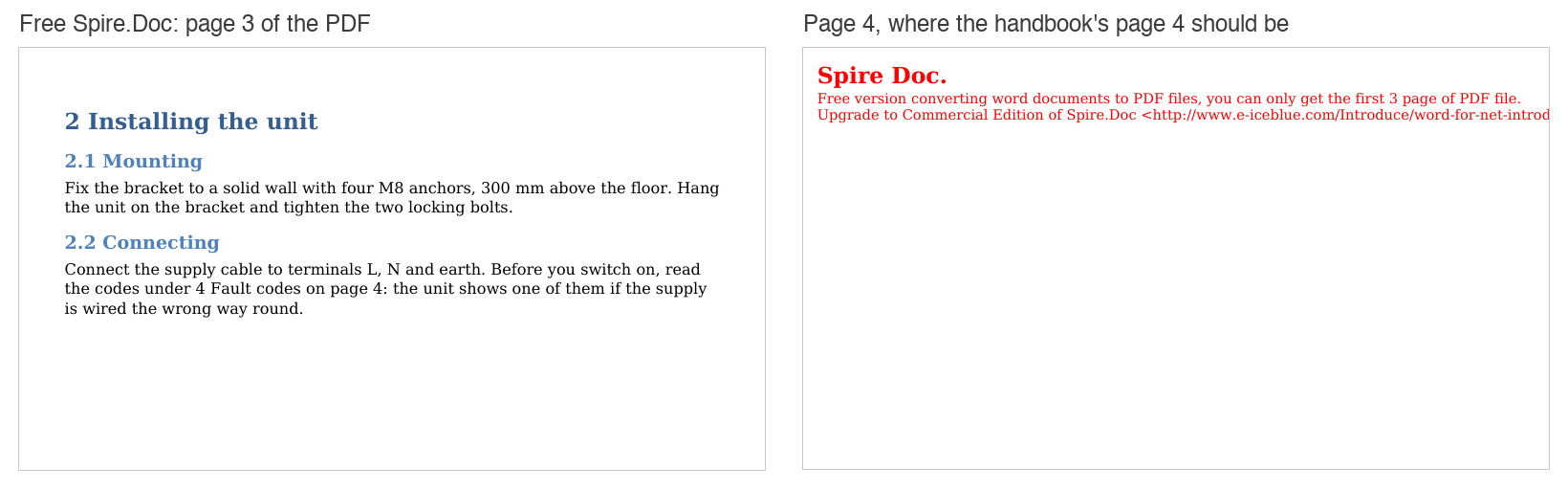
Each free way to turn a Word file into a PDF in C# stopped somewhere in our tests. Free Spire.Doc 14.11 converted the first 3 pages of a 6-page handbook and put an upgrade notice where page 4 should be. GemBox.Document's free mode threw FreeLimitReachedException on both files longer than 20 paragraphs. LibreOffice converted everything, after a 320 MB install, and printed the contract's tracked changes into the PDF. PDFConversionAPI, our API, needs HttpClient and nothing else: send the .docx, get the PDF back. The DOCX to PDF conversion page lists what it keeps from a Word file and what it doesn't.
With PDFConversionAPI: HttpClient only
// Word to PDF with pdfconversionapi.com. .NET 8 or later, no NuGet packages.
using System.Net.Http.Headers;
using System.Text.Json;

public static class PdfConversionApi
{
    static readonly HttpClient Http = new() { Timeout = TimeSpan.FromSeconds(240) };
    const string Api = "https://api.pdfconversionapi.com/v2/convert/docx/to/pdf";

    /// <summary>Sends a .docx and writes the PDF. Options are API parameters, such as ("UpdateFields", "true").</summary>
    public static async Task DocxToPdfAsync(string path, string outPath, params (string Name, string Value)[] options)
    {
        using var form = new MultipartFormDataContent();
        form.Add(new ByteArrayContent(await File.ReadAllBytesAsync(path)), "File", Path.GetFileName(path));
        foreach (var (name, value) in options) form.Add(new StringContent(value), name);

        using var request = new HttpRequestMessage(HttpMethod.Post, Api) { Content = form };
        request.Headers.Authorization = new AuthenticationHeaderValue("Bearer", Environment.GetEnvironmentVariable("PDFCONVERSIONAPI_KEY"));
        using var response = await Http.SendAsync(request);
        using var body = JsonDocument.Parse(await response.Content.ReadAsStringAsync());
        if (!response.IsSuccessStatusCode)
            throw new HttpRequestException($"{(int)response.StatusCode} {body.RootElement.GetProperty("Message").GetString()}");
        var data = body.RootElement.GetProperty("Files")[0].GetProperty("FileData").GetString()!;
        await File.WriteAllBytesAsync(outPath, Convert.FromBase64String(data));
    }
}
Set PDFCONVERSIONAPI_KEY to your key (you get one by signing in at app.pdfconversionapi.com), then:
await PdfConversionApi.DocxToPdfAsync("quarterly-report.docx", "quarterly-report.pdf");
await PdfConversionApi.DocxToPdfAsync("field-service-handbook.docx", "field-service-handbook.pdf", ("UpdateFields", "true"));

foreach (var docx in Directory.EnumerateFiles("contracts", "*.docx"))
await PdfConversionApi.DocxToPdfAsync(docx, Path.ChangeExtension(docx, ".pdf"));- No package to add and no license key in your code:
HttpClient,MultipartFormDataContentandSystem.Text.Jsonship with .NET. One staticHttpClientserves every call. - The PDF arrives as base64 in the JSON response, in
Files[0].FileData. ("UpdateFields", "true")rebuilds the table of contents before the PDF is written: the handbook's contents list, saved before its last edits, came out with the new section names and page numbers. Table of contents not updating has the details.- An option DOCX to PDF can't apply is refused, not ignored:
("PageRange", "1-2")threwHttpRequestException: 400 PageRange is not supported yet for DOCX → PDF. - The 240-second timeout leaves room for a conversion of up to 120 seconds plus the upload (Limits).
- The loop sends one file at a time, which is what the Free plan allows: a second request while one is running gets 429 with
Retry-After: 5. Paid plans run 4 to 30 at once (Pricing), soTask.WhenAllover a few files works there.
Against the container on our own machine, a conversion took 0.03 to 0.05 seconds after the first. Over the internet you add the upload and download; from Google's servers to the hosted API, a call took 1.0 to 3.7 seconds in our Apps Script test.
Free editions of .NET libraries
Searches for a free C# library mostly lead to the free editions of commercial ones. We tried two, with these calls:
// Free Spire.Doc (NuGet: FreeSpire.Doc)
var document = new Spire.Doc.Document();
document.LoadFromFile("field-service-handbook.docx");
document.SaveToFile("field-service-handbook.pdf", Spire.Doc.FileFormat.PDF);

// GemBox.Document in free mode (NuGet: GemBox.Document)
GemBox.Document.ComponentInfo.SetLicense("FREE-LIMITED-KEY");
var model = GemBox.Document.DocumentModel.Load("field-service-handbook.docx");
model.Save("field-service-handbook.pdf");| Free Spire.Doc 14.11 | GemBox.Document, free mode | |
|---|---|---|
| The 3-page report | 3 pages, no bookmarks | FreeLimitReachedException: "Free version is limited to 20 paragraphs" |
| The 6-page handbook | 4 pages: the first 3, then a page reading "Free version converting word documents to PDF files, you can only get the first 3 page of PDF file. Upgrade to Commercial Edition of Spire.Doc" | The same exception |
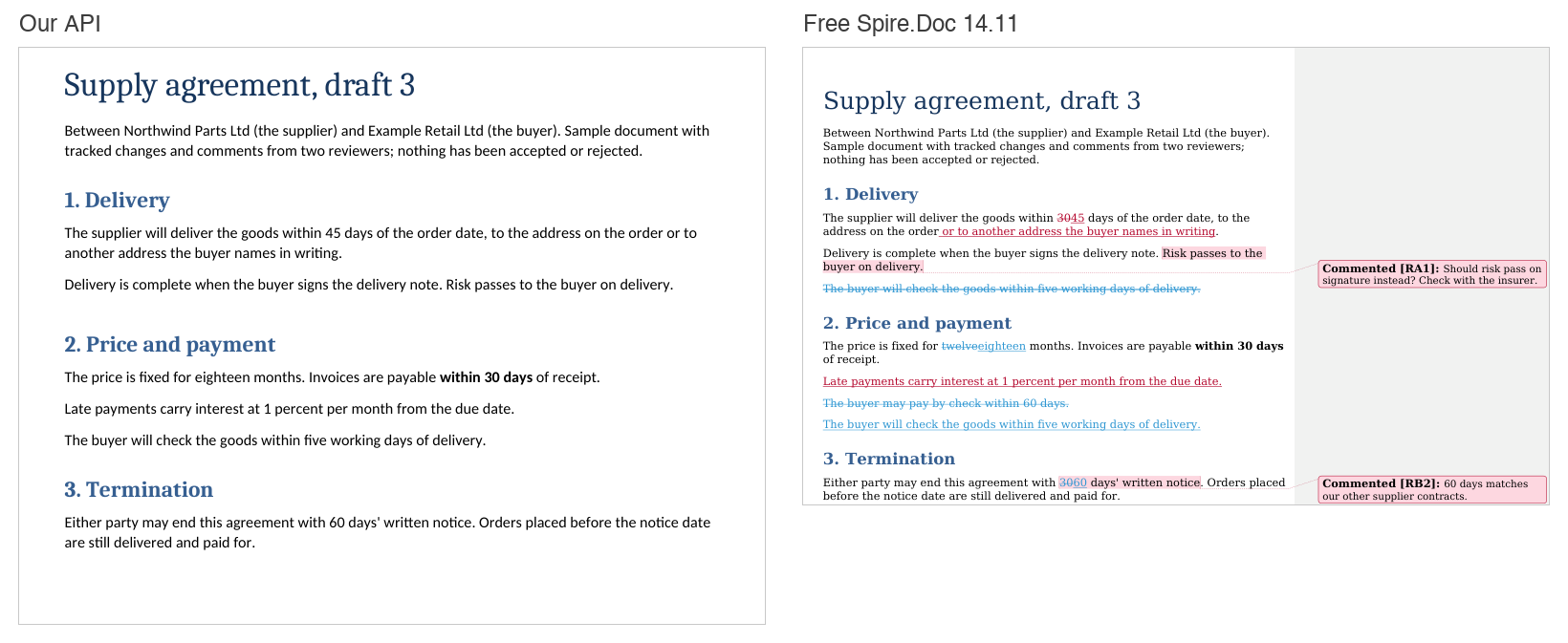
| The 1-page contract | Tracked changes printed as markup, and both reviewers' comments printed in a column beside the page | Converted, with the changes accepted and 3 bookmarks |
| Bookmarks from headings | None in any of the three PDFs | Yes, on the one file it converted |
Both are free to try, and both lift these limits in their paid editions, which we didn't test. In free form, neither converts an ordinary multi-page business document whole.
With LibreOffice, called from C#
LibreOffice converts Word files without a screen. In Microsoft's .NET 9 SDK image, apt-get install --no-install-recommends libreoffice-writer-nogui added 104 packages: 100 MB to download and 320 MB on disk. This is the code we ran:
// Word to PDF with LibreOffice, run headless. Needs LibreOffice installed (apt install libreoffice-writer-nogui).
using System.Diagnostics;
public static class LibreOfficePdf
{
/// <summary>Writes <name>.pdf into outDir. A profile of its own per call lets several conversions run at once.</summary>
public static async Task DocxToPdfAsync(string path, string outDir)
{
var profile = Directory.CreateTempSubdirectory("soffice-profile-");
try
{
var start = new ProcessStartInfo("soffice") { RedirectStandardOutput = true, RedirectStandardError = true };
foreach (var arg in new[] { $"-env:UserInstallation=file://{profile.FullName}", "--headless",
"--convert-to", "pdf", "--outdir", outDir, path })
start.ArgumentList.Add(arg);
using var process = Process.Start(start)!;
using var timeout = new CancellationTokenSource(TimeSpan.FromSeconds(120));
var error = process.StandardError.ReadToEndAsync();
await process.WaitForExitAsync(timeout.Token);
if (process.ExitCode != 0) throw new Exception($"soffice exited with {process.ExitCode}: {await error}");
}
finally { profile.Delete(recursive: true); }
}
}- With a new profile each call, a file took 0.47 to 0.66 seconds. Four calls at once through
Task.WhenAllwrote all four PDFs in 0.75 seconds. - Keep the profile per call. In our Python test, four conversions sharing the default profile wrote only two PDFs, and the other two exited with code 1 and no useful message. Checking
ExitCode, as the code above does, catches that. - The image had none of the fonts these files name, so LibreOffice drew every page in DejaVu, as did both libraries. On Linux, install the fonts your documents use (for Word's defaults,
fonts-crosextra-carlitoandfonts-crosextra-caladea). - It printed the contract's tracked changes: "The buyer may pay by check" and "twelve", both deleted in the draft, are in the PDF's text.
What the PDFs contain
| Our API | LibreOffice 7.4 | Free Spire.Doc 14.11 | GemBox, free mode | |
|---|---|---|---|---|
| Files converted whole | 3 of 3 | 3 of 3 | 2 of 3 (the handbook stops after page 3) | 1 of 3 |
| Bookmarks from headings | Yes | Yes | No | Yes |
| The contract's tracked changes | Printed as accepted | Printed as markup | Printed as markup, with the comments | Printed as accepted |
| Fonts, with nothing installed on your side | Liberation for the report, Carlito and Caladea for the contract | DejaVu | DejaVu | DejaVu |
| What your server needs | Nothing but .NET | 104 packages, 320 MB | A NuGet package and Linux native assets | A NuGet package and Linux native assets |
Which one to use
- A free library edition: for documents you know stay short. Free Spire.Doc stops after 3 pages of PDF and GemBox's free mode after 20 paragraphs. Check that a free edition's license covers your use before shipping it.
- LibreOffice: when you control the server image, can add about 320 MB to it, install the fonts your documents name, and accept tracked changes in the PDF or clean them out first.
- Our API: when the files are ordinary business documents of any length, the code runs in a small container or a function, or several conversions run at once. The Free plan includes 250 conversions a month, files up to 10 MB and 1 conversion at a time; files are converted and returned, and nothing is kept unless you ask for a download link.
How we tested
- Date
- 2026-11-26. Every request and result on this page ran that day.
- System
- Containers from Microsoft's official .NET 9 SDK image (mcr.microsoft.com/dotnet/sdk:9.0, .NET 9.0.23), on an arm64 Mac, with no extra fonts installed. LibreOffice 7.4.7.2 from the image's package manager, apt. FreeSpire.Doc 14.11.0 and GemBox.Document 2026.11.125 from NuGet, with the SkiaSharp and HarfBuzzSharp native assets for Linux.
- Server
- Our API running locally in a container, built from the same source as the hosted API; the day before, the same build's PDF of the contract draft was byte for byte the PDF the hosted API returned. The code shows the hosted address; we ran it with only the base URL changed. The API times on this page therefore leave out the trip over the internet.
- Files
- The three Word files from our Python guide (download them above): a 3-page quarterly report that names Liberation Serif and Liberation Sans; a contract draft that names Calibri and Cambria, with tracked changes and two comments; and a 6-page handbook whose table of contents was saved before its last edits.
- Runs
- Our API three times per file, the handbook with UpdateFields=true, the usage lines on this page, and one request with an option DOCX to PDF doesn't support. LibreOffice twice per file, with a new profile each call, and four conversions at once with Task.WhenAll. Free Spire.Doc and GemBox.Document's free mode once per file, with the calls shown on this page.
- Checked with
- Page count, fonts, bookmarks, document properties and page text read with PyMuPDF 1.27.2; first pages rendered with PyMuPDF and compared by eye; install sizes as apt reported them.
- Not checked
- The paid editions of either library, these libraries with extra fonts installed, Windows, Microsoft Word itself, and files larger than 26 KB.