Guide8 min read
Convert DOCX to PDF in Google Apps Script
Apps Script's getAs('application/pdf') fails on .docx files. Convert Word files in Drive with UrlFetchApp and PDFConversionAPI, tested in Apps Script.
Written and tested by Zeel Shekhaliya, Founder
Contents (6 sections)
Apps Script can't turn a Word file into a PDF on its own. getAs('application/pdf') on a .docx in Drive throws Conversion from application/vnd.openxmlformats-officedocument.wordprocessingml.document to application/pdf failed. The code below sends the file to PDFConversionAPI, our DOCX to PDF endpoint, with UrlFetchApp and saves the PDF next to the .docx. From a script in a personal Google account, each call to the API took 1.0 to 3.7 seconds, and a folder of five files took 21 seconds, reading and saving in Drive included.
Set up PDFConversionAPI in Apps Script
- Open the Apps Script editor: script.google.com for a standalone project, or Extensions > Apps Script in a Google Sheet or Doc. Paste the code below into
Code.gs. - Click Project Settings (the gear on the left). Under Script Properties, click Add script property, enter
PDFCONVERSIONAPI_KEYas the property and your API key as the value, and click Save script properties. You get a key by signing in at app.pdfconversionapi.com. - Run a function that calls
convertDocxToPdfwith a file id, like the one under the code. The first run asks you to authorize the script, because it reads your Drive and connects to an outside address.
The key stays out of the code, but anyone who can edit the project can open Project Settings and read it. Don't give edit access to a script that holds your key.
// Word (.docx) to PDF from Google Apps Script with pdfconversionapi.com.
// Set your key once: Project Settings > Script properties > PDFCONVERSIONAPI_KEY.
const API = 'https://api.pdfconversionapi.com/v2/convert/';

/**
 * Sends a .docx Blob to the API and returns the PDF as a Blob.
 * A busy server (503) or a full conversion slot (429) is retried up to twice.
 */
function docxBlobToPdf_(docx, options = {}) {
  const key = PropertiesService.getScriptProperties().getProperty('PDFCONVERSIONAPI_KEY');
  if (!key) throw new Error('Add PDFCONVERSIONAPI_KEY in Project Settings > Script properties.');
  for (let attempt = 1; ; attempt++) {
    const response = UrlFetchApp.fetch(API + 'docx/to/pdf', {
      method: 'post',
      headers: { Authorization: 'Bearer ' + key },
      payload: { File: docx, ...options },
      muteHttpExceptions: true,
    });
    const status = response.getResponseCode();
    const text = response.getContentText();
    if (status === 200) {
      const file = JSON.parse(text).Files[0];
      return Utilities.newBlob(Utilities.base64Decode(file.FileData), MimeType.PDF, file.FileName);
    }
    const headers = response.getHeaders();
    const wait = Number(headers['Retry-After'] || headers['retry-after'] || 0);
    if ((status === 429 || status === 503) && attempt < 3 && wait > 0 && wait <= 60) {
      console.log(`HTTP ${status}; trying again in ${wait} s`);
      Utilities.sleep(wait * 1000);
      continue;
    }
    let message = text.slice(0, 300);
    try { message = JSON.parse(text).Message; } catch (e) {}
    throw new Error(`docx/to/pdf: HTTP ${status} ${message}`);
  }
}

/** Converts one .docx in Drive and saves the PDF in the same folder. Returns the new file. */
function convertDocxToPdf(fileId) {
  const docx = DriveApp.getFileById(fileId);
  const parents = docx.getParents();
  const folder = parents.hasNext() ? parents.next() : DriveApp.getRootFolder();
  return folder.createFile(docxBlobToPdf_(docx.getBlob()));
}

/**
 * Converts every .docx in a folder that has no PDF of the same name yet.
 * Starts no new conversion after 3.5 minutes, so a slow file can't run into
 * Apps Script's 6-minute limit. Run it again to carry on.
 */
function convertFolder(folderId) {
  const started = Date.now();
  const folder = DriveApp.getFolderById(folderId);
  const files = folder.getFilesByType(MimeType.MICROSOFT_WORD);
  let converted = 0;
  while (files.hasNext()) {
    if (Date.now() - started > 3.5 * 60 * 1000) {
      console.log(`Converted ${converted}. Stopped before the time limit; run again to carry on.`);
      return false;
    }
    const docx = files.next();
    const pdfName = docx.getName().replace(/\.docx$/i, '') + '.pdf';
    if (folder.getFilesByName(pdfName).hasNext()) continue;
    folder.createFile(docxBlobToPdf_(docx.getBlob()).setName(pdfName));
    converted++;
  }
  console.log(`Converted ${converted}. The folder is done.`);
  return true;
}
A file's id is the part of its Drive link after /d/, and a folder's is the part after /folders/:
function run() {
  const pdf = convertDocxToPdf('YOUR_FILE_ID');
  console.log(`${pdf.getName()} ${pdf.getSize()} bytes`);
}quarterly-report.pdf 82830 bytesWhat the code relies on:
- The payload is an object with a Blob in it. Apps Script then sends a multipart form, the format our API reads, with the Blob as the
Filefield and the file's Drive name as its file name. Options go in the same object, as strings. - The PDF comes back as base64 inside JSON.
Files[0].FileDataholds it, andFileNameis the .docx name with.pdfat the end.Utilities.base64DecodeandUtilities.newBlobturn it into a file Drive can save. In our run the 82,830-byte PDF arrived as 110,440 characters of base64. muteHttpExceptions: truelets you read our error. Without it, a wrong key makes Apps Script throwRequest failed for https://api.pdfconversionapi.com returned code 401. Truncated server response:followed by the start of our JSON. With it, the code reads the JSON and throws itsMessagein full, as in thePageRangeexample below.
To send options, pass them as the second argument to docxBlobToPdf_. With { IncludeMetadata: 'false' }, the PDF of our contract draft no longer contained the reviewer's name that the Word file had saved as its author (Convert Word to PDF without comments or tracked changes has the details). Some options aren't supported yet for DOCX to PDF and are refused, not ignored: { PageRange: '1-2' } threw docx/to/pdf: HTTP 400 PageRange is not supported yet for DOCX → PDF.
Convert a whole folder
convertFolder converts each .docx in a folder that doesn't have a PDF of the same name next to it yet, so you can run it again on the same folder. On a folder of five copies of the quarterly report, the first run converted all five in 21.4 seconds. The second run found nothing to do and finished in 1.7 seconds, without a request to our API.
Apps Script stops any run after 6 minutes, and one conversion on our side may take up to 120 seconds (Limits). So the loop starts no new file after 3.5 minutes and tells you to run it again. It looks at the folder itself, not at its subfolders.
More than one conversion at a time
The Free plan runs one conversion at a time per account. We sent three requests at once with UrlFetchApp.fetchAll on a Free plan key: one came back 200, and the other two came back 429 the Free plan runs 1 conversion at a time; wait for the one running to finish, with Retry-After: 5. Paid plans run 4 to 30 at a time (Pricing), and fetchAll with up to that many requests suits them. We didn't test it on a paid plan.
docxBlobToPdf_ waits and tries again when it gets 429 or 503 with a Retry-After of a minute or less, up to twice. We ran the same script in two editor tabs at the same moment. One tab converted its four files without a refusal. In the other tab, the first request was refused twice while the first tab was converting, then went through on the third try, after 13.3 seconds instead of 1 to 4. A 429 because the month's conversions are used up has a Retry-After that runs to the start of next month, usually far more than a minute, so the code throws it straight away.
Why not Apps Script's own conversion?
Apps Script has two ways to make a PDF without us, and we tried both on the same two files.
getAs('application/pdf')on the .docx threw the error at the top of this page for both files, after 1.8 and 2.8 seconds. It does work for a file that is already a Google Doc: a new Google Doc came out as a 20,010-byte PDF in 1.8 seconds. For Google Docs you don't need our API.- Copy the .docx into Google Docs, then
getAsthe copy. The Drive API'sfiles.copywithmimeTypeset to Google Docs makes the copy; it worked with the script's own token (ScriptApp.getOAuthToken()) and needed no extra service.testDriveImportin the download is the code we ran. It converted both files, but the PDFs differ from the Word files:
| Our API | Copied into Google Docs, then getAs | |
|---|---|---|
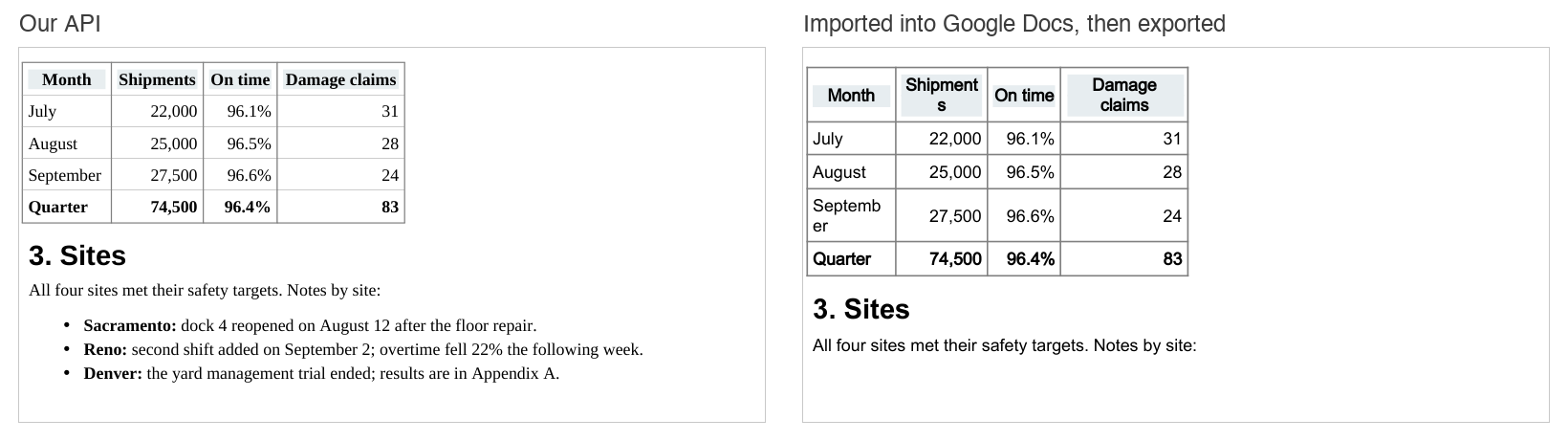
| Report fonts | Liberation Serif and Liberation Sans, the fonts the file names | Arial for all the text |
| Report layout | 3 pages; the three site notes end page 1 | 3 pages; "Shipments" and "September" break in the middle of the word in the table, and the site notes move to page 2 |
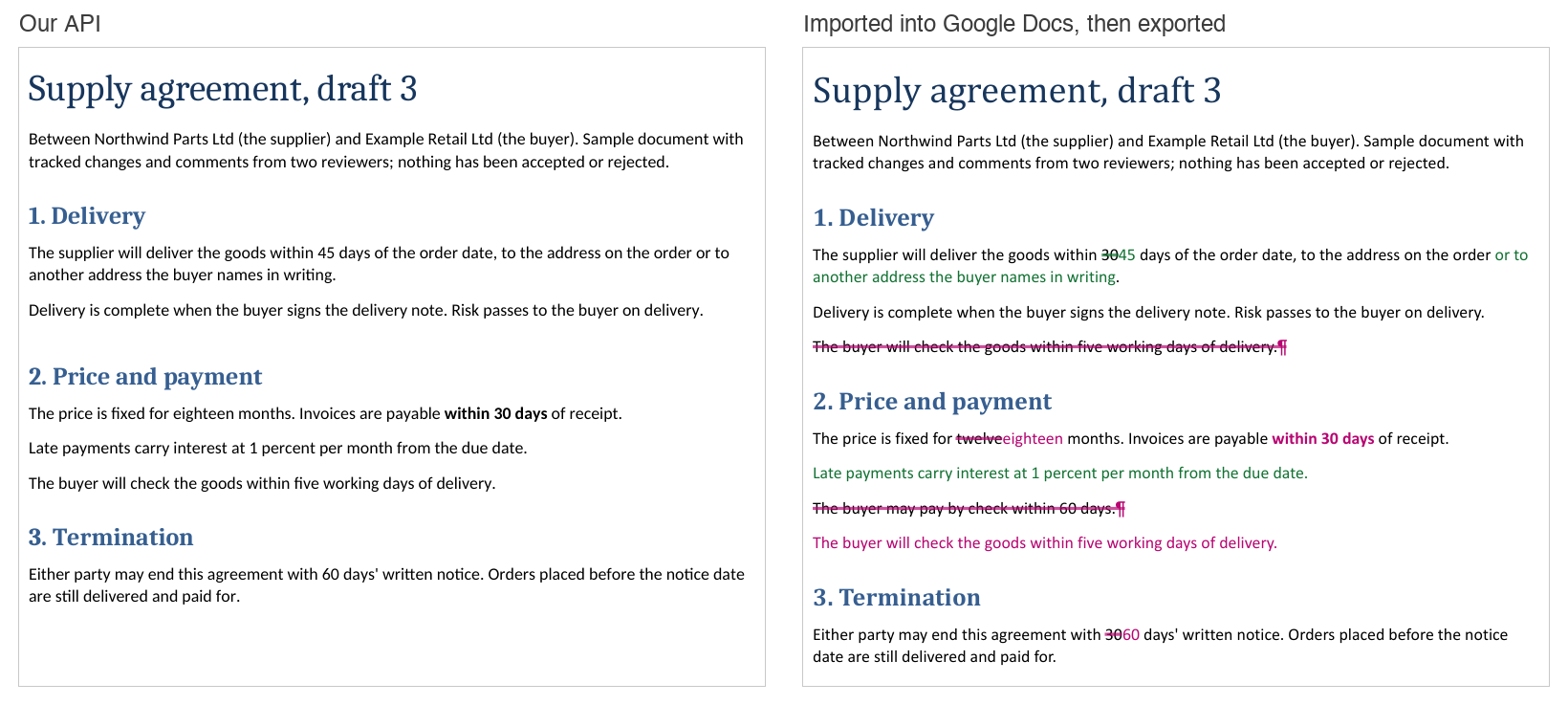
| Contract fonts | Carlito and Caladea, which have the same character widths as Calibri and Cambria | Calibri and Cambria |
| Contract tracked changes | Printed as if accepted; the deleted text is not in the PDF | Printed as suggestions: deleted text struck through, new text in color. "The buyer may pay by check" and "twelve" are in the PDF's text |
| Comments and the hidden sentence | Left out | Left out |
| PDF title | The title in the Word file's properties | The name of the Google Docs copy |
| Author | The Word file's author, unless you send IncludeMetadata=false | None |
| Left in Drive | The PDF | The PDF and a Google Docs copy |
| Time per file in our runs | 4 to 6 seconds, reading the .docx from Drive and saving the PDF included | 2.6 to 3.5 seconds, the copy included |
| Cost | One conversion from your plan's month | No charge; Google's quotas apply |
In the contract's paragraphs that had no tracked changes, lines broke at the same words in both PDFs. The report changed most: Google Docs replaced the fonts it names with Arial, which is wider than Liberation Serif.
Limits on the Apps Script side
Google's quotas page, as it read on November 24, 2026:
| Limit | Personal account | Google Workspace |
|---|---|---|
| Script runtime | 6 min per run | 6 min per run |
UrlFetchApp calls | 20,000 a day | 100,000 a day |
Request size (UrlFetchApp POST) | 50 MB | 50 MB |
| Response size | 50 MB | 50 MB |
What that means with our API:
- Uploads: the Free plan takes requests up to 10 MB and paid plans up to 100 MB (Upload size), but from Apps Script nothing over Google's 50 MB goes out.
- Large PDFs: base64 makes the response about a third larger than the PDF, so a PDF of more than about 37 MB doesn't fit in a 50 MB response. Send
StoreFile=trueand you get a download link instead of the data (Stored files). From Apps Script,UrlFetchApp.fetch(file.Url)on that link returned our 82,830-byte PDF asapplication/pdf. Google's 50 MB response limit applies to that download too. - Conversions a month: each file is one conversion, and failed requests don't count. The Free plan includes 250 a month.
How we tested
- Date
- 2026-11-24. Every request and result on this page ran that day.
- Server
- Our hosted API, called from Google Apps Script with a Free plan key.
- Script
- An Apps Script project in a personal Google account, on the V8 runtime, run from the script editor. The code is the one on this page; the test functions next to it are in the download above.
- Files
- The quarterly report from our DOCX to PDF page, which names the fonts Liberation Serif and Liberation Sans and has a chart, a table and lists; and the contract draft from our guide to comments and tracked changes, which names Calibri and Cambria and has tracked changes from two reviewers, two comments and a hidden sentence.
- Runs
- 20 conversions with our API, among them a folder of five copies of the report, two copies of the script running at the same time, StoreFile=true and IncludeMetadata=false. Apps Script's getAs('application/pdf') on both .docx files and on a new Google Doc. Both files copied into Google Docs with the Drive API's files.copy and exported with getAs. Requests refused on purpose: a wrong key, an unsupported option, and three requests at once on the Free plan.
- Times
- Measured in the script with Date.now(), so they include the trip between Google's servers and ours.
- Checked with
- Page text, fonts, outlines and metadata read with PyMuPDF 1.27.2; first pages rendered with PyMuPDF and compared by eye.
- Not tested
- Google's quotas, which are quoted from its quotas page as it read on 2026-11-24. Not checked: Google Workspace accounts, time-driven triggers, files larger than 26 KB, paid plans' conversions at once, and Microsoft Word itself.