Guide6 min read
Updated
Convert DOCX to PDF in Python on Linux, without Word
docx2pdf needs Microsoft Word, so it fails on Linux. LibreOffice works, with caveats we measured. PDFConversionAPI needs only requests. Tested on Python 3.13.
Written and tested by Zeel Shekhaliya, Founder
Contents (6 sections)
On a Linux server, docx2pdf can't convert anything: it drives Microsoft Word, and on Linux it raises NotImplementedError: docx2pdf is not implemented for linux as it requires Microsoft Word to be installed. LibreOffice, run headless, does work, at 0.25 to 0.44 seconds a file in our tests, after an install of 137 packages. But it printed the contract draft's tracked changes into the PDF, needed three font packages before the layout matched, and when four conversions started at once, two of them wrote nothing. PDFConversionAPI, our API, needs only requests: send the .docx, get the PDF back. Before you write any code, you can try our DOCX to PDF API on one of your own files, with no key.
With PDFConversionAPI: only requests
# Word to PDF with pdfconversionapi.com. Needs: pip install requests
import base64
import os

import requests

API = "https://api.pdfconversionapi.com/v2/convert/docx/to/pdf"


def docx_to_pdf(path, out_path, **options):
    """Sends a .docx and writes the PDF. Options are API parameters, such as UpdateFields="true"."""
    with open(path, "rb") as f:
        response = requests.post(
            API,
            headers={"Authorization": f"Bearer {os.environ['PDFCONVERSIONAPI_KEY']}"},
            files={"File": (os.path.basename(path), f)},
            data=options,
            timeout=240,
        )
    body = response.json()
    if not response.ok:
        raise RuntimeError(f"{response.status_code} {body['Message']}")
    with open(out_path, "wb") as out:
        out.write(base64.b64decode(body["Files"][0]["FileData"]))
Set PDFCONVERSIONAPI_KEY to your key (you get one by signing in at app.pdfconversionapi.com), then:
from pathlib import Path

from convert_api import docx_to_pdf

docx_to_pdf("quarterly-report.docx", "quarterly-report.pdf")
docx_to_pdf("field-service-handbook.docx", "field-service-handbook.pdf", UpdateFields="true")

for docx in Path("contracts").glob("*.docx"):
docx_to_pdf(docx, docx.with_suffix(".pdf"))- Nothing to install on the server but
requests, and nothing to keep running: no office suite, no fonts, no profile directory. - The PDF arrives as base64 in the JSON response, in
Files[0].FileData. UpdateFields="true"rebuilds the table of contents and cross-references before the PDF is written. In the handbook, the contents list saved before the last edits ("2 Setup", page 2) came out rebuilt ("2 Installing the unit", page 3). Table of contents not updating has the details.- An option DOCX to PDF can't apply is refused, not ignored:
PageRange="1-2"raisedRuntimeError: 400 PageRange is not supported yet for DOCX → PDF. timeout=240leaves room for a conversion of up to 120 seconds plus the upload, as Limits explains.- The loop sends one file at a time, which is what the Free plan allows: it runs one conversion at a time per account, and a second request while one is running gets 429 with
Retry-After: 5. Paid plans run 4 to 30 at once (Pricing).
Against the container on our own machine, the conversion took 0.03 to 0.09 seconds a file. Over the internet you add the upload and download: from Google's servers to the hosted API, a call took 1.0 to 3.7 seconds in our Apps Script test.
Why docx2pdf fails on Linux
docx2pdf doesn't convert anything itself. It asks Microsoft Word to save the file as PDF, so it runs only where Word is installed: Windows and macOS. On Linux both of its entry points stop before doing any work:
NotImplementedError: docx2pdf is not implemented for linux as it requires Microsoft Word to be installedconvert() raised it, and the docx2pdf command printed it and exited with code 1. No PDF was written. On Windows or macOS with Word installed, that is what docx2pdf is for (we didn't test it there); on a Linux server, in a container or in a serverless function, there is no Word for it to drive.
With LibreOffice, run headless
LibreOffice can convert Word files without a screen. On a Linux image that uses apt, as python:3.13-slim does, apt-get install --no-install-recommends libreoffice-writer-nogui installs the word processor alone. This is the code we ran:
# Word to PDF with LibreOffice, run headless. Needs LibreOffice installed (apt install libreoffice-writer-nogui).
import subprocess
import tempfile


def docx_to_pdf(path, outdir):
    """Writes <name>.pdf into outdir. A profile of its own per call lets several conversions run at once."""
    with tempfile.TemporaryDirectory() as profile:
        subprocess.run(
            ["soffice", f"-env:UserInstallation=file://{profile}", "--headless",
             "--convert-to", "pdf", "--outdir", outdir, path],
            check=True, capture_output=True, timeout=120,
        )
What we measured, on the same three files:
| LibreOffice 25.2, headless | Our API | |
|---|---|---|
| What the server needs | 137 packages from apt: 110 MB to download, 383 MB on disk. The python:3.13-slim image grew from 204 MB to 743 MB | requests |
| Time per file | 0.25 to 0.44 seconds once its profile exists; 1.4 to 2.0 seconds for the first run, which creates the profile; 0.9 to 1.4 seconds with a new profile each call, as in the code above | 0.03 to 0.09 seconds of conversion, plus the trip over the internet |
| Memory per conversion | 173 to 213 MB for each soffice process | None on your server beyond the HTTP request |
| Four conversions at once | With the shared default profile, two exited with code 1 and wrote no PDF. With a profile each, all four worked | Each request stands alone; your plan sets how many run at once |
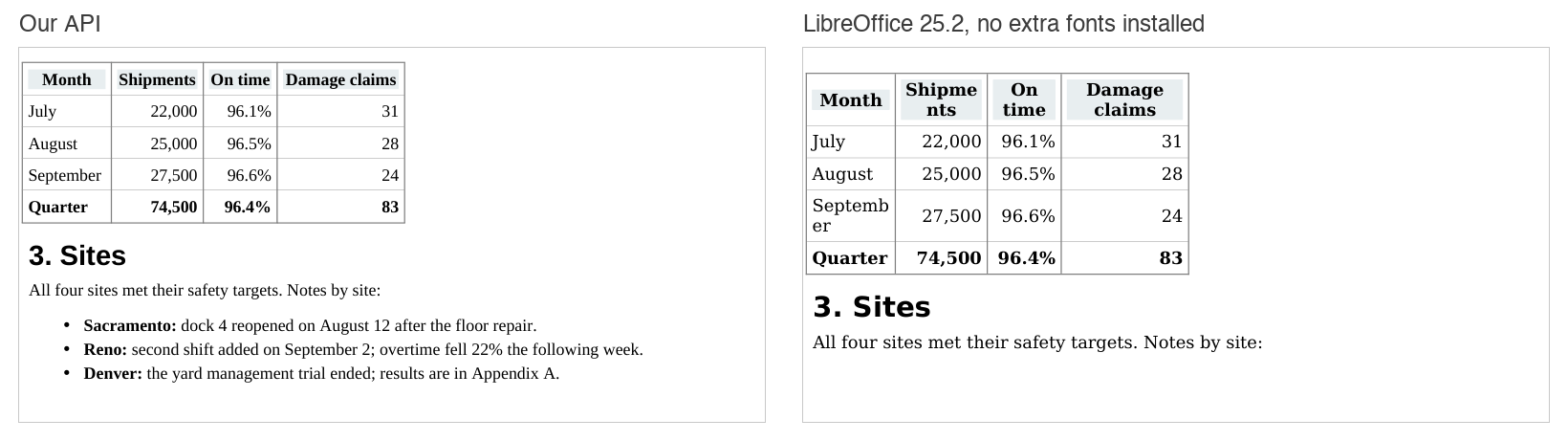
| Fonts | A plain install has none of the fonts these files name, so every page came out in DejaVu. With fonts-liberation, fonts-crosextra-carlito and fonts-crosextra-caladea (7.5 MB more), the same fonts as ours | Liberation for the report, Carlito and Caladea for the contract, without anything on your server |
| Tracked changes in the contract | Printed as markup: deleted text struck through, new text underlined, in color, with change bars | Printed as if accepted; the deleted text isn't in the PDF |
| The handbook's saved table of contents | Printed as saved | Printed as saved; UpdateFields="true" rebuilt it |
The failed conversions are the trap. Every soffice process uses the same user profile unless you give it its own, and with the shared profile two of the four processes exited with code 1. The only thing they printed was a Java warning that the two successful processes printed too. Check the exit code (check=True does) and give each call its own profile, as convert_lo.py does, or run conversions one at a time.
What the PDFs contain
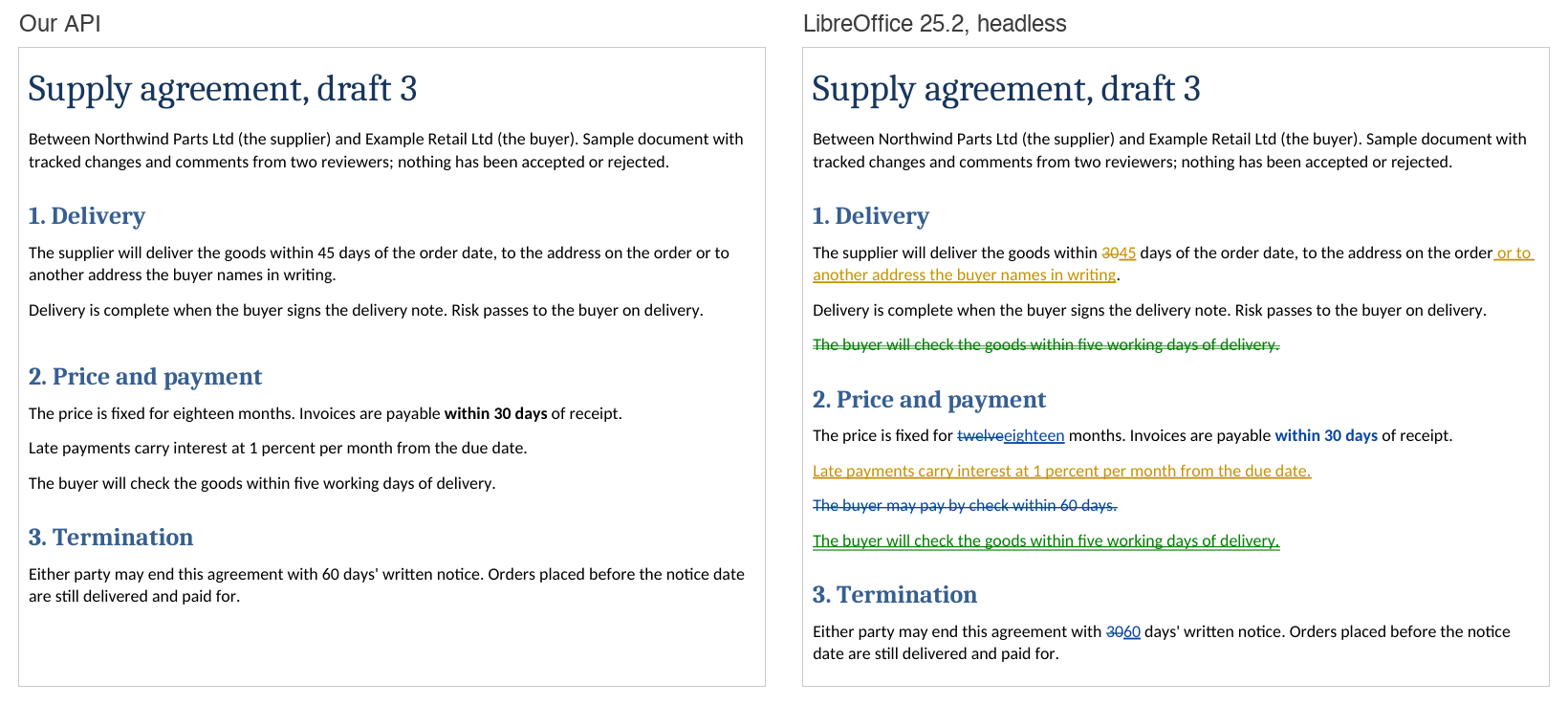
- Tracked changes. The contract has edits from two reviewers that nobody has accepted yet. LibreOffice printed them as markup, so "The buyer may pay by check" and "twelve", both deleted in the draft, are in the PDF's text. Our PDF contains the text as if every change were accepted; Convert Word to PDF without comments or tracked changes shows what
IncludeMarkup=trueadds. Neither PDF contained the comments or the sentence formatted as hidden text. - Fonts. The report names Liberation Serif and Liberation Sans. A plain LibreOffice install doesn't have them, so it used DejaVu, which is wider: the table heading "Shipments" and the month "September" broke in the middle of the word, and the three site notes moved from page 1 to page 2. With the three font packages installed, LibreOffice's report broke its pages where ours did.
- Properties. All three PDFs of the contract kept the Word file's author, "Reviewer A". Our API leaves it out when you send
IncludeMetadata="false".
Which one to use
- docx2pdf: on a Windows or Mac desktop that has Word, when Word's own output is what you want.
- LibreOffice: when you control the server image, can add about 540 MB to it, install the fonts your documents name, give each conversion its own profile, and either accept tracked changes in the PDF or clean them out of the files first. We didn't test a way to make it print the accepted text.
- Our API: when the code runs somewhere you'd rather not install an office suite, such as a small container, a serverless function or a shared host, or when several conversions run at once. The Free plan includes 250 conversions a month, files up to 10 MB and 1 conversion at a time; files are converted and returned, and nothing is kept unless you ask for a download link.
How we tested
- Date
- 2026-11-25. Every request and result on this page ran that day.
- System
- Containers from the official python:3.13-slim image, on an arm64 Mac. Python 3.13, requests 2.34.2, docx2pdf 0.1.8, and LibreOffice 25.2.3.2 installed with the image's package manager, apt.
- Server
- Our API running locally in a container, built from the same source as the hosted API. Its PDF of the contract draft was byte for byte the PDF the hosted API returned the day before; the report's differed only in its creation date and file id. The code shows the hosted address; we ran it with only the base URL changed. The API times on this page therefore leave out the trip over the internet.
- Files
- Three Word files from our other guides (download them above). A quarterly report that names the fonts Liberation Serif and Liberation Sans, with a chart, a table and lists; a contract draft that names Calibri and Cambria, with tracked changes and comments from two reviewers; and a handbook whose table of contents was saved before its last edits.
- Runs
- Docx2pdf's convert() and its command line. LibreOffice's soffice --convert-to, four times per file, on a plain install and again with fonts-liberation, fonts-crosextra-carlito and fonts-crosextra-caladea added; four soffice processes at once, sharing the default profile and with a profile each. Our API four times per file, the handbook with UpdateFields=true, the usage lines on this page, and one request with an option DOCX to PDF doesn't support.
- Checked with
- Page count, fonts, bookmarks, document properties and page text read with PyMuPDF 1.27.2; first pages rendered with PyMuPDF and compared by eye; memory with GNU time (maximum resident set size); install sizes as apt and the container tool reported them.
- Not checked
- Microsoft Word itself, Windows and macOS (where docx2pdf does run), driving LibreOffice through its UNO scripting interface, and files larger than 26 KB.