Guide8 min read
Convert Word (DOCX) to PDF in n8n: a tested workflow
n8n has no Word to PDF node. A tested workflow with HTTP Request and PDFConversionAPI, why it sends one file at a time, and how self-hosted Gotenberg compares.
Written and tested by Zeel Shekhaliya, Founder
Contents (9 sections)
n8n has no node that turns a Word file into a PDF: Convert to File writes CSV, Excel, ODS, HTML, RTF, text, JSON and calendar files, not PDF. The working routes send the file to a converter from an HTTP Request node. With PDFConversionAPI, our Word (DOCX) to PDF API, that's a five-node workflow you can import below; it converted our three test files in 0.37 seconds. The step that's easy to miss is pacing: HTTP Request sends every item at once, and on our Free plan, which runs one conversion at a time, two of three requests were refused and the run wrote no PDF. On a self-hosted n8n, our community node does the pacing itself and returns the PDF as a file. If you'd rather host the converter yourself, Gotenberg converted the same files well, as a separate 692 MB service you run next to n8n.
The workflow with PDFConversionAPI
Download the workflow, then in n8n open a new workflow and choose Import from File (or paste the file's contents onto the canvas). It has five nodes:
| Node | What it does | Settings |
|---|---|---|
| Read Word files | Stands in for your source | Read Files from Disk, /home/node/.n8n-files/in/*.docx. Replace it with Google Drive, Gmail or a webhook: any node that puts the .docx in the binary field data |
| One file at a time | Sends the next file only when the last one is done | Loop Over Items, batch size 1 |
| Convert to PDF | Sends the file to our API | HTTP Request, POST https://api.pdfconversionapi.com/v2/convert/docx/to/pdf. Authentication: Generic Credential Type, Bearer Auth. Body: Form-Data, one field of type n8n Binary File named File, input data field data. Timeout 240,000 ms |
| Base64 to PDF file | Turns the reply into a file | Convert to File, Move Base64 String to File, base64 field Files[0].FileData, file name {{ $json.Files[0].FileName }}, MIME type application/pdf |
| Write PDF | Stands in for your destination | Write Files to Disk. Replace it with Google Drive, email or anything else that takes a binary file |
To add your key, open Convert to PDF, create a Bearer Auth credential and paste the key as the token. You get a key by signing in at app.pdfconversionapi.com.
- The API answers with JSON, and the PDF is base64 inside it in
Files[0].FileData. That's why the workflow needs Convert to File after HTTP Request. FileNamein the reply is the Word file's name with.pdfat the end, soquarterly-report.docxcame back asquarterly-report.pdf.- Options go in the same Form-Data body: add a field such as
UpdateFieldswith the valuetrue. An option DOCX to PDF can't apply is refused, not ignored:PageRangestopped the run with the error below.
Against the container on our own machine, the three files took 0.37 seconds in all. The contract and handbook PDFs were byte for byte the ones our API returned to curl in our PHP test, and the report differed only in its creation time. Over the internet you add the upload and download; from Google's servers to the hosted API, a call took 1.0 to 3.7 seconds in our Apps Script test.
Our n8n node
On a self-hosted n8n you can install our community node instead of building the HTTP Request steps. Open Settings → Community Nodes → Install and enter n8n-nodes-pdfconversionapi. The workflow is then three nodes: read the Word file, PDFConversionAPI with the conversion DOCX to PDF, and write the PDF. Add your key as a PDFConversionAPI API credential; n8n checks it against our usage endpoint, which doesn't use a conversion.
- It sends one file at a time unless you raise Conversions at Once under Options, so the Free plan's limit described below doesn't stop the run. Against the stand-in, the three files converted one after another in 4.7 seconds.
- When the API answers that the plan's conversions are all running, the node waits as long as the
Retry-Afterheader says and tries again, up to 3 times. With two at once on the stand-in, one request got 429, the node waited 5 seconds, and all three PDFs were written. - The PDF comes back as a file in the binary field
data, named after the Word file, so there's no Convert to File step. The contract and handbook PDFs were byte for byte the ones the HTTP Request workflow wrote, and the report differed only in its creation time and document ID. - Options → API Parameters takes the conversion's options as name and value. With
UpdateFields=true, the handbook's table of contents showed the right page numbers instead of the ones saved before its last edits. - An error stops the node with the API's status and message, such as
400 PageRange is not supported yet for DOCX → PDF. With n8n's Continue On Fail setting, the message goes into the item's JSON instead. - The same node runs the API's other single-file conversions, 550 in all, such as Excel or PowerPoint to PDF. A conversion that returns several files gives one item per file: a 3-page PDF to JPG gave three items.
- On n8n Cloud, a community node appears only after n8n verifies it. We submitted ours on November 27, 2026, and n8n says reviews can take up to four weeks. Until it's verified, use the HTTP Request workflow above on n8n Cloud.
Its code is on GitHub under the MIT license.
Why one file at a time
n8n's HTTP Request node starts the request for every incoming item at once and waits for them all. Our Free plan runs one conversion at a time, and answers a second request with 429 and Retry-After: 5; paid plans run 4 to 30 at once (Pricing). We sent the three files to a stand-in server that applies the Free plan's rule:
| How the node was set | What happened |
|---|---|
| HTTP Request as it comes | All three requests arrived together: one converted, two got 429. The node failed, and no PDF was written, not even the converted one. |
| With Retry On Fail, 3 tries, 5 seconds apart | Each try resent all three files at once, with the same result. After three tries and 15 seconds the run failed with no PDF, and three conversions had run; on the hosted API, each counts toward your month. |
| With Batching, 1 item every 2 seconds | All three converted. The node starts the next request on time whether or not the last one has finished, so this works only while every conversion takes less than the interval. |
| Inside Loop Over Items, batch size 1 | All three converted, each request waiting for the last, in 4.8 seconds. |
So the workflow uses Loop Over Items. On a paid plan, raise its batch size to the number of conversions your plan runs at once, and the node sends that many together.
Errors you'll see
n8n shows its own message with the API's explanation under it:
| Cause | n8n's message | The API's explanation |
|---|---|---|
| An option DOCX to PDF doesn't support | Bad request - please check your parameters | PageRange is not supported yet for DOCX → PDF |
| A wrong or missing key | Authorization failed - please check your credentials | a valid API key is required (Authorization: Bearer <key>) |
| A second conversion while one runs, on the Free plan | The service is receiving too many requests from you | the free plan runs 1 conversion at a time; wait for the one running to finish |
Self-hosted: Gotenberg
Gotenberg is an open-source conversion server that runs LibreOffice behind an HTTP interface. You run it next to n8n and call it from an HTTP Request node: POST to http://<gotenberg>:3000/forms/libreoffice/convert, Form-Data with the Word file as files, and the response format set to File, because Gotenberg returns the PDF itself.
- Its image is a 692 MB download that takes about 1.6 GB on disk. Idle after our runs, it used about 140 MB of memory.
- It converted each file in 0.10 to 0.29 seconds, and took the three at once from n8n without an error.
- It comes with the fonts our files name (Liberation, Carlito, Caladea) and embedded them, kept the bookmarks, and refreshed the handbook's table of contents on its own. Our API does that with
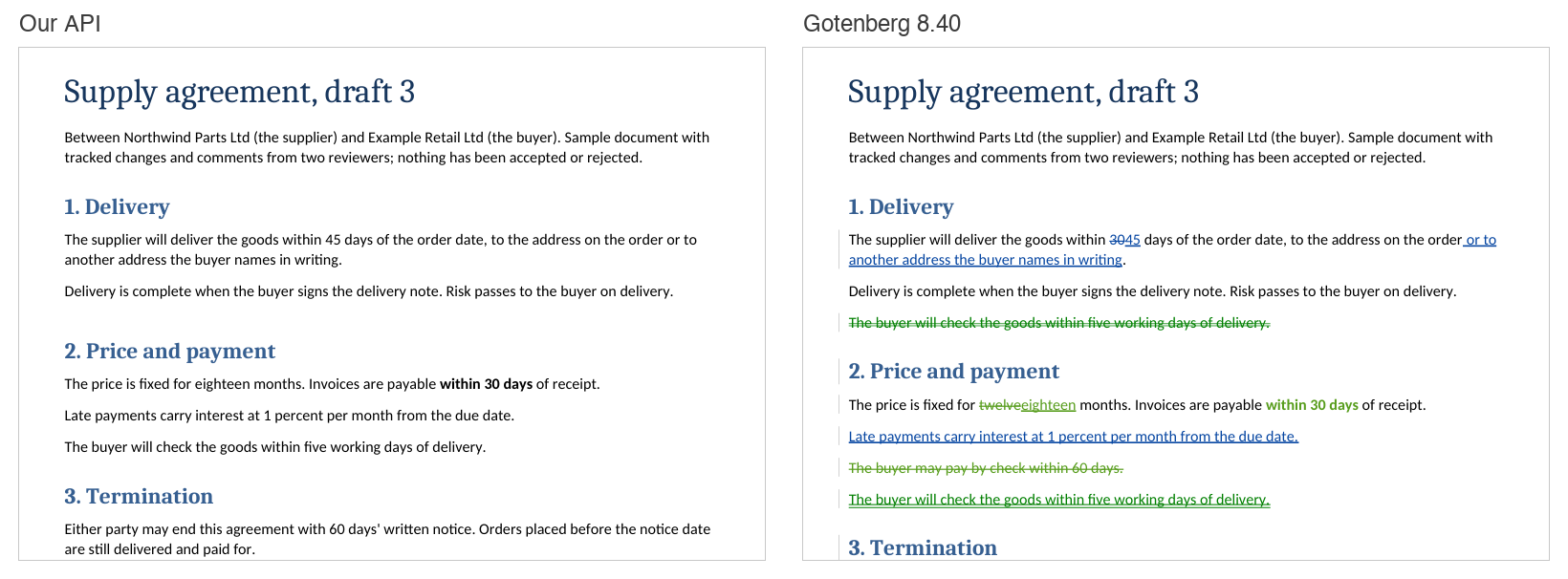
UpdateFields=true. - It printed the contract's tracked changes as markup, struck through and underlined in color, with a moved sentence in both places:
- It accepted our requests with no key or password, so keep it on a private network that only n8n can reach.
The other routes people suggest
- Google Drive. Copy the Word file into Google Docs, then download the copy as a PDF. We didn't run this in n8n, but it's Google's own converter, which we measured in our Apps Script guide: the report's text all became Arial, its table headings broke mid-word, the contract's tracked changes printed as suggestions in color, and a Google Docs copy stays in Drive.
- LibreOffice through the Execute Command node. n8n 2.49 turns Execute Command off unless you change its settings, its file nodes read and write only under
~/.n8n-filesby default, and the official n8n image has no package manager to install LibreOffice with. You'd build your own image and turn the node back on. We didn't take it further than checking those defaults.
What the PDFs contain
| Our API | Gotenberg 8.40 | Google Docs (from our Apps Script test) | |
|---|---|---|---|
| The contract's tracked changes | Printed as accepted | Markup, in color | Suggestions, in color |
| The contract's hidden note | Left out | Left out | Not checked |
| The handbook's table of contents | As saved; rebuilt with UpdateFields=true | Rebuilt | Not checked |
| Fonts | Liberation for the report, Carlito and Caladea for the contract | The same as our API | Arial for the report, Calibri and Cambria for the contract |
| What you run | n8n only | A 692 MB service next to n8n | n8n plus a Google account |
Which one to use
- Gotenberg: when you host n8n yourself, can run one more service and keep it off the internet, and accept tracked changes in the PDF or clean them out first.
- Google Drive: for occasional files where the look doesn't matter much and the files already live in Drive.
- Our API: when you use n8n Cloud or don't want another service to look after, when the files are reviewed business documents, or when the same workflow converts Excel, PowerPoint and images too. On a self-hosted n8n, our node replaces the HTTP Request steps and paces the requests for you. The Free plan includes 250 conversions a month, files up to 10 MB and 1 conversion at a time; files are converted and returned, and nothing is kept unless you ask for a download link.
How we tested
- Date
- 2026-11-27. Every run and result on this page is from that day.
- System
- N8n 2.49.7, the current stable release, from the official n8n image, run in a container on an arm64 Mac. Workflows were imported and run with n8n's command line (`n8n import:workflow`, `n8n execute`), so the screens n8n shows weren't used. Gotenberg 8.40.0 (with LibreOffice 26.8.2.2) from its official image, in a second container. Our node, n8n-nodes-pdfconversionapi: its 0.1.0 code installed as a package in n8n 2.49.7, and 0.1.1 (which adds only the AI agent tool setting) installed from npm in n8n 2.49.8 when that became the stable release the same day.
- Server
- Our API running locally in a container, built from the same source as the hosted API; on 2026-11-25 the same build's PDF of the contract draft was byte for byte the PDF the hosted API returned. The workflow file shows the hosted address; we ran it with only the address and the output folder changed. Times on this page therefore leave out the trip over the internet. The local container doesn't apply plan limits, so the one-at-a-time tests used a stand-in server that does what the hosted API does on the Free plan: one conversion at a time per key, and 429 with `Retry-After: 5` for a second one. Each of its conversions took 1.5 seconds. Its script is in the test files.
- Files
- The three Word files from our Python guide (download them above): a 3-page quarterly report that names Liberation Serif and Liberation Sans; a contract draft that names Calibri and Cambria, with tracked changes, two comments and a hidden note; and a 6-page handbook whose table of contents was saved before its last edits.
- Runs
- The workflow on this page on all three files, then with an option the API doesn't support for DOCX to PDF and with a wrong key. Against the stand-in, the same three files four ways: HTTP Request as it comes, with Retry On Fail (3 tries, 5 seconds apart), with batching (1 item every 2 seconds), and inside Loop Over Items with a batch size of 1. Gotenberg from an HTTP Request node on all three files, then each file twice more from the command line for timing. Our node: DOCX to PDF on all three files, the handbook with `UpdateFields=true`, `PageRange` and a wrong key for the error messages, and a 3-page PDF to JPG; against the stand-in, the three files with the default of one conversion at a time, and again with two at once.
- Checked with
- Page count, page size, fonts and whether they are embedded, bookmarks, page text, and the lines and colors of tracked-change markup, read with PyMuPDF 1.27.2; pages rendered and compared by eye; n8n's execution output for status, timing and error messages; the stand-in's log of when each request arrived.
- Not checked
- N8n Cloud, n8n's screens (including the Community Nodes install screen and our node as an AI agent tool), Google Drive or Gmail nodes in n8n, the Execute Command node, Gotenberg's options, paid plans' limits on the hosted API, and files larger than 26 KB.