Guide7 min read
Convert DOCX to PDF in PHP: PHPWord and the free options, tested
PHPWord with Dompdf, mPDF or TCPDF lost the contents, page numbers and list numbers; LibreOffice adds 365 MB. Or PHP's curl and PDFConversionAPI.
Written and tested by Zeel Shekhaliya, Founder
Contents (6 sections)
PHPWord, the library most PHP answers point to, doesn't lay out a Word file itself: it turns the document into HTML and hands that to Dompdf, mPDF or TCPDF. In our test all three dropped the handbook's table of contents and page numbers, lost the report's list numbers and printed US Letter pages as A4; Dompdf also drew the report's chart past the edge of the page. The TCPDF version Composer installs today failed on every file. LibreOffice, called with proc_open, converted all three files after a 365 MB install. PDFConversionAPI, our API, needs PHP's curl extension: send the .docx, get the PDF back. For a sample report before and after, and the full list of parameters, see converting DOCX to PDF with our API.
With PDFConversionAPI: PHP's curl
<?php
// Word to PDF with pdfconversionapi.com. PHP 8 or later with the curl extension, no Composer packages.
const PDFCONVERSIONAPI_URL = 'https://api.pdfconversionapi.com/v2/convert/docx/to/pdf';

/** Sends a .docx and writes the PDF. Options are API parameters, such as ['UpdateFields' => 'true']. */
function docx_to_pdf(string $docx, string $pdf, array $options = []): void
{
    $curl = curl_init(PDFCONVERSIONAPI_URL);
    curl_setopt_array($curl, [
        CURLOPT_HTTPHEADER => ['Authorization: Bearer ' . getenv('PDFCONVERSIONAPI_KEY')],
        CURLOPT_POSTFIELDS => ['File' => new CURLFile($docx)] + $options,
        CURLOPT_RETURNTRANSFER => true,
        CURLOPT_TIMEOUT => 240,
    ]);
    $body = curl_exec($curl);
    if ($body === false) {
        throw new RuntimeException(curl_error($curl));
    }
    $status = curl_getinfo($curl, CURLINFO_RESPONSE_CODE);
    $json = json_decode($body, true);
    if ($status !== 200) {
        throw new RuntimeException($status . ' ' . ($json['Message'] ?? $body));
    }
    file_put_contents($pdf, base64_decode($json['Files'][0]['FileData']));
}
Set PDFCONVERSIONAPI_KEY to your key (you get one by signing in at app.pdfconversionapi.com), then:
require 'pdfconversionapi.php';

docx_to_pdf('quarterly-report.docx', 'quarterly-report.pdf');
docx_to_pdf('field-service-handbook.docx', 'field-service-handbook.pdf', ['UpdateFields' => 'true']);

foreach (glob('contracts/*.docx') as $docx) {
    docx_to_pdf($docx, preg_replace('/\.docx$/', '.pdf', $docx));
}- Passing an array with a
CURLFiletoCURLOPT_POSTFIELDSmakes curl send a multipart form, which is what the API reads. The official PHP images include the curl extension. - The PDF arrives as base64 in the JSON response, in
Files[0].FileData. ['UpdateFields' => 'true']rebuilds the table of contents before the PDF is written: the handbook's contents list, saved before its last edits, came out with the new section names and page numbers. Table of contents not updating has the details.- An option DOCX to PDF can't apply is refused, not ignored:
['PageRange' => '1-2']threwRuntimeException: 400 PageRange is not supported yet for DOCX → PDF. - A path that doesn't exist fails inside curl with the unhelpful
operation aborted by callback. Checkis_file()first if paths come from users. - The 240-second timeout leaves room for a conversion of up to 120 seconds plus the upload (Limits).
- The loop sends one file at a time, which is what the Free plan allows: a second request while one is running gets 429 with
Retry-After: 5. Paid plans run 4 to 30 at once (Pricing), socurl_multior a queue with several workers fits there. - The same file ran unchanged on PHP 8.6.0 with every notice turned on, and printed none.
Against the container on our own machine, a conversion took 0.03 to 0.07 seconds after the first. Over the internet you add the upload and download; from Google's servers to the hosted API, a call took 1.0 to 3.7 seconds in our Apps Script test.
In Laravel
Laravel's HTTP client does the same in one chain:
// Add 'pdfconversionapi' => ['key' => env('PDFCONVERSIONAPI_KEY')] to config/services.php.
use Illuminate\Support\Facades\Http;

$response = Http::withToken(config('services.pdfconversionapi.key'))
    ->timeout(240)
    ->attach('File', file_get_contents($docx), basename($docx))
    ->post('https://api.pdfconversionapi.com/v2/convert/docx/to/pdf')
    ->throw();
file_put_contents($pdf, base64_decode($response->json('Files.0.FileData')));
Options go in the second argument of post(), such as ['UpdateFields' => 'true']. We ran these lines on illuminate/http 13.44.1 outside a Laravel app: the handbook came out byte for byte the same as with curl, the report differed only in its creation time and document ID, and ['PageRange' => '1-2'] threw RequestException: HTTP request returned status code 400 with the API's message in the body.
PHPWord with Dompdf, mPDF or TCPDF
PHPWord reads .docx files into its own document model. To write a PDF it renders that model as HTML and passes it to a PDF library you install next to it. We ran it as the PHPWord documentation shows it:
// composer require phpoffice/phpword dompdf/dompdf (or mpdf/mpdf, or tecnickcom/tcpdf)
use PhpOffice\PhpWord\IOFactory;
use PhpOffice\PhpWord\Settings;

Settings::setPdfRendererName(Settings::PDF_RENDERER_DOMPDF);
Settings::setPdfRendererPath(__DIR__ . '/vendor/dompdf/dompdf');
$phpWord = IOFactory::load('quarterly-report.docx');
IOFactory::createWriter($phpWord, 'PDF')->save('quarterly-report.pdf');
Anything HTML can't carry from the Word file is gone before the PDF library sees it. These went missing with all three writers:
- The handbook's table of contents, and the "Page 1 of 6" footer on each of its pages.
- The report's numbered list lost its numbers, and each bulleted line split into a bold label on one line and its text on the next.
- Every page came out A4 instead of the US Letter size the files are set to, and no PDF has bookmarks.
- The contract's title, "Supply agreement, draft 3", printed at body-text size.
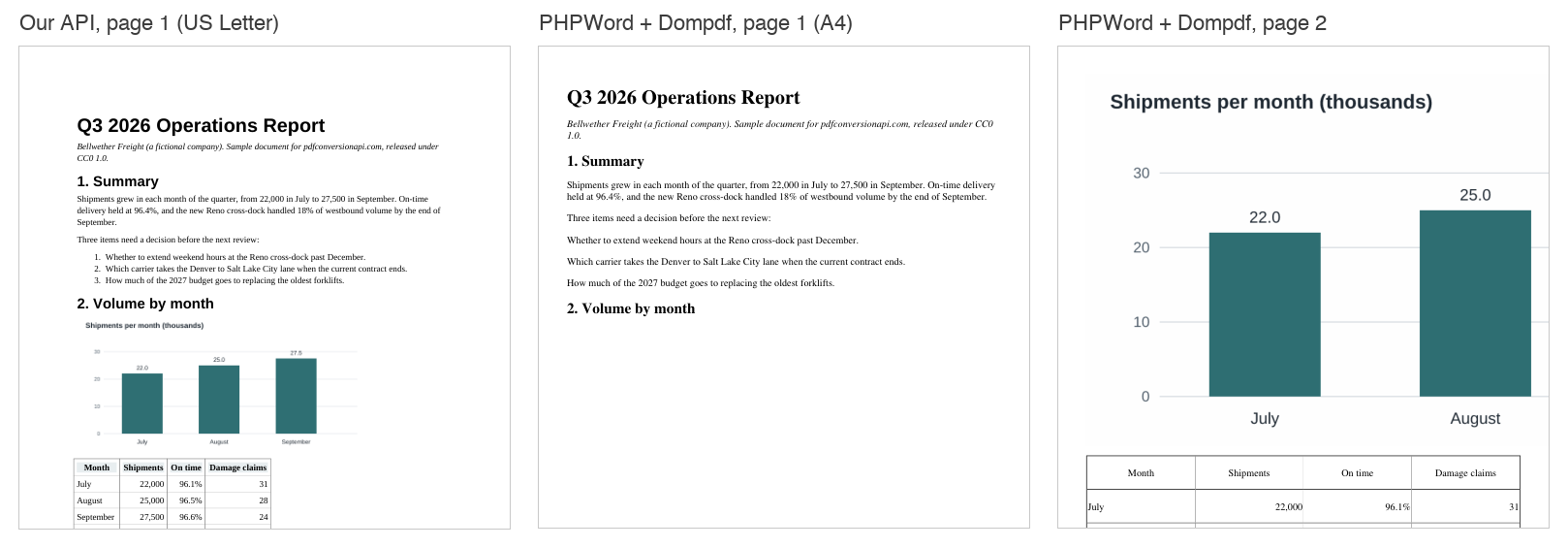
Each writer then failed differently:
- Dompdf 3.1.6 (7 packages, 14 MB). It drew the report's chart from its pixel size, 960 points wide on a 595-point page, so the chart moved to page 2 and its September bar is off the page. The handbook's six pages ran together onto two. Every page uses Times, which is not embedded, so each viewer substitutes its own font.
- mPDF 8.3.1 (10 packages, 98 MB). The closest of the three: six handbook pages, the chart on the page, and DejaVu Sans Condensed embedded. Its latest release allows PHP up to 8.5, so on PHP 8.6.0 Composer refused to install it.
- TCPDF.
composer require tecnickcom/tcpdfinstalled 7.0.24, released on 15 Nov 2026, which describes itself as "Deprecated legacy PDF engine for PHP" and runs on a newer library underneath. With it, PHPWord failed on every file withunable to read file: helvetica.jsonand left an empty file where each PDF should be. Withtecnickcom/tcpdf:^6(6.11.4) all three converted, in Helvetica, not embedded.
On the contract draft, PHPWord kept the tracked changes in the PDF, in black. With Dompdf and mPDF, deleted words are struck through and inserted words underlined, so "within 3045 days" shows which number replaced which. TCPDF struck through the deletions but left the insertions unmarked. None of the three printed the comments or the hidden note.
PHPWord needs PHP's zip and gd extensions, and Dompdf and mPDF also need mbstring. The official PHP images don't include zip or gd, and the PHP 8.6 image doesn't include mbstring either.
With LibreOffice, called from PHP
LibreOffice converts Word files without a screen. In the official PHP image, apt-get install --no-install-recommends libreoffice-writer-nogui added 111 packages: 105 MB to download and 365 MB on disk. This is the code we ran:
<?php
// Word to PDF with LibreOffice, run headless. Needs LibreOffice installed (apt install libreoffice-writer-nogui).

/** Writes <name>.pdf into $outDir. A profile of its own per call lets several conversions run at once. */
function libreoffice_docx_to_pdf(string $docx, string $outDir): string
{
    $profile = sys_get_temp_dir() . '/soffice-profile-' . bin2hex(random_bytes(8));
    $process = proc_open(
        ['timeout', '120', 'soffice', '-env:UserInstallation=file://' . $profile, '--headless',
            '--convert-to', 'pdf', '--outdir', $outDir, $docx],
        [1 => ['pipe', 'w'], 2 => ['redirect', 1]],
        $pipes,
    );
    $output = stream_get_contents($pipes[1]);
    $code = proc_close($process);
    exec('rm -rf ' . escapeshellarg($profile));
    $pdf = $outDir . '/' . pathinfo($docx, PATHINFO_FILENAME) . '.pdf';
    if ($code !== 0 || !is_file($pdf)) {
        throw new RuntimeException("soffice exited with $code: $output");
    }
    return $pdf;
}- Each file took 0.73 to 0.96 seconds. Four PHP processes at once, the way four PHP-FPM workers would call it, wrote all four PDFs in 1.11 seconds.
- Keep the check for the PDF. Given a file that doesn't exist,
sofficeexited with 0 and wrote nothing; its only output was a warning about Java. timeout 120stops a conversion that hangs. Your host has to allowproc_open, and the PHP user needs a writable temporary folder.- The image had none of the fonts these files name, so LibreOffice drew every page in DejaVu, and the report's table headings broke mid-word ("Shipme nts"). On Linux, install the fonts your documents use (for Word's defaults,
fonts-crosextra-carlitoandfonts-crosextra-caladea). - It printed the contract's tracked changes as markup, struck through and underlined in color. It left the hidden note out.
The ncjoes/office-converter package wraps the same command in two lines (new OfficeConverter($docx), then convertTo('name.pdf')). It converted each file on its own in 0.37 to 0.96 seconds, with the same output. But it runs LibreOffice with the default profile in your home folder, and when four PHP processes called it at once, two threw OfficeConverterException: Convertion Failure! Contact Server Admin:code 1. Every call also printed a deprecation notice on PHP 8.5.
What the PDFs contain
| Our API | LibreOffice 25.2 | PHPWord + Dompdf | PHPWord + mPDF | PHPWord + TCPDF 6 | |
|---|---|---|---|---|---|
| Files converted | 3 of 3 | 3 of 3 | 3 of 3 | 3 of 3 | 3 of 3 (0 of 3 with TCPDF 7) |
| The contract's tracked changes | Printed as accepted | Markup, in color | Markup, in black | Markup, in black | Deletions struck through, insertions unmarked |
| The handbook's contents list and page numbers | Yes | Yes | No | No | No |
| The report's list numbers | Yes | Yes | No | No | No |
| Page size | US Letter, as set in the files | US Letter | A4 | A4 | A4 |
| Bookmarks from headings | Yes | Yes | No | No | No |
| Fonts, with nothing installed on your side | Liberation for the report, Carlito and Caladea for the contract | DejaVu | Times, not embedded | DejaVu Sans Condensed | Helvetica, not embedded |
| What your server needs | The curl extension | 111 packages, 365 MB | 7 packages, 14 MB | 10 packages, 98 MB; PHP 8.5 or earlier | 3 packages, 30 MB |
Which one to use
- PHPWord with a PDF writer: for simple documents your own code builds with PHPWord, with no contents list, page numbers, numbered lists or tracked changes to keep. Of the three writers, mPDF came closest. Check the output before you send it to anyone.
- LibreOffice: when you control the server, can add about 365 MB to it, can run programs from PHP, install the fonts your documents name, and accept tracked changes in the PDF or clean them out first. Use a profile per call if more than one request can convert at the same time.
- Our API: when the files are reviewed business documents, when your hosting doesn't let you install an office suite or run programs, or when you'd rather not keep one on your server. The Free plan includes 250 conversions a month, files up to 10 MB and 1 conversion at a time; files are converted and returned, and nothing is kept unless you ask for a download link.
How we tested
- Date
- 2026-11-27. Every request and result on this page ran that day.
- System
- Containers from the official PHP 8.5 image (php:8.5-cli: PHP 8.5.13) with the zip and gd extensions and Composer added, and the same setup on the PHP 8.6 image (PHP 8.6.0, with mbstring added too) for the 8.6 runs, on an arm64 Mac. From Packagist: phpoffice/phpword 1.4.0 with dompdf/dompdf 3.1.6, with mpdf/mpdf 8.3.1, and with tecnickcom/tcpdf 7.0.24 and 6.11.4; ncjoes/office-converter 1.0.8; illuminate/http 13.44.1, Laravel's HTTP client. LibreOffice 25.2.3.2 from the image's package manager, apt. No fonts beyond what those packages bring.
- Server
- Our API running locally in a container, built from the same source as the hosted API; on 2026-11-25 the same build's PDF of the contract draft was byte for byte the PDF the hosted API returned. The code shows the hosted address; we ran it with only the address changed. The API times on this page therefore leave out the trip over the internet.
- Files
- The three Word files from our Python guide (download them above): a 3-page quarterly report that names Liberation Serif and Liberation Sans; a contract draft that names Calibri and Cambria, with tracked changes, two comments and a hidden note; and a 6-page handbook whose table of contents was saved before its last edits.
- Runs
- Our API three times per file on PHP 8.5 and again on PHP 8.6 with every notice turned on, the handbook with UpdateFields=true, the usage lines on this page (with the paths under a test folder), one request with an option DOCX to PDF doesn't support, and one with a path that doesn't exist. The Laravel lines on two files and once with an unsupported option, on illuminate/http outside a Laravel app. PHPWord once per file with each PDF writer, and with Dompdf and TCPDF 6 again on PHP 8.6. LibreOffice twice per file with a new profile each call, then four PHP processes at once; office-converter once per file, then four PHP processes at once.
- Checked with
- Page count, page size, fonts and whether they are embedded, bookmarks, images, page text, and the strike-through and underline lines, read with PyMuPDF 1.27.2; pages rendered with PyMuPDF and compared by eye; install sizes as apt, Composer and du reported them.
- Not checked
- These libraries with extra fonts installed, PHPWord's other settings, other versions of them, Windows, Microsoft Word itself, shared hosting, and files larger than 26 KB.